ALLPCB


If you're new to PCB design, you might be wondering, "What are vias, and why are they important?" Vias are small holes in a printed circuit board (PCB) that allow electrical connections between different layers. They are crucial for routing signals and power in multi-layer boards. In this guide, we'll dive into the different types of vias in PCBs, how to select via sizes, what via spacing means, and provide a via placement tutorial for beginners to help you design better boards.
Whether you're just starting out or looking to refine your skills, this comprehensive blog will walk you through the essentials of via placement, ensuring your designs are functional and efficient. Let's explore the world of vias step by step.
What Are Vias in PCB Design?
Vias, short for "vertical interconnect access," are tiny conductive pathways drilled into a PCB to connect different layers. Imagine a multi-story building where elevators connect floors—that's what vias do for electrical signals and power in a PCB. Without vias, signals would be stuck on a single layer, making complex designs impossible.
Vias are typically plated with a conductive material like copper to ensure a reliable electrical connection. They come in various types and sizes, depending on the design requirements, such as signal integrity, current capacity, or space constraints. Understanding vias is the first step to mastering PCB layout, especially for beginners tackling multi-layer designs.
Different Types of Vias in PCBs
Not all vias are the same. Depending on your PCB design needs, you'll encounter several types of vias, each with a specific purpose. Here's a breakdown of the most common types:
- Through-Hole Vias: These are the most common vias, extending through all layers of the PCB. They are easy to manufacture and suitable for connecting signals or power from the top to the bottom layer. However, they can take up space on layers where no connection is needed.
- Blind Vias: These vias start on an outer layer and connect to an inner layer but don't go through the entire board. They save space on unused layers and are often used in high-density designs.
- Buried Vias: Located entirely within the inner layers of a PCB, buried vias don't appear on the outer surfaces. They are ideal for compact designs but can be more expensive to fabricate.
- Microvias: These are very small vias, often used in high-density interconnect (HDI) boards. They are typically less than 0.006 inches (0.15 mm) in diameter and are perfect for modern, miniaturized electronics.
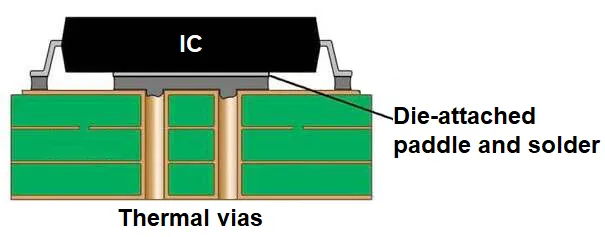
- Thermal Vias: Designed to transfer heat away from components, thermal vias are often placed under heat-generating parts like power ICs. They connect to ground planes or heat sinks to improve thermal management.
Choosing the right type of via depends on your PCB's complexity, space constraints, and performance requirements. For beginners, starting with through-hole vias is often the easiest approach before moving to more advanced options like blind or buried vias.
How to Select Via Size for Your PCB Design
Selecting the right via size is critical for ensuring your PCB functions as intended. Via size refers to the diameter of the drilled hole and the surrounding annular ring (the copper pad around the via). If the via is too small, it might not carry enough current or could be difficult to manufacture. If it's too large, it wastes valuable board space. Here's how to choose the right size:
1. Consider Current Carrying Capacity
The size of a via affects how much current it can handle. A larger via diameter allows more current to pass through without overheating. For example, a via with a 0.3 mm diameter might handle around 1-2 amps, while a 0.5 mm via could manage up to 3-4 amps, depending on the copper thickness (typically 1 oz/ft2 or 35 μm). Use online calculators or design software to estimate the required size based on your circuit's current needs.
2. Account for Manufacturing Constraints
Manufacturers have minimum via sizes they can reliably produce. For standard PCBs, the smallest via diameter is often around 0.2-0.3 mm. Smaller sizes, like microvias below 0.15 mm, require advanced fabrication techniques and may increase costs. Always check with your manufacturing partner for their capabilities and design rules.
3. Balance Space and Signal Integrity
In high-speed designs, via size impacts signal integrity. Larger vias can introduce parasitic capacitance and inductance, potentially distorting signals at frequencies above 1 GHz. For such applications, smaller vias (e.g., 0.2 mm) are preferred to minimize these effects. However, in space-constrained designs, avoid making vias too small, as they might not align well with component pads.
As a beginner, start with via sizes between 0.3 mm and 0.5 mm for most low-to-medium current applications. These sizes are widely supported by manufacturers and provide a good balance of performance and ease of use.
What Is Via Spacing in PCB Design?
Via spacing refers to the distance between vias or between a via and other elements like traces, pads, or other vias on a PCB. Proper spacing is essential to avoid electrical interference, ensure manufacturability, and maintain the structural integrity of the board. Here's what you need to know:
Why Via Spacing Matters
If vias are placed too close together, you risk short circuits or manufacturing defects like drill breakout, where the drilled holes overlap or damage nearby copper. Spacing also affects signal integrity in high-speed designs, as closely spaced vias can cause crosstalk or electromagnetic interference (EMI).
General Spacing Guidelines
For standard PCB designs, maintain a minimum spacing of at least 0.2-0.3 mm between vias, though this can vary based on the manufacturer's design rules. For high-speed signals, increase spacing to at least 3-5 times the via diameter to reduce crosstalk. For example, if your via diameter is 0.3 mm, aim for a spacing of 0.9-1.5 mm between vias carrying high-speed signals.
Spacing from Traces and Pads
Vias should also be spaced appropriately from traces and component pads to avoid interference. A common rule is to keep a clearance of at least 0.2 mm between a via and a trace or pad, though this may increase for high-voltage designs to prevent arcing.
Always refer to your PCB design software's design rule check (DRC) feature to ensure proper spacing. These tools can automatically flag violations based on the manufacturing constraints you've set.
Via Placement Tutorial for Beginners
Now that you understand the basics of vias, let's walk through a step-by-step tutorial on via placement in PCB design. This guide assumes you're using a common PCB design tool and working on a simple 2- or 4-layer board.
Step 1: Plan Your Layer Stackup
Before placing vias, determine your PCB's layer stackup. For a 4-layer board, a typical configuration might be signal layers on the top and bottom, with power and ground planes in the middle. Decide where signals need to transition between layers, as this will dictate via placement.
Step 2: Route Traces and Identify Via Locations
Start routing your traces on the top layer. When a trace needs to connect to another layer (e.g., to reach a ground plane or another signal layer), place a via at that point. Most design software will automatically add a via when you switch layers during routing. Ensure the via is placed in a location that doesn't interfere with other components or traces.
Step 3: Choose the Right Via Type and Size
For a simple design, use through-hole vias with a diameter of 0.3-0.5 mm. If you're working on a high-density board, consider blind or microvias, but remember they may increase costs. Set the via size in your design software's properties panel before placement.
Read Reading: Mastering Microvias: A Comprehensive Guide to PCB Laser Drilling
Step 4: Maintain Proper Spacing
As you place vias, ensure they are spaced at least 0.2-0.3 mm apart and away from traces or pads. Use the DRC tool in your software to check for spacing violations. If you're placing multiple vias for power or ground connections (known as stitching vias), arrange them in a grid pattern with consistent spacing for even current distribution.
Step 5: Optimize for Signal Integrity
For high-speed signals, minimize the number of vias a trace passes through, as each via introduces a small delay and potential signal distortion. If a via is unavoidable, place it close to the component pin to reduce stub length (the unused portion of the via), which can act as an antenna and cause signal reflections at frequencies above 500 MHz.
Step 6: Review and Adjust
After placing all vias, review your layout for congestion or potential issues. Adjust via positions if they block other traces or components. Run a final DRC to confirm all design rules are met before sending the design for fabrication.
Best Practices for Via Placement in PCB Design
To wrap up, here are some best practices to keep in mind as you work on via placement:
- Minimize Via Usage: Use vias only when necessary to switch layers. Fewer vias mean less signal distortion and easier manufacturing.
- Use Stitching Vias for Ground Planes: Place multiple vias (e.g., every 5-10 mm) to connect ground planes across layers. This reduces EMI and improves signal return paths.
- Avoid Vias Under Components: Unless using via-in-pad technology, avoid placing vias directly under components, as they can interfere with soldering.
- Consider Thermal Management: For heat-generating components, add thermal vias connected to a ground plane to dissipate heat effectively.
- Follow Manufacturer Guidelines: Always adhere to the design rules provided by your fabrication partner to ensure your board can be produced without issues.
Related Reading: The Ultimate Guide to Via Placement in 4-Layer PCBs: Optimizing Signal and Power Delivery
Conclusion: Mastering Via Placement as a Beginner
Via placement is a fundamental skill in PCB design that directly impacts the performance, reliability, and manufacturability of your board. By understanding what vias are, exploring the different types of vias in PCBs, learning how to select via sizes, grasping the concept of via spacing, and following a via placement tutorial for beginners, you're well on your way to creating effective designs.
Start with simple through-hole vias, stick to standard sizes like 0.3-0.5 mm, and maintain proper spacing to avoid common pitfalls. As you gain experience, experiment with advanced via types like blind or microvias for more complex projects. With practice and attention to detail, you'll master via placement and elevate the quality of your PCB layouts.
Designing PCBs can be challenging at first, but with the right knowledge and tools, it becomes an exciting and rewarding process. Keep learning, follow best practices, and soon you'll be designing boards like a pro!