ALLPCB


Introduction
Starting your journey into electronics as a hobbyist opens up a world of creativity and problem-solving. Whether you dream of lighting up LEDs in patterns or sensing environmental changes, the right electronics project components make all the difference. This guide serves as your ultimate DIY electronics components list, focusing on breadboard components that enable quick prototyping without soldering. From basic electronics components like resistors and capacitors to more dynamic parts for Arduino project components setups, we cover everything essential. You'll learn not just what to buy, but why each piece fits into hobby electronics components projects. By the end, you'll have a clear path to building your first circuit confidently.
Many beginners feel overwhelmed by the vast array of parts available. However, sticking to a curated list keeps things simple and effective. These components support experiments from simple blinkers to interactive sensors. Hobbyists appreciate breadboards for their reusability, allowing endless tweaks. Power through your first project with this practical selection tailored for electronic hobbyists.
Why Basic Electronics Components Matter for Your First Project
Basic electronics components form the foundation of any successful hobby project. They enable you to test ideas rapidly on a breadboard, avoiding permanent commitments like soldering. Understanding their roles builds intuition for how circuits function, from current flow to signal processing. For electronic hobbyists, this knowledge translates to more ambitious builds later. Reliability starts with quality parts that adhere to established norms, ensuring consistent performance.
In hobby electronics components work, mismatched or low-grade items lead to frustration. Preferred values for resistors and capacitors, as outlined in industry guidelines, prevent common pitfalls like unstable voltages. These standards promote interoperability across projects. Breadboard components shine here because they connect easily via friction fit. Investing in versatile hobby electronics components pays off in learning efficiency. Ultimately, a solid DIY electronics components list accelerates skill development.
Electronics project components also encourage experimentation. Swap a resistor value to see brightness changes in an LED, or add a capacitor for timing effects. This hands-on approach demystifies theory. Arduino project components extend this by introducing programming alongside hardware. Beginners gain confidence troubleshooting real circuits. The result is a rewarding hobby that grows with you.
Key Principles of Essential Electronics Project Components
Electronics project components operate on fundamental principles of electricity. Passive parts like resistors limit current, capacitors store charge, while active ones like transistors amplify signals. Voltage, current, and resistance interplay via Ohm's law in every circuit. Breadboard components make these concepts tangible without complex tools. Hobbyists grasp impedance and timing through simple setups.
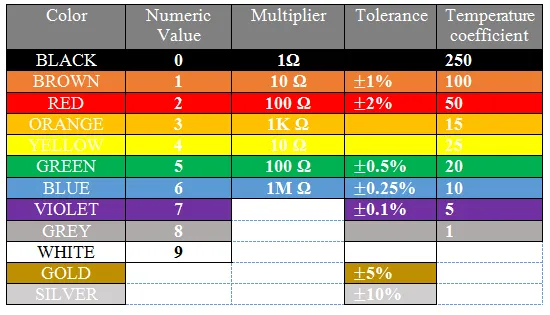
Resistors follow marking codes standardized for quick identification. IEC 60062 defines these codes, using colors or numbers to denote value and tolerance. This ensures accurate selection for current limiting or voltage division. Capacitors complement them by smoothing signals or creating delays. Preferred series values per relevant guidelines optimize inventory for most projects. Together, they stabilize hobby electronics components circuits.
Semiconductors introduce directionality and switching. Diodes allow current one way, protecting circuits from reverse polarity. LEDs emit light when forward biased, ideal for visual feedback. Transistors act as switches or amplifiers, controlled by small base currents. These align with JEDEC guidelines for reliable operation in varying conditions. Understanding polarity prevents damage in breadboard builds.
Microcontrollers process inputs and outputs digitally. They read sensors and drive actuators via pins. Analog-to-digital conversion handles real-world signals. Power management components regulate supply to avoid brownouts. ICs like timers provide precise pulses. These principles scale from basic to Arduino project components complexity.
Your DIY Electronics Components List: Must-Have Breadboard Components
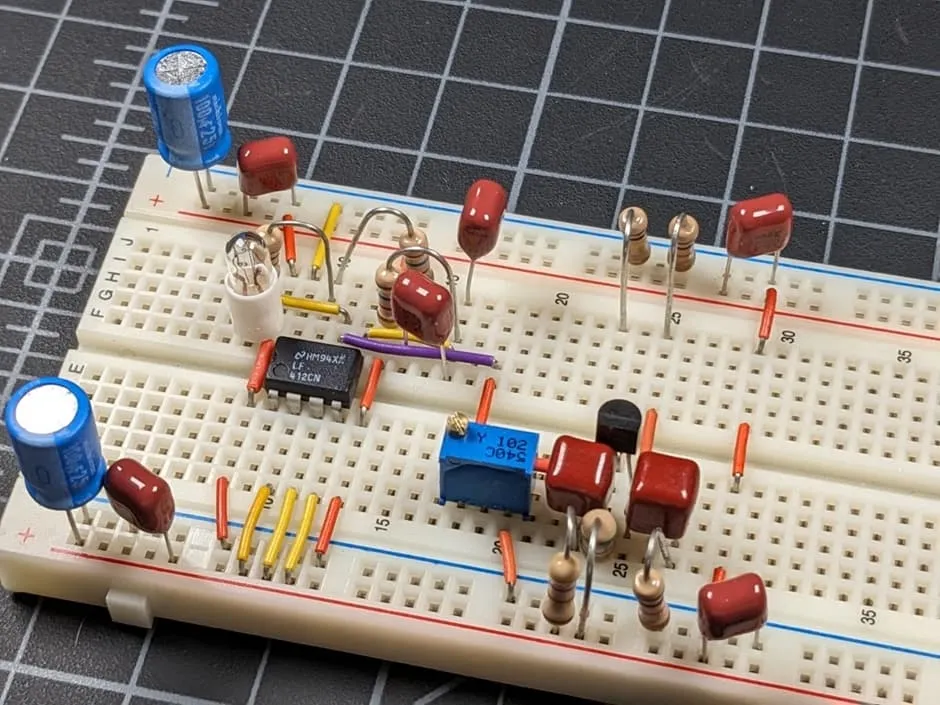
Gather these core items for any first project. Start with a solderless breadboard, the heart of prototyping. It features interconnected rows and columns for easy wiring. Jumper wires in male-to-male and male-to-female varieties connect everything flexibly. A pack of assorted lengths prevents tangles. These breadboard components enable plug-and-play assembly.
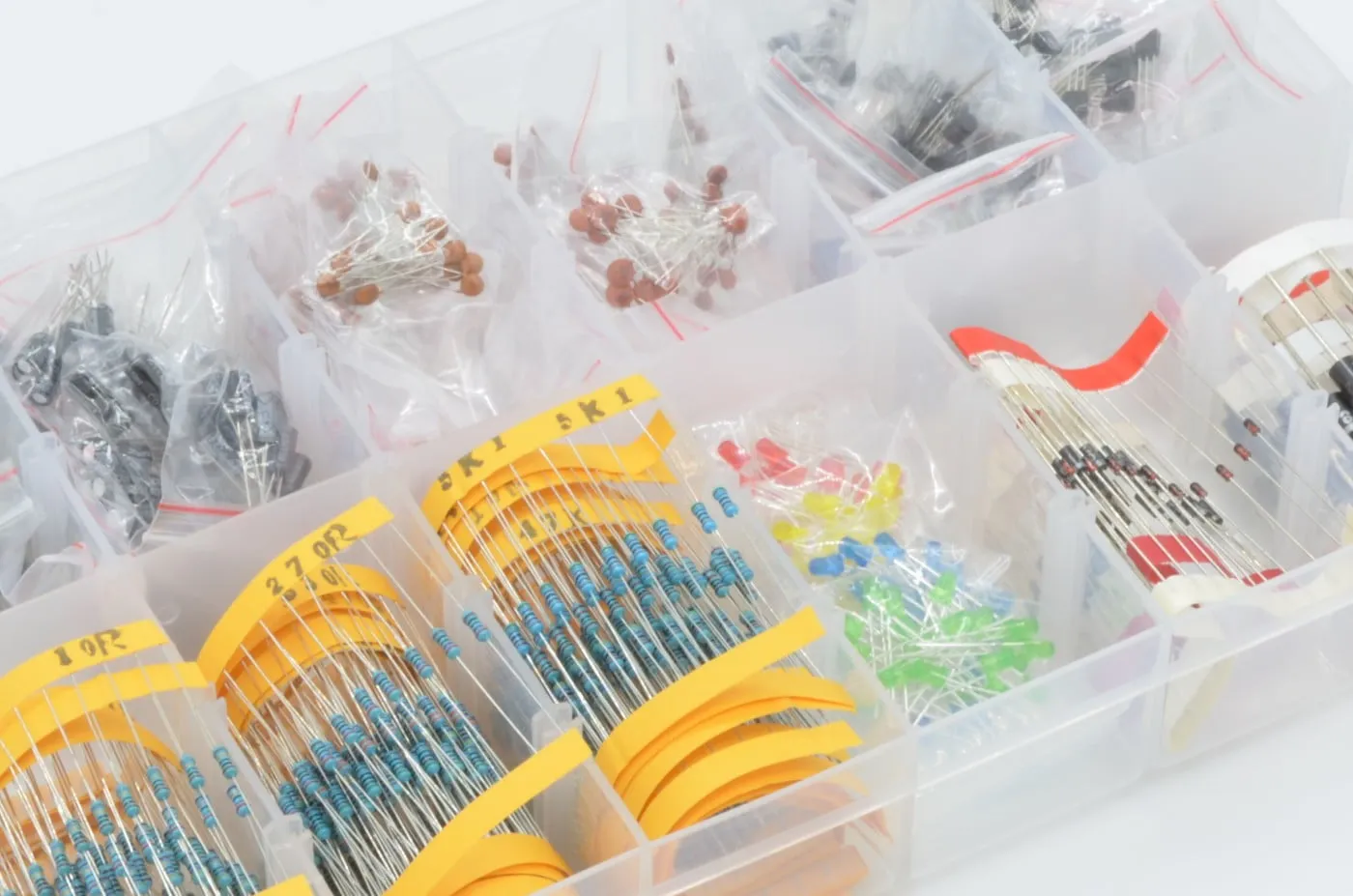
Resistors are non-negotiable basic electronics components. Get values from 100 ohms to 1 megaohm in 1/4 watt rating, covering E12 or E24 series. They limit current for LEDs, typically 220 ohms for safety. Color bands follow IEC 60062 for reading. Potentiometers add adjustability, like 10k ohms for volume or brightness control. Stock multiples to experiment freely.
Capacitors handle timing and filtering. Ceramic discs in 10pF to 1uF suit high-frequency needs, while electrolytics from 1uF to 1000uF manage power supply ripple. Observe polarity on the latter. Preferred capacitance values aid selection per established series. They pair with resistors in RC circuits for delays. Essential for stable hobby electronics components operation.
LEDs provide instant visual confirmation. Assorted colors in 3mm or 5mm sizes glow at 20mA forward current. Pair with resistors to match supply voltage. Diodes like general-purpose types protect against reverses. These semiconductors enhance interactivity in electronics project components.
Switches and buttons enable user input. Momentary push buttons fit breadboard rails perfectly. Slide switches toggle power states. Transistors, such as NPN types, switch higher loads with low control signals. A few 555 timer ICs generate pulses for blinking or tones.
Sensors introduce real-world interaction. Photoresistors change resistance with light, thermistors with temperature. Simple and breadboard-friendly. A small buzzer or piezo speaker adds audio feedback. These expand your DIY electronics components list creatively.
Power sources complete the setup. 9V battery clips or AA holders supply portable juice. USB breakout for 5V regulated power suits microcontroller work. Breadboards often have power rails for distribution. Voltage regulators step down if needed. Safe, steady power prevents erratic behavior.
- Component Category: Passive - Key Examples: Resistors (100R-1M), Capacitors (10pF-1000uF), Potentiometers (10k) - Typical Uses: Current limiting, timing, adjustment
- Component Category: Indicators - Key Examples: LEDs (assorted), Diodes - Typical Uses: Status, protection
- Component Category: Control - Key Examples: Push buttons, Transistors (NPN), 555 IC - Typical Uses: Input, switching, oscillation
- Component Category: Input/Output - Key Examples: Photoresistor, Thermistor, Buzzer - Typical Uses: Sensing, feedback
- Component Category: Power - Key Examples: Battery holder, USB 5V - Typical Uses: Supply
- Component Category: Prototyping - Key Examples: Breadboard, Jumper wires - Typical Uses: Assembly
This list summarizes your starter kit. Aim for 100-200 pieces total initially. Quality matters for repeatability.
Best Practices for Assembling Hobby Electronics Components Projects
Plan your breadboard layout first. Power rails on sides distribute positive and ground consistently. Group related components in sections to avoid spaghetti wires. Double-check connections before powering up. Use a multimeter to verify continuity and voltages. This methodical approach minimizes errors.
Follow current limits strictly. LEDs need series resistors; calculate via (supply - forward voltage)/desired current. Prototype iteratively, testing subsections. Document with photos for troubleshooting later. Breadboard components forgive mistakes, unlike soldered boards. Scale to permanent versions once proven.
Incorporate standards awareness early. Component markings per IEC 60062 speed inventory management. JEDEC guidelines ensure semiconductors handle electrostatic discharge properly. Store parts in anti-static bags. Organized bins by value prevent mix-ups. These habits build professional workflows.
For Arduino project components, align pins logically. Digital for switches, analog for sensors. Upload simple sketches to blink or read. Breadboard shields expand pins if needed. Debug with serial monitor prints. This bridges hardware and code seamlessly.
Troubleshooting Common Issues with Basic Electronics Components
No lights? Check power connections and polarity first. Breadboard rails sometimes disconnect; reseat wires firmly. Measure voltage across components. Resistor values wrong? Recheck color codes. Dim LEDs indicate insufficient current; lower resistance value carefully.
Capacitors bulging or leaking signal failure; replace immediately. Oscillations from noise? Add decoupling caps near ICs. Transistor not switching? Verify base resistor and emitter-ground link. Sensor readings off? Calibrate with known conditions. Systematic voltage tracing resolves most.
Overheating points to shorts or overloads. Inspect for bridged contacts on breadboard. ICs hot? Poor power decoupling. Moisture can affect semiconductors; follow handling per JEDEC practices. Log symptoms and fixes for future reference. Patience turns setbacks into learning.
Conclusion
Your first electronics project thrives on a thoughtful DIY electronics components list. Breadboard components like resistors, capacitors, LEDs, and jumpers provide endless possibilities without commitment. Grasping their principles empowers creative circuits. Best practices and troubleshooting ensure success. Stock these hobby electronics components, start simple, and iterate. Soon, basic setups evolve into sophisticated Arduino project components marvels. Dive in and build today.
Frequently Asked Questions
Q1: What are the most important electronics project components for a beginner?
A1: Basic electronics components include a breadboard, jumper wires, resistors, capacitors, and LEDs. These form the core of any DIY electronics components list for prototyping. They allow testing circuits like blinkers or sensors quickly. Add a power source and switches for interactivity. Focus on assorted values to cover common needs. This setup suits electronic hobbyists perfectly.
Q2: How do I choose resistors for breadboard components projects?
A2: Select resistors based on Ohm's law for current limiting, typically 220 ohms for LEDs on 5V. Use color codes per standards for identification. Stock E12 series values like 100R, 1k, 10k for versatility. Higher wattage handles more power if needed. Test with a multimeter for accuracy. Essential for stable hobby electronics components circuits.
Q3: What makes a good DIY electronics components list for Arduino projects?
A3: Include microcontroller boards, sensors, LEDs, and passives alongside breadboard components. Jumper wires and USB power enable easy connections. Transistors switch loads, capacitors filter noise. Preferred values streamline builds. This Arduino project components selection supports code-hardware integration. Troubleshooting focuses on pin mappings.
Q4: Why include capacitors in basic electronics components kits?
A4: Capacitors store charge for timing, filtering, and decoupling in electronics project components. They smooth power ripples preventing resets. Electrolytic for bulk storage, ceramic for high speed. Match values to resistors for RC delays. Vital for reliable breadboard operation. Hobbyists use them in oscillators and sensors.
References
IEC 60062:2016 - Marking codes for fixed resistors and capacitors. IEC, 2016
IEC 60063:2015 - Preferred number series for resistors and capacitors. IEC, 2015
JEDEC J-STD-020E - Moisture/Reflow Sensitivity Classification. JEDEC, 2014