 ALLPCB


Introduction
If you are a developer, system administrator, or simply interested in Linux, this list covers common Linux-related questions encountered in Unix-like system administration or programming interviews.
Linux is a Unix-like operating system with decades of history, originally based on the Unix kernel. Linux is open source, meaning its source code is available for modification, and it is widely used beyond desktop computers — for example, many servers run Linux.
Linux powers a wide range of systems, from Android smartphones to web servers. It is used in supercomputers, enterprise data centers operated by major technology companies, and many other environments. In the Linux world, you need to know a set of commands to interact with the system. The following sections discuss the most important commands and how they work.
1. Questions to Expect in a Linux Interview
Question 1: What are the basic elements or components of Linux?
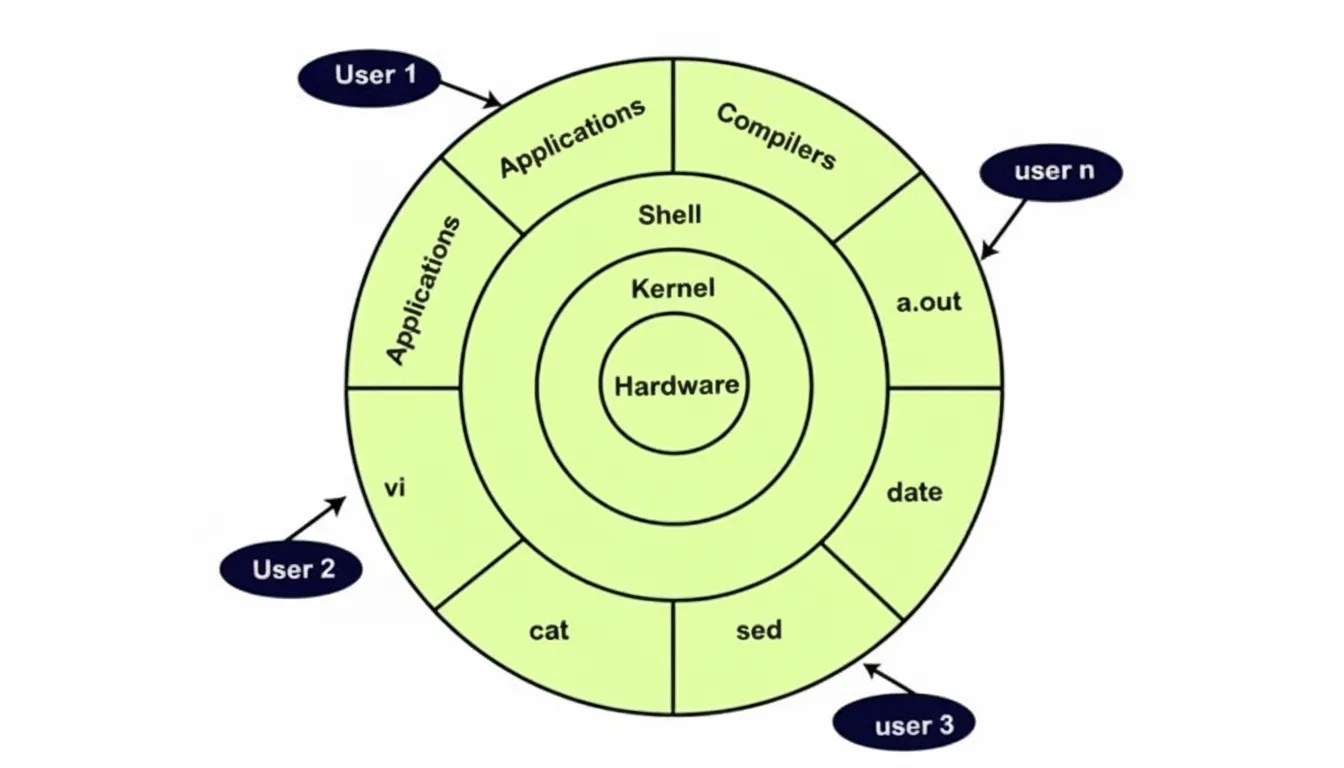
Linux typically includes the following five components:
- Kernel: The core of Linux that manages processes, devices, memory, and other low-level operations.
- System libraries: Special functions or programs that allow applications and utilities to access kernel functionality without containing kernel code directly.
- System utilities: Utilities that perform specific tasks and allow users to manage the computer.
- Hardware: Physical devices such as mouse, keyboard, display, and CPU.
- Shell: The environment where commands, shell scripts, and programs are run. It provides an interface between the user and the kernel and is used to execute commands.
Question 2: What is LILO?
LILO stands for Linux Loader. It is a bootloader used to load the Linux operating system into main memory and start execution.
Question 3: Why use LVM?
LVM stands for Logical Volume Management. It is a storage management scheme that allows users to create, resize, and delete logical volumes. LVM adds abstraction, flexibility, and control by aggregating physical storage into volume groups and allocating logical units.
Question 4: What are the different network bonding modes in Linux?
Common Linux network bonding modes:
- mode 0 (balance-rr): Default round-robin mode. Provides fault tolerance and load balancing by transmitting packets in sequential order.
- mode 1 (active-backup): Active-backup mode where only one slave is active; another takes over on failure. Provides fault tolerance.
- mode 2 (balance-xor): XOR-based balancing using source and destination MAC addresses to provide fault tolerance.
- mode 3 (broadcast): Broadcast mode transmits everything on all slave interfaces. Provides fault tolerance for specific use cases.
- mode 4 (802.3ad): Dynamic link aggregation mode that creates aggregated groups with the same speed and uses transmit hashing to select the outbound slave.
- mode 5 (balance-tlb): Transmit load balancing. Outbound traffic is distributed based on the load on each slave; inbound traffic is received by the current slave.
- mode 6 (balance-alb): Adaptive load balancing that requires no special switch support.
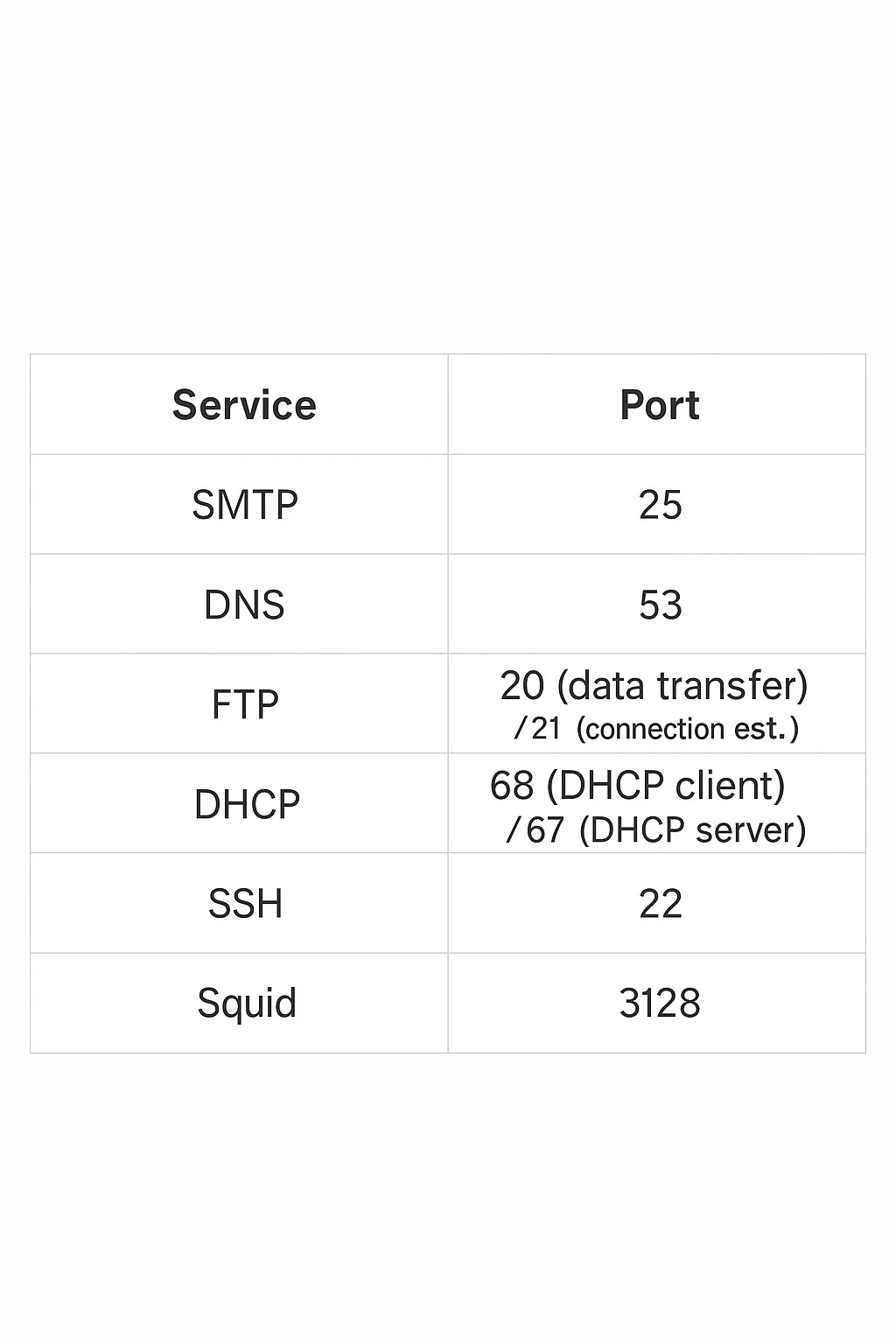
Question 5: What are the default ports for SMTP, DNS, FTP, DHCP, SSH, and squid?
Details are shown in the image below.
Question 6: How do you remove files or directories from a Linux system?
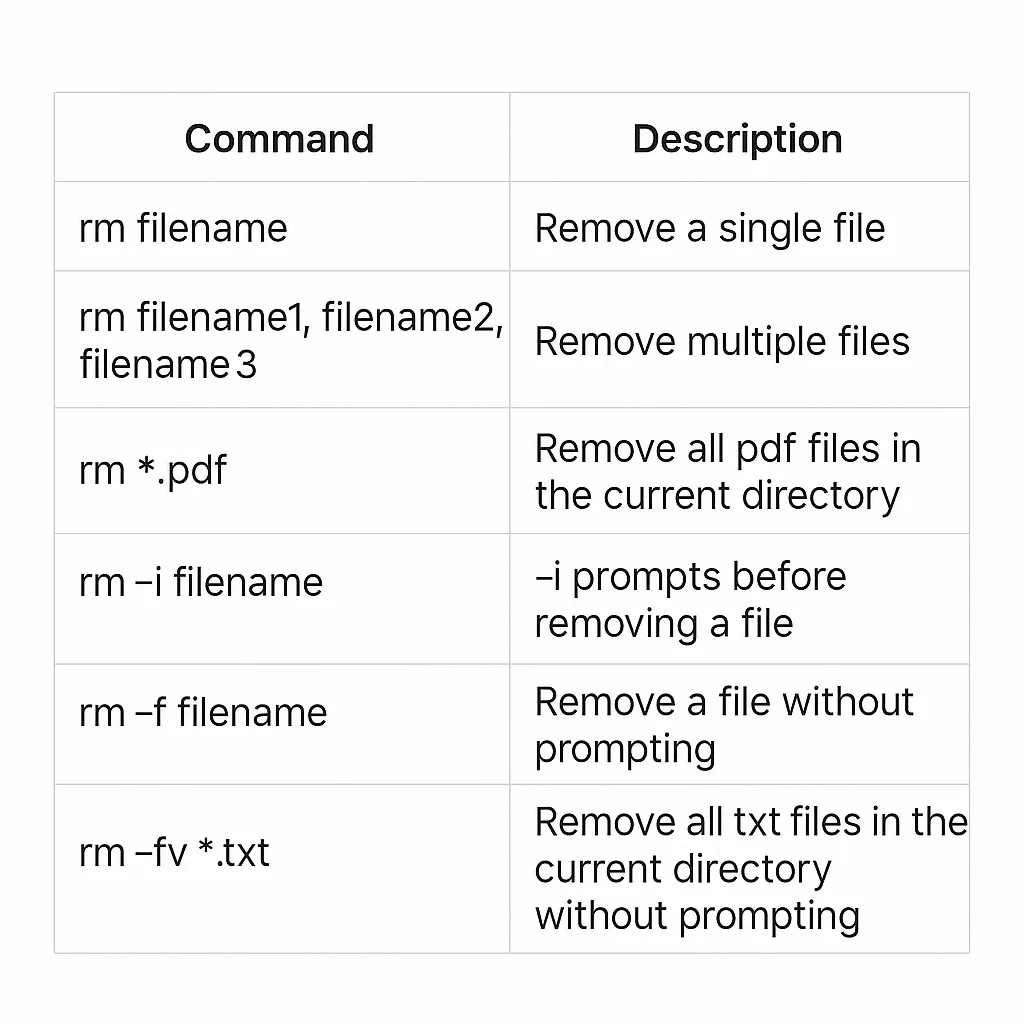
Use the rm command to remove files or directories from the command line. Exercise caution when deleting files or directories.
Syntax:
rm filename
Question 7: Explain the rmdir command in Linux
The rmdir command removes the specified directory from the command line.
rmdir [-p] [-v | --verbose] [--ignore-fail-on-non-empty] directory
Question 8: What does a pipe mean in Linux?
A pipe is a form of redirection used to chain two or more commands so that the output of one command becomes the input of the next.
Syntax:
command1 | command2 | command3 | ... | commandN
Question 9: What is a zombie process?
A zombie process has completed execution but still has an entry in the process table because the parent process needs to read the child's exit status. Once the parent collects the status using the wait system call, the zombie process is removed from the process table.
Question 10: Describe features of a stateless Linux server
Characteristics of a stateless Linux server:
- Store a prototype for each system.
- Store snapshots taken of systems.
- Store home directories centrally.
- Use LDAP to determine which snapshot should run on which system.
Question 11: How to run a command for a limited time?
Use the timeout utility. Example:
timeout 10s ./script.sh
# Restart every 30 minuteswhile true; do timeout 30m ./script.sh; done
Question 12: How to run a command each time a file is modified?
Example using inotifywait:
while inotifywait -e close_write document.texdomakedone
Question 13: How to list contents of a tar.gz and extract only one file?
Use the following commands:
tar of file.tgztar xf file.tgz filename
Question 14: How to get the full path of a file in Linux?
Use:
readlink -f file.txt
Question 15: How to limit a command's memory usage?
ulimit -Sv 1000 # 1000 KBs = 1 MB
ulimit -Sv unlimited # Remove limit
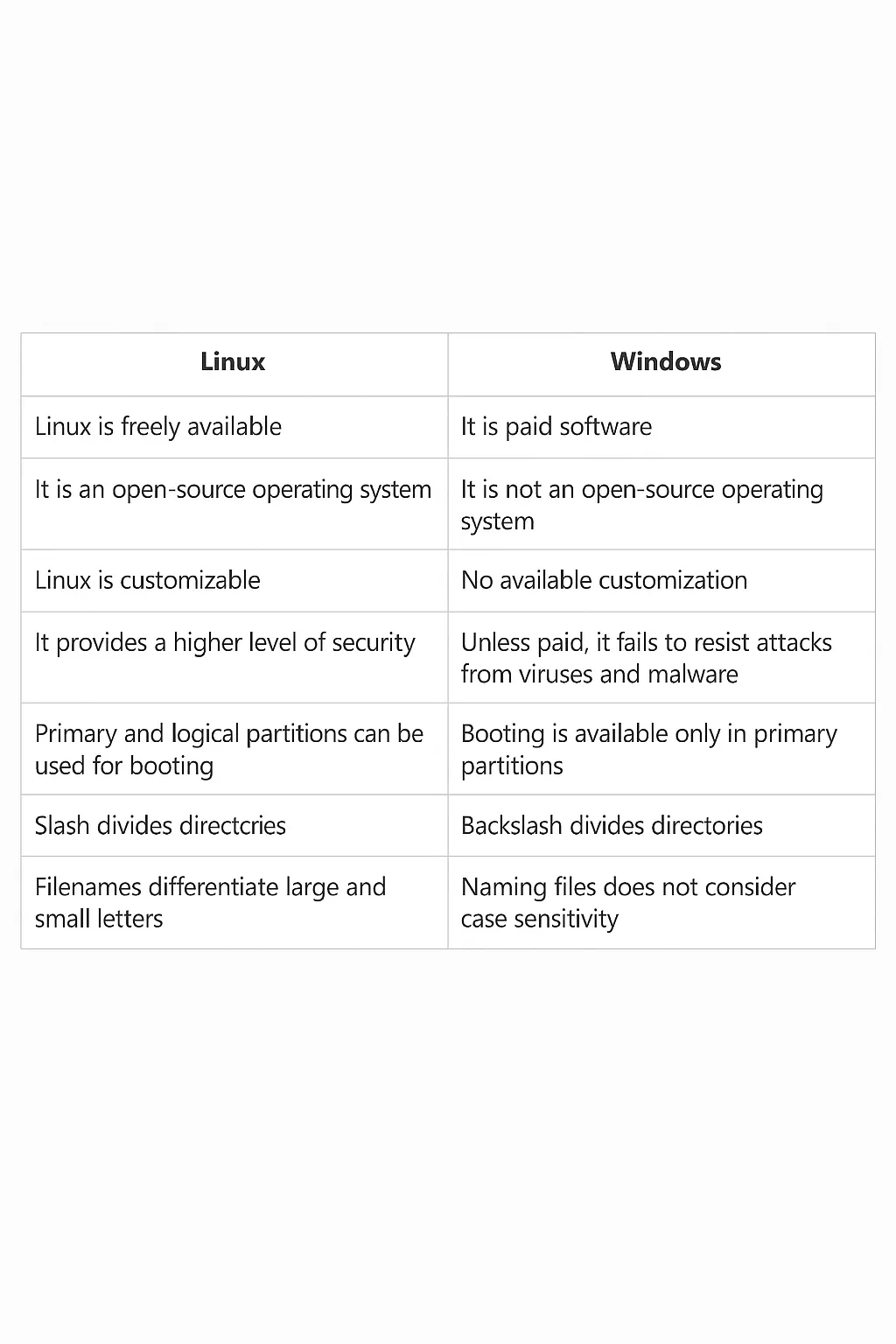
Question 16: Differences between Linux and Windows
Key differences are summarized in the images below.
Question 17: What is the df command used for in Linux?
The df command reports available disk space. Use df to diagnose disk space issues.
Example:
df -h
Question 18: What is the du command used for in Linux?
The du command provides detailed information about which files are using disk space within a directory.
Example:
$ du -sh /var/log/* 1.8M /var/log/anaconda 384K /var/log/audit 4.0K /var/log/boot.log 0 /var/log/chrony 4.0K /var/log/cron 4.0K /var/log/maillog 64K /var/log/messages
Question 19: What is the env command used for in Linux?
The env command allows users to set or print environment variables. It is useful during troubleshooting to check whether environment variables prevent your application from starting.
Example:
$ envPYTHON_PI P_VERSION=9.0.1HOME=/rootDB_NAME=testPATH=/usr/local/bin:/usr/local/sbinLANG=C.UTF-8PYTHON_VERSION=3.4.6PWD=/DB_URI=mongodb://database:27017/test
Question 20: What is the ps command used for in Linux?
The ps command displays process status. Use ps to identify running applications or confirm expected processes.
Examples:
$ ps -ef $ ps -ef | grep tomcat
Question 21: What is the grep command used for in Linux?
grep searches for patterns within files or command output. It highlights matching lines and is commonly used to search logs or process listings.
Example:
$ cat tomcat.log | grep org.apache.Catalina.startup.Catalina.start 12-Jan-2018 17:35.542 INFO [main] org.apache.Catalina.startup.Catalina.start Server startup in 681 ms
Question 22: What is the cat command used for in Linux?
cat concatenates and prints files. Use cat to view the contents of dependency files or confirm a locally built application's version.
Example:
$ cat requirements.txt flask flask_pymongo
Question 23: What is the tail command used for in Linux?
tail shows the end of a file. For troubleshooting, you usually want to see recent log entries rather than the entire log.
Example:
$ tail -n 100 /var/log/httpd/access_log
Question 24: Why is Linux considered more secure than some other operating systems?
Reasons commonly cited for Linux security:
- Limited account access: Linux systems typically restrict access, so malware cannot easily affect the entire system.
- Active community: The open-source community reviews code and often identifies and fixes vulnerabilities.
- Iptables: A packet filtering framework used to enforce network-level security policies.
- Varied distributions: Multiple distributions and environments can reduce exposure to a single attack vector.
- Extensive logging: Linux systems keep detailed logs, which help investigate issues.
- Smaller user base in some contexts: In certain environments, fewer users can mean reduced exposure.
Question 25: How does Ctrl+Alt+Del work on Linux?
On many Linux systems, pressing Ctrl+Alt+Del triggers an immediate reboot without displaying a confirmation prompt, depending on the system configuration.
Question 26: What are internal and external commands?
Internal commands: Commands executed directly by the shell without creating a separate process.
External commands: Commands that run as separate processes with their own process IDs.
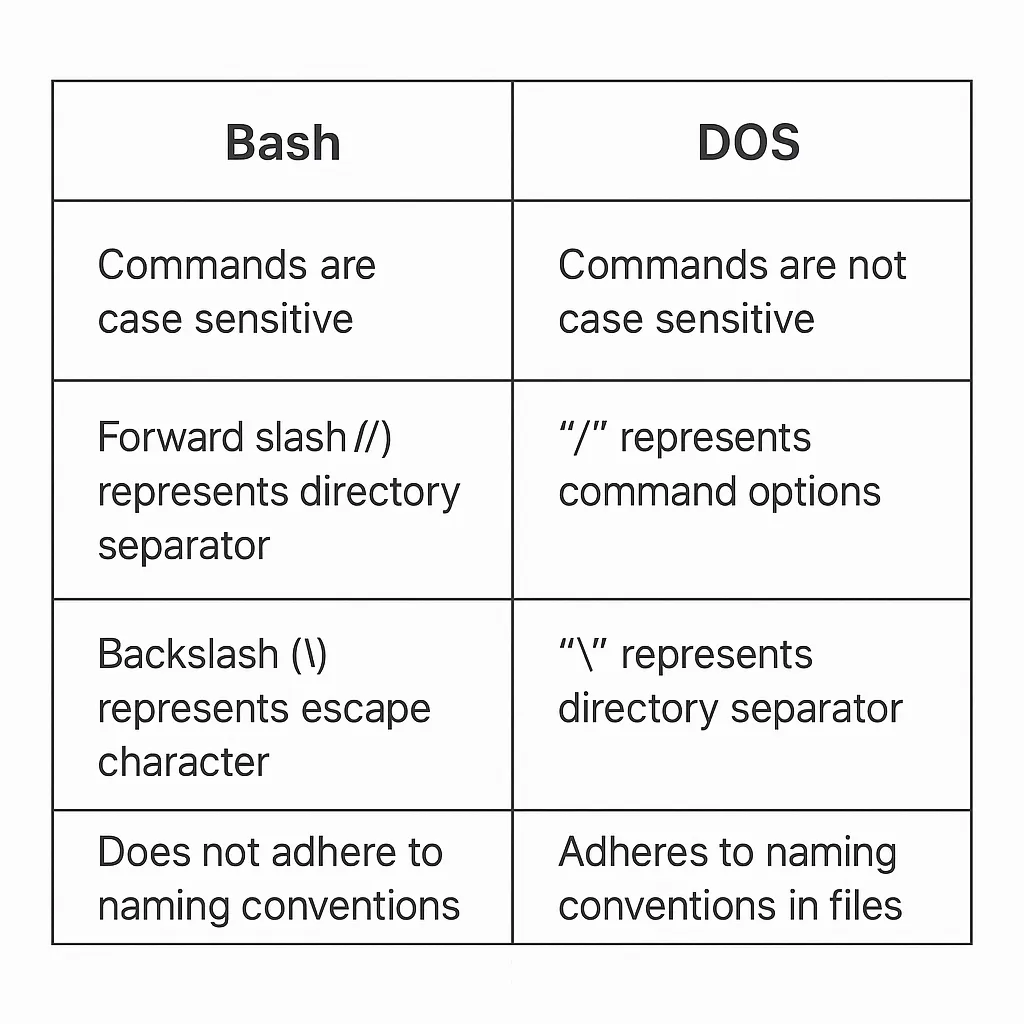
Question 27: Differences between Bash and DOS
Key differences are illustrated in the image below.
Question 28: What are the characteristics of the Linux operating system?
Characteristics of Linux:
- Portable: Software can run on different hardware types in the same way, and distributions can be carried on USB drives or storage cards.
- Open source: Source code is freely available and developed by the community.
- Multi-user: Multiple users can use RAM, applications, and run programs simultaneously.
- Multitasking: Multiple programs can run concurrently.
- Shell: Provides an interpreter for executing system programs and commands.
- Security: Offers authentication, authorization, and encryption to protect data.
Question 29: Why use Linux?
Reasons to use Linux include:
- High stability: Linux is known for stability and consistent performance.
- Security: Linux is a reliable server platform that helps avoid many viruses and malware. System changes typically require elevated privileges.
- Ease of operation: Many distributions provide package repositories and simple update mechanisms, including automatic updates.
- Hardware compatibility: Linux runs on a wide range of hardware and can use system resources efficiently.
- Open source: Source code is available under free and open source software models.
Question 30: List some Linux distributions and their typical uses
Common distributions:
- Linux Mint: Known for stability and ease of use, often using the MATE or Cinnamon desktops.
- Debian: Emphasizes robustness, stability, and a well-defined release cycle.
- Ubuntu: Based on Debian, available in desktop and server editions.
- openSUSE: Suitable for both new and experienced users.
- Manjaro: Aims to provide a pleasant experience for new and experienced users.
Summary
Linux is an operating system that runs efficiently on many types of hardware. It is free and open source, offering flexibility in how its code is used or modified. This article presents typical Linux interview questions and answers to give an idea of what to expect in interviews for Linux-related roles. Topics include commands, system features, and common distributions.





