 ALLPCB


Features
High concurrency and high performance.
Modular architecture provides good extensibility.
Asynchronous, non-blocking event-driven model, similar to Node.js.
Compared with other servers, it can run for months or longer without restarting, providing high reliability.
Hot deployment and smooth upgrades.
Fully open source with a large ecosystem.
Common Use Cases
Typical uses for Nginx include:
- Serving static resources from the local filesystem.
- Reverse proxying, including caching and load balancing.
- Application integration with OpenResty and similar solutions.
For frontend developers, Node.js may be familiar. Many concepts overlap between Nginx and Node.js: HTTP server, event-driven, asynchronous non-blocking, etc. Although many Nginx features can be implemented with Node.js, they are complementary. Nginx is strong at handling low-level server resources (static resource handling, proxying, load balancing), while Node.js excels at higher-level application logic. They can be combined effectively.
Illustration:
Common Nginx Commands
nginx -s reload # Send a signal to the master process to reload configuration, hot restart nginx -s reopen # Restart Nginx nginx -s stop # Fast shutdown nginx -s quit # Wait for worker processes to finish then shut down nginx -T # Show the final Nginx configuration nginx -t # Test the configuration for errors
Core Configuration
nginx.conf file structure
A typical Nginx configuration example:
# main section configuration user nginx; # User to run worker processes; default is nginx and this can be omitted worker_processes auto; # Number of Nginx worker processes, generally set to the number of CPU cores error_log /var/log/nginx/error.log warn; # Nginx error log location pid /var/run/nginx.pid; # PID file location for the Nginx master process # events section configuration events { use epoll; # Use the epoll I/O model (if unsure, Nginx will automatically select the most suitable polling method for your operating system) worker_connections 1024; # Maximum concurrent connections per process } # http section configuration # The most frequently used part: proxy, cache, log definitions, and settings for most features and third-party modules http { # Set log format log_format main '$remote_addr - $remote_user [$time_local] \"$request\" ' '$status $body_bytes_sent \"$http_referer\" ' '\"$http_user_agent\" \"$http_x_forwarded_for\"'; access_log /var/log/nginx/access.log main; # Nginx access log location sendfile on; # Enable efficient file transmission tcp_nopush on; # Reduce the number of TCP segments tcp_nodelay on; keepalive_timeout 65; # Keep-alive timeout in seconds types_hash_max_size 2048; include /etc/nginx/mime.types; # File extension to MIME type mapping default_type application/octet-stream; # Default file type include /etc/nginx/conf.d/*.conf; # Load sub-configuration files # server section configuration server { listen 80; # Listening port server_name localhost; # Configured domain name # location section configuration location / { root /usr/share/nginx/html; # Website root index index.html index.htm; # Default index files deny 172.168.22.11; # Deny access from this IP address; can be 'all' allow 172.168.33.44; # Allow access from this IP address; can be 'all' } error_page 500 502 503 504 /50x.html; # Default 50x error page error_page 400 404 error.html; # Default 400/404 error page } }
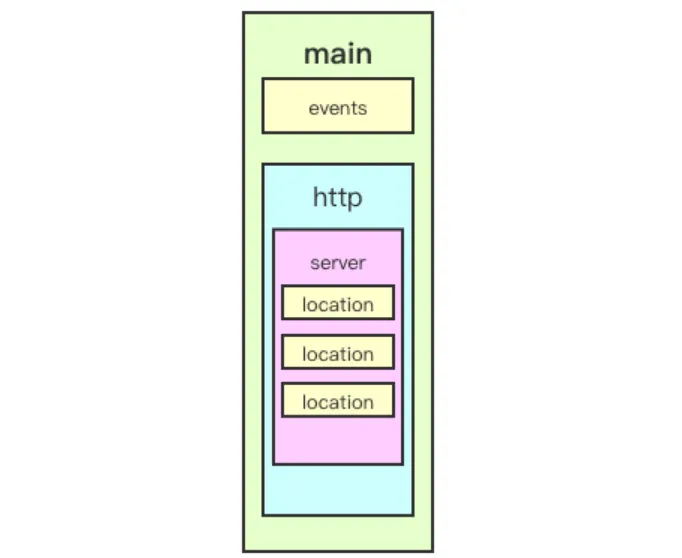
Structure summary:
- Main: global configuration that applies globally.
- Events: affects network connections between Nginx and clients.
- Http: proxy, cache, logs, and most third-party module configurations.
- Server: virtual host settings; an http block can contain multiple server blocks.
- Location: configures URI matching.
- Upstream: defines backend server addresses; essential for load balancing.
Hierarchy diagram:
nginx.conf syntax rules
- Configuration consists of directives and directive blocks.
- Each directive ends with a semicolon ; and parameters are separated by spaces.
- Directive blocks group multiple directives using { } braces.
- Include statements allow combining multiple configuration files to improve maintainability.
- Comments are added with the # symbol to improve readability.
- Variables are referenced with the $ symbol.
- Some directive parameters support regular expressions, for example the location directive.
Main section core parameters
user
Specifies the owner and group for Nginx worker processes. Group is optional.
# Syntax: # user USERNAME [GROUP] user nginx lion; # user is nginx; group is lion
pid
Specifies the path where the Nginx master process PID file is stored.
pid /opt/nginx/logs/nginx.pid # Master process PID stored in nginx.pid
worker_rlimit_nofile
Specifies the maximum number of file descriptors that a worker process can open.
worker_rlimit_nofile 20480; # Can be understood as the maximum number of connections per worker process
worker_rlimit_core
Specifies the core file settings when a worker process terminates abnormally, useful for debugging.
worker_rlimit_core 50M; # Size limit for core files working_directory /opt/nginx/tmp; # Directory to store core files
worker_processes
Specifies the number of worker processes to start with Nginx.
worker_processes 4; # Specify a fixed number of worker processes worker_processes auto; # Match the number of physical CPU cores
worker_cpu_affinity
Binds each worker process to specific CPU cores.
worker_cpu_affinity 0001 0010 0100 1000; # 4 physical cores, 4 worker processes
Binding workers to specific cores can reduce cache invalidation and improve performance, but it does not completely prevent process scheduling.
worker_priority
Sets the nice value for worker processes to adjust Nginx scheduling priority. Typically set to a negative value to prioritize Nginx.
worker_priority -10; # Default process priority 120 + (-10) = 110; lower value is higher priority
Note: On Linux the default process priority value is 120; the nice value ranges from -20 to +19.
worker_shutdown_timeout
Specifies the timeout for graceful shutdown of worker processes.
worker_shutdown_timeout 5s;
timer_resolution
Timer resolution used internally by worker processes. Increasing the interval reduces system calls and can improve performance; decreasing it increases system calls.
timer_resolution 100ms;
On Linux, requesting timer information requires a system call to the kernel, which carries overhead; a larger interval reduces that overhead.
daemon
Specifies whether Nginx runs in the foreground or background. Foreground is for debugging; background is for production.
daemon off; # Default is on (background mode)
events section core parameters
use
Specifies which event model Nginx should use.
use method; # Not recommended to set; let Nginx choose automatically
Available methods include: select, poll, kqueue, epoll, /dev/poll, eventport
worker_connections
Maximum number of concurrent connections a worker process can handle.
worker_connections 1024; # Maximum connections per worker process
accept_mutex
Whether to enable the accept mutex for load balancing.
accept_mutex on; # Default is off; enabling is recommended
server_name directive
Specifies virtual host domain names.
# Syntax: # server_name name1 name2 name3; # Example: server_name www.nginx.com;
Four ways to match domain names:
- Exact match: server_name www.nginx.com;
- Left-side wildcard: server_name *.nginx.com;
- Right-side wildcard: server_name www.nginx.*;
- Regex: server_name ~^www\.nginx.*$;
Matching priority: exact match > left-side wildcard > right-side wildcard > regex match.
server_name examples and local testing:
- Configure local DNS resolution in hosts
Add the following entries; 121.42.11.34 is a cloud server IP address:
121.42.11.34 www.nginx-test.com 121.42.11.34 mail.nginx-test.com 121.42.11.34 www.nginx-test.org 121.42.11.34 doc.nginx-test.com 121.42.11.34 www.nginx-test.cn 121.42.11.34 fe.nginx-test.club
Note: This example uses virtual domains for testing, so local DNS resolution is needed. If using a purchased domain, set up DNS appropriately with your DNS provider.
# Example server configurations (http server blocks only) # Left wildcard match server { listen 80; server_name *.nginx-test.com; root /usr/share/nginx/html/nginx-test/left-match/; location / { index index.html; } } # Regex match server { listen 80; server_name ~^.*\.nginx-test\..*$; root /usr/share/nginx/html/nginx-test/reg-match/; location / { index index.html; } } # Right wildcard match server { listen 80; server_name www.nginx-test.*; root /usr/share/nginx/html/nginx-test/right-match/; location / { index index.html; } } # Exact match server { listen 80; server_name www.nginx-test.com; root /usr/share/nginx/html/nginx-test/all-match/; location / { index index.html; } }
root
Specifies the location of static resources. It can be set in http, server, or location contexts.
# root path # Example: location /image { root /opt/nginx/static; } # When a user requests www.test.com/image/1.png, the server will look for /opt/nginx/static/image/1.png
Note: root concatenates the defined path with the URI; alias takes only the defined path.
alias
Also specifies a static resource directory, but can only be used inside a location block.
location /image { alias /opt/nginx/static/image/; } # When a user requests www.test.com/image/1.png, the server will look for /opt/nginx/static/image/1.png
Note: When using alias, include the trailing slash and use it only inside a location block.
location
Configures path matching.
location [ = | ~ | ~* | ^~ ] uri { ... }
Matching rules:
- = exact match
- ~ regex match, case-sensitive
- ~* regex match, case-insensitive
- ^~ stop searching when matched
Match priority: = > ^~ > ~ > ~* > no modifier.
Example:
server { listen 80; server_name www.nginx-test.com; # Only matches when accessing /match_all/ location = /match_all/ { root /usr/share/nginx/html; index index.html; } # Matches image file extensions location ~ .(jpeg|jpg|png|svg)$ { root /usr/share/nginx/images; } # Matches and stops searching further location ^~ /bbs/ { root /usr/share/nginx/html; index index.html index.htm; } }
Trailing slash in location
location /test { ... } location /test/ { ... }
If the location does not include a trailing slash, when accessing http://www.nginx-test.com/test, Nginx first checks for a test directory. If it exists, it serves index.html from that directory; if not, it will check for a file named test.
return
Stops processing and returns a response code or redirects to another URL. After return, subsequent directives in the location will not be executed.
# return code [text]; # return code URL; # return URL; # Examples: location / { return 404; # Immediately return the status code } location / { return 404 "pages not found"; # Return status code with text } location / { return 302 /bbs; # Return status code with redirect location } location / { return https://www.baidu.com; # Return redirect to URL }
rewrite
Rewrites the URL based on a regex match.
# Syntax: # rewrite regex replacement [flag]; # Contexts: server, location, if # Example: rewrite /images/(.*.jpg)$ /pic/$1; # $1 is the back-reference to (.*.jpg)
Flag meanings:
- last: After rewriting, initiate a new request and search server/location again.
- break: Use the rewritten URL directly and do not search other locations.
- redirect: Return a 302 temporary redirect.
- permanent: Return a 301 permanent redirect.
server { listen 80; server_name fe.lion.club; # Configure in local hosts for testing root html; location /search { rewrite ^/(.*) https://www.baidu.com redirect; } location /images { rewrite /images/(.*) /pics/$1; } location /pics { rewrite /pics/(.*) /photos/$1; } location /photos { } }
Analysis:
- Accessing fe.lion.club/search will redirect to https://www.baidu.com.
- Accessing fe.lion.club/images/1.jpg will first rewrite to /pics/1.jpg, then to /photos/1.jpg, and then serve the static file from html/photos/1.jpg.
if directive
# Syntax: # if (condition) { ... } # Contexts: server, location # Example: if ($http_user_agent ~ Chrome) { rewrite /(.*)/browser/$1 break; }
Condition types:
- $variable: When used alone, an empty string or a string starting with 0 is treated as false.
- = or != : equality or inequality.
- ~ : regex match.
- !~ : not regex match.
- ~* : case-insensitive regex match.
- -f or ! -f : file exists or not.
- -d or ! -d : directory exists or not.
- -e or ! -e : file, directory, or symlink exists or not.
- -x or ! -x : file is executable or not.
server { listen 8080; server_name localhost; root html; location / { if ( $uri = "/images/" ){ rewrite (.*) /pics/ break; } } }
When accessing localhost:8080/images/, the if condition matches and the rewrite is executed.
autoindex
If a request ends with /, autoindex can list the directory structure. Useful for quickly serving downloadable static resources.
Example configuration for autoindex:
server { listen 80; server_name fe.lion-test.club; location /download/ { root /opt/source; autoindex on; # Enable autoindex; options are on | off autoindex_exact_size on; # When off, file sizes are shown as KB, MB, GB; default on shows exact size in bytes autoindex_format html; # Format: html | json | xml autoindex_localtime off; # When off, displayed file times are in GMT; when on, show local server time } }





