ALLPCB


In the fast-paced world of electronics design, efficiency is everything. If you're searching for the best PCB schematic capture software to streamline your PCB design workflow, you're in the right place. This blog post will explore how schematic capture tools can boost schematic capture efficiency, help improve schematic design speed, and even introduce schematic design automation to save you time and effort. We'll dive deep into the features, benefits, and tips for choosing the right tools to elevate your design process.
Whether you're a seasoned engineer or just starting, this guide will provide actionable insights to make your PCB design journey smoother and more productive. Let’s unlock the potential of schematic capture tools together!
What Are PCB Schematic Capture Tools and Why Do They Matter?
PCB schematic capture tools are software solutions that allow engineers to create digital representations of electrical circuits before they are turned into physical printed circuit boards (PCBs). These tools act as the foundation of the PCB design workflow, enabling designers to map out connections, components, and signals in a clear and organized way.
Why do they matter? A well-designed schematic is the blueprint for a successful PCB layout. Errors or inefficiencies at this stage can lead to costly mistakes down the line, such as signal interference or component mismatches. By using the best PCB schematic capture software, you can ensure accuracy, reduce design time, and improve collaboration across teams.
Key Features to Look for in Schematic Capture Tools
Not all schematic capture tools are created equal. To find the software that maximizes schematic capture efficiency, consider these essential features:
1. User-Friendly Interface
A cluttered or confusing interface can slow down your design process. Look for tools with intuitive layouts, drag-and-drop functionality, and customizable shortcuts to improve schematic design speed. A clean workspace lets you focus on creativity rather than struggling with the software.
2. Extensive Component Libraries
Access to a vast library of components, such as resistors, capacitors, and ICs, saves time. The best tools allow you to search for parts with specific parameters, like a resistor with a 1kΩ value or a capacitor rated for 50V, ensuring precision in your designs.
3. Integration with PCB Layout Tools
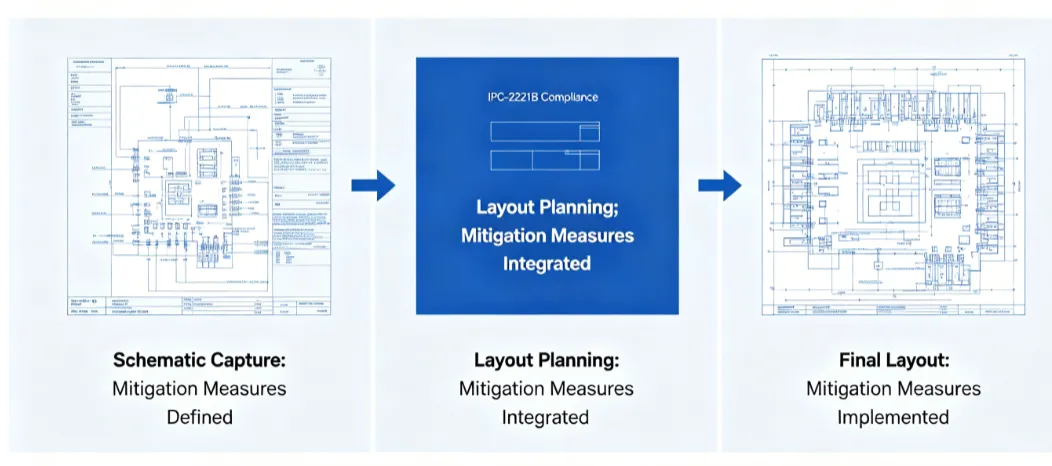
A seamless connection between schematic capture and PCB layout phases is critical for an efficient PCB design workflow. Tools that automatically transfer your schematic data to the layout stage prevent manual errors and save hours of rework.
4. Simulation Capabilities
Some advanced tools offer built-in simulation features to test your circuit's behavior before manufacturing. For example, you can check if a signal achieves the desired speed of 100 MHz or if impedance matches at 50Ω, helping catch issues early.
5. Automation Features
Schematic design automation is a game-changer. Features like auto-routing for connections, automatic net labeling, and design rule checks (DRC) reduce repetitive tasks and minimize human error. Automation can cut design time by up to 30%, depending on the complexity of the project.
How Schematic Capture Tools Boost Efficiency in PCB Design
Efficiency in PCB design isn't just about speed—it's about accuracy, collaboration, and scalability. Here's how schematic capture tools help achieve these goals:
1. Faster Design Iterations
Modern tools allow you to make quick edits to your schematics, such as swapping a 10kΩ resistor for a 5kΩ one, without disrupting the entire design. This ability to improve schematic design speed is invaluable when working on tight deadlines.
2. Error Reduction with Design Rule Checks
Design rule checks (DRC) automatically flag issues like unconnected pins or mismatched nets. For instance, if a signal line exceeds a safe current of 2A, the software can alert you before the design moves to layout, saving time and resources.
3. Enhanced Team Collaboration
Many tools support cloud-based sharing or version control, allowing multiple engineers to work on a schematic simultaneously. This is especially useful for large projects where signal integrity across a 10-layer board needs to be verified by different team members.
4. Streamlined Documentation
Good schematic tools generate detailed bills of materials (BOM) and netlists automatically. This reduces manual documentation time by as much as 40%, ensuring that manufacturing teams have accurate data from the start.
Top Benefits of Using Schematic Capture Tools for Your Workflow
Integrating the right schematic capture software into your PCB design workflow offers several benefits that go beyond just creating diagrams. Here are some key advantages:
- Time Savings: Automation and intuitive features can reduce schematic design time by 25-50%, depending on the tool and project complexity.
- Cost Efficiency: Catching errors early, such as a voltage mismatch at 3.3V instead of 5V, prevents expensive redesigns or manufacturing defects.
- Scalability: Whether you're designing a simple 2-layer board or a complex 16-layer system, the best tools adapt to your needs.
- Improved Signal Integrity: Simulation features help ensure signals operate within safe parameters, like maintaining a rise time of 1ns for high-speed designs.
Tips to Maximize Schematic Capture Efficiency
To get the most out of your schematic capture tools and enhance schematic capture efficiency, follow these practical tips:
1. Organize Your Workspace
Keep your schematic clean by grouping related components, such as power supply circuits or signal processing blocks. Use color coding or labeling to make navigation easier, especially for designs with over 100 components.
2. Leverage Shortcuts and Templates
Many tools offer keyboard shortcuts for common tasks like copying or rotating components. Additionally, using pre-built templates for recurring designs can cut setup time by up to 20%.
3. Regularly Update Component Libraries
Outdated libraries can lead to unavailable parts or incorrect specifications. Ensure your software’s database is current to avoid delays during procurement.
4. Use Hierarchical Design for Complex Projects
For large designs, break your schematic into smaller, manageable sheets using hierarchical structures. This approach can reduce clutter and improve readability, especially for boards with high-speed signals requiring impedance control at 50Ω.
5. Test Early and Often
Run simulations at various stages to verify performance metrics, such as ensuring a clock signal maintains a frequency of 25 MHz. Early testing prevents major issues during the layout phase.
The Role of Automation in Modern Schematic Design
Schematic design automation is transforming how engineers approach PCB design. By minimizing manual input, automation tools help tackle repetitive tasks and allow you to focus on innovation. Here’s how automation plays a role:
- Auto-Placement of Components: Some tools suggest optimal component placement based on electrical connections, reducing manual adjustments.
- Netlist Generation: Automatically creating netlists ensures that every connection, down to a specific 0.1μF capacitor, is accounted for without manual entry.
- Error Detection: Automated checks can identify issues like short circuits or incorrect pin assignments in seconds, far faster than manual reviews.
By embracing automation, you can achieve a smoother PCB design workflow and allocate more time to critical design decisions, such as optimizing for thermal performance or signal integrity.
Choosing the Right Schematic Capture Tool for Your Needs
Selecting the best PCB schematic capture software depends on your specific requirements. Here are some factors to consider:
- Budget: Some tools are free with basic features, while premium options offer advanced simulation and automation for a cost. Decide based on your project’s needs.
- Project Complexity: For simple designs, basic tools with limited layers may suffice. For high-speed or multi-layer boards, opt for software with robust simulation and DRC features.
- Learning Curve: Choose software with tutorials or community support if you’re new to schematic design. A steep learning curve can hinder schematic capture efficiency.
- Compatibility: Ensure the tool integrates with other software or hardware you use, such as Gerber file generation for manufacturing.
Common Challenges in Schematic Capture and How to Overcome Them
Even with the best tools, challenges can arise during schematic capture. Here’s how to address them:
1. Component Mismatches
Inaccurate component data can lead to design flaws. Double-check specifications, such as ensuring a transistor handles a collector current of 500mA, before finalizing your schematic.
2. Signal Integrity Issues
For high-speed designs, improper routing can cause crosstalk or delays. Use simulation tools to verify that signals maintain integrity, achieving, for example, a propagation delay under 5ns.
3. Overcrowded Schematics
Complex designs can become visually overwhelming. Use hierarchical sheets or split large designs into smaller sections to maintain clarity.
Future Trends in Schematic Capture Tools
The world of PCB design is evolving, and schematic capture tools are keeping pace. Here are some trends to watch:
- AI-Driven Design: Artificial intelligence is being integrated to suggest optimized layouts and predict potential errors before they occur.
- Cloud Collaboration: More tools are moving to the cloud, enabling real-time teamwork across global design teams.
- Enhanced Simulations: Future tools will offer more detailed simulations, such as thermal analysis for power dissipation up to 10W, directly within the schematic environment.
Conclusion: Elevate Your PCB Design Workflow with the Right Tools
Schematic capture tools are the cornerstone of an efficient PCB design workflow. By choosing the best PCB schematic capture software for your needs, you can unlock schematic capture efficiency, improve schematic design speed, and leverage schematic design automation to create better designs in less time. From reducing errors to enhancing collaboration, these tools empower engineers to tackle projects of any complexity with confidence.
Start by evaluating your design requirements and exploring tools that offer the features discussed in this guide. With the right software, you’ll not only save time but also produce high-quality PCBs that meet performance and reliability standards. Efficiency is within reach—take the first step today!