 ALLPCB


Introduction
This article shows a zlib decompression example for Air780E software.
1. Zlib decompression tool overview
zlib is a widely used compression and decompression library that implements the DEFLATE algorithm. It is used for file compression, data compression for network transmission, and data storage and reading in many applications. The zlib codebase is compact, making it suitable for embedded systems and resource-constrained environments.
2. Demonstration overview
This article demonstrates how to compress and decompress data using the zlib interface provided in the demo.
3. Hardware setup
For detailed instructions on the core board, refer to the Air780E product manual and the Core_Air780E usage documentation.
3.1 Data cable
Use a Type-C USB data cable.
3.2 PC
Windows system.
4. Software environment
4.1 Basic download and debug tools
Use Luatools for downloading and debugging the firmware.
5. zlib decompression resources
5.1 Documents and tools
Latest LuatOS resources and documentation are available from the LuatOS project pages. Firmware used for the 780E module: SDK and demo documentation center. The firmware version used in this demo is LuatOS-SoC_V1112_EC618_FULL.soc.
The demo used in this tutorial is the miniz demo from the LuatOS-Air780E repository.
5.2 Demo API overview
Constants
| Constant | Type | Description |
|---|---|---|
| miniz.WRITE_ZLIB_HEADER | int | Compression flag: whether to write the zlib header. Default for compress() |
| miniz.COMPUTE_ADLER32 | int | Compression/decompression flag: whether to compute/check Adler-32 checksum |
| miniz.GREEDY_PARSING_FLAG | int | Compression flag: enable greedy parsing for faster processing; default is the slower mode |
| miniz.NONDETERMINISTIC_PARSING_FLAG | int | Compression flag: enable fast compressor initialization |
| miniz.RLE_MATCHES | int | Compression flag: scan only for RLE matches |
| miniz.FILTER_MATCHES | int | Compression flag: filter matches shorter than 5 bytes |
| miniz.FORCE_ALL_STATIC_BLOCKS | int | Compression flag: disable optimized Huffman tables |
| miniz.FORCE_ALL_RAW_BLOCKS | int | Compression flag: use raw blocks only |
| miniz.PARSE_ZLIB_HEADER | int | Decompression flag: whether to parse zlib header. Default for uncompress() |
| miniz.HAS_MORE_INPUT | int | Decompression flag: more input available; only for streaming decompression, currently not supported |
| miniz.USING_NON_WRAPPING_OUTPUT_BUF | int | Decompression flag: output buffer is large enough for entire data; only for streaming decompression, currently not supported |
miniz.compress(data, flags)
Purpose: fast compression. Requires approximately 165 KB system memory and 32 KB Lua VM memory.
Parameters
| Parameter | Type | Description |
|---|---|---|
| data | string | Data to compress. Do not compress data smaller than 400 bytes. Compressed output must not exceed 32 KB. |
| flags | int | Compression flags. Default is miniz.WRITE_ZLIB_HEADER to write the zlib header. |
Return value
| Type | Description |
|---|---|
| string | Returns the compressed data string on success, otherwise nil. |
string.fromBase64(str)
Purpose: base64 decode a string.
Parameters
| Parameter | Type | Description |
|---|---|---|
| str | string | String to decode. |
Return value
| Type | Description |
|---|---|
| string | Decoded string. Returns an empty string if decoding fails. |
miniz.uncompress(data, flags)
Purpose: fast decompression. Requires 32 KB Lua VM memory.
Parameters
| Parameter | Type | Description |
|---|---|---|
| data | string | Data to decompress. Decompressed output must not exceed 32 KB. |
| flags | int | Decompression flags. Default is miniz.PARSE_ZLIB_HEADER to parse the zlib header. |
Return value
| Type | Description |
|---|---|
| string | Returns the decompressed data string on success, otherwise nil. |
6. Code example
6.1 Decompress data
First base64 decode the compressed string, then decompress the result.
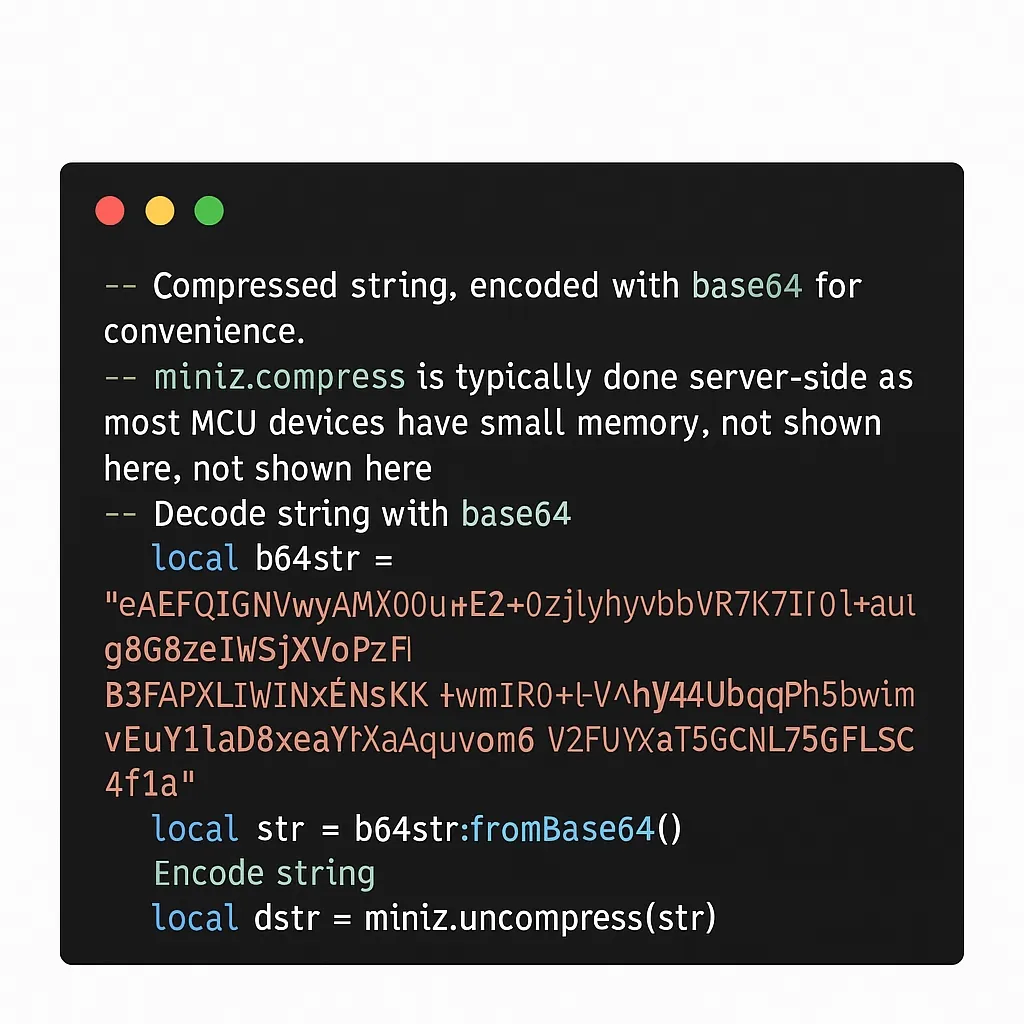
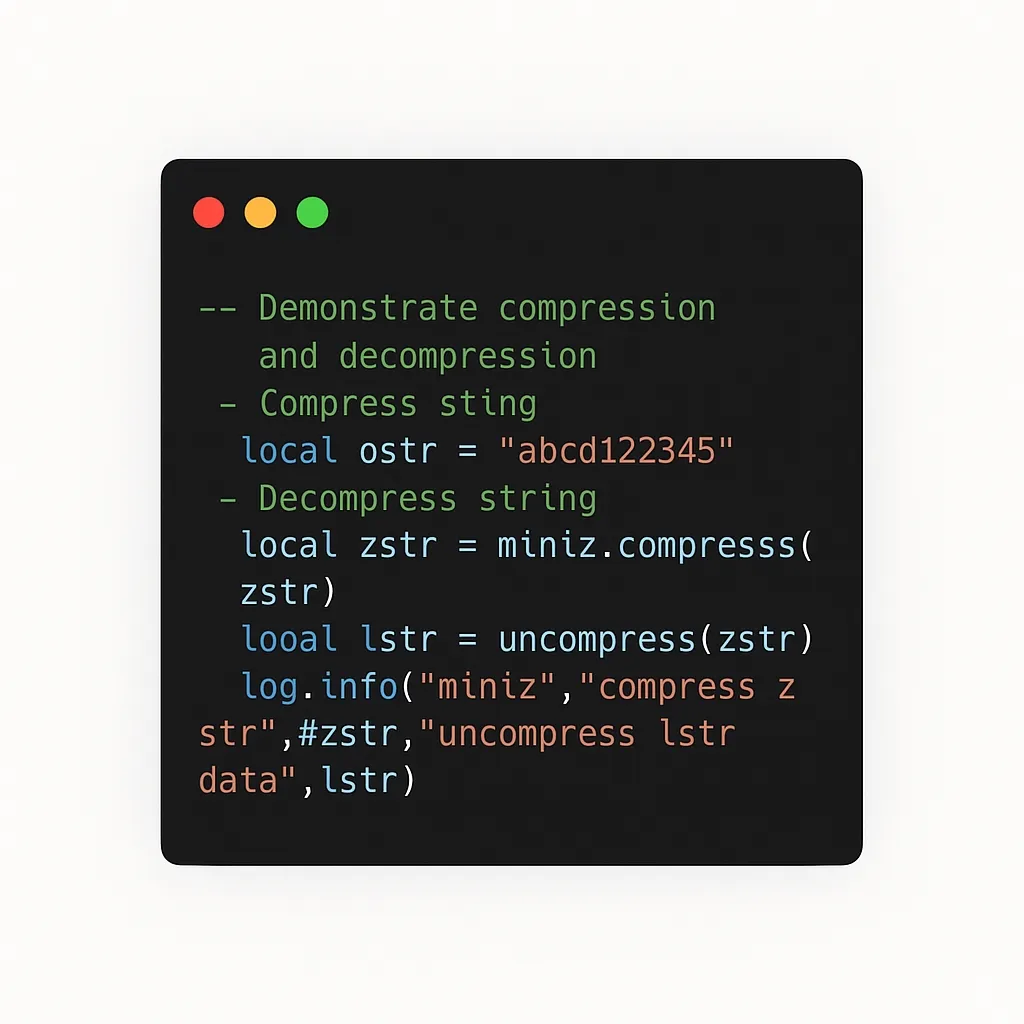
Compressed data and then decompressed:
7. Summary
This tutorial shows how to compress and decompress data using the miniz API in the Air780E demo.
8. FAQ
8.1 What is the maximum size for decompressed data?
Decompressed data must not exceed 32 KB.





