 ALLPCB


Installing Linux on Windows 11
Very simple. Run Linux on Windows 11 without installing a virtual machine.
Installation notes
If errors occur, a missing driver may be the cause.
Driver download locations
Install vim editor
Enter command: sudo apt-get install vim
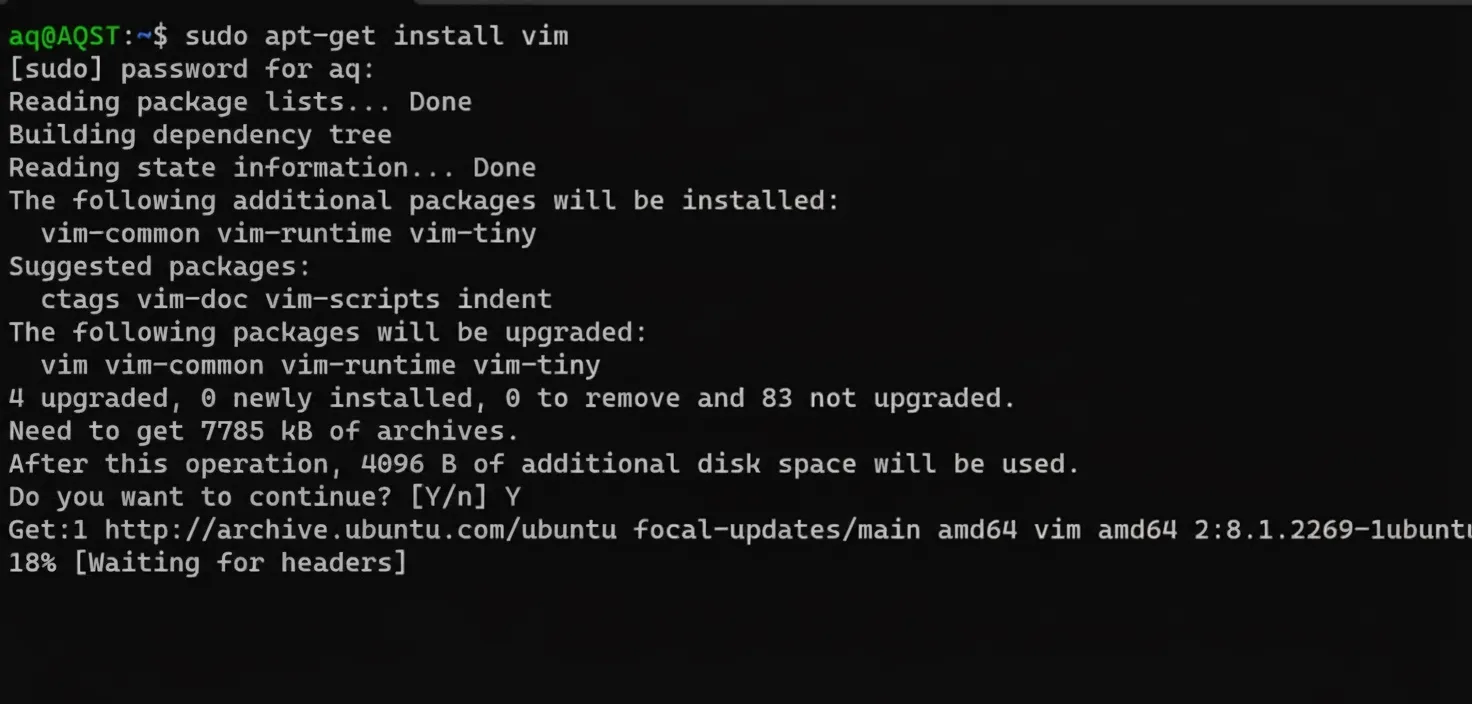
aq@AQST:~$ sudo apt-get install vim
[sudo] password for aq:
Reading package lists... Done
Building dependency tree
Reading state information... Done
The following additional packages will be installed:  vim-common vim-runtime vim-tiny
Suggested packages:  ctags vim-doc vim-scripts indent
The following packages will be upgraded:  vim vim-common vim-runtime vim-tiny
4 upgraded, 0 newly installed, 0 to remove and 83 not upgraded.
Need to get 7785 kB of archives.
After this operation, 4096 B of additional disk space will be used.
Do you want to continue? [Y/n] Y
Get:1 http://archive.ubuntu.com/ubuntu focal-updates/main amd64 vim amd64 2:8.1.2269-1ubuntu5.18 [1242 kB]
Get:2 http://archive.ubuntu.com/ubuntu focal-updates/main amd64 vim-tiny amd64 2:8.1.2269-1ubuntu5.18 [581 kB]
Get:3 http://archive.ubuntu.com/ubuntu focal-updates/main all vim-runtime 2:8.1.2269-1ubuntu5.18 [5875 kB]
Get:4 http://archive.ubuntu.com/ubuntu focal-updates/main all vim-common 2:8.1.2269-1ubuntu5.18 [87.1 kB]
Fetched 7785 kB in 22s (362 kB/s)
(Reading database ... 32701 files and directories currently installed.)
Preparing to unpack .../vim_2%3a8.1.2269-1ubuntu5.18_amd64.deb ...
Unpacking vim (2:8.1.2269-1ubuntu5.18) over (2:8.1.2269-1ubuntu5.14) ...
Preparing to unpack .../vim-tiny_2%3a8.1.2269-1ubuntu5.18_amd64.deb ...
Unpacking vim-tiny (2:8.1.2269-1ubuntu5.18) over (2:8.1.2269-1ubuntu5.14) ...
Preparing to unpack .../vim-runtime_2%3a8.1.2269-1ubuntu5.18_all.deb ...
Unpacking vim-runtime (2:8.1.2269-1ubuntu5.18) over (2:8.1.2269-1ubuntu5.14) ...
Preparing to unpack .../vim-common_2%3a8.1.2269-1ubuntu5.18_all.deb ...
Unpacking vim-common (2:8.1.2269-1ubuntu5.18) over (2:8.1.2269-1ubuntu5.14) ...
Setting up vim-common (2:8.1.2269-1ubuntu5.18) ...
Setting up vim-runtime (2:8.1.2269-1ubuntu5.18) ...
Setting up vim (2:8.1.2269-1ubuntu5.18) ...
Setting up vim-tiny (2:8.1.2269-1ubuntu5.18) ...
Processing triggers for mime-support (3.64ubuntu1) ...
Processing triggers for man-db (2.9.1-1) ...
Install gcc compiler
Enter command: sudo apt-get install gcc
aq@AQST:~$ sudo apt-get install gcc
Reading package lists... Done
Building dependency tree
Reading state information... Done
The following additional packages will be installed:  binutils binutils-common binutils-x86-64-linux-gnu cpp cpp-9 gcc-10-base gcc-9 gcc-9-base libasan5 libatomic1 libbinutils libc-dev-bin libc6 libc6-dev libcc1-0 libcrypt-dev libc-ctf-nobfd0 libctf0 libgcc-9-dev libgcc-s1 libgomp1 libisl22 libitm1 liblsan0 libmpc3 libquadmath0 libstdc++6 libtsan0 libubsan1 linux-libc-dev manpages-dev
Suggested packages:  binutils-doc cpp-doc gcc-9-locales gcc-multilib make autoconf automake libtool flex bison gdb gcc-doc gcc-9-multilib gcc-9-doc glibc-doc
The following NEW packages will be installed:  binutils binutils-common binutils-x86-64-linux-gnu cpp cpp-9 gcc gcc-9 gcc-9-base libasan5 libatomic1 libbinutils libc-dev-bin libc6-dev libcc1-0 libcrypt-dev libctf-nobfd0 libctf0 libgcc-9-dev libgomp1 libisl22 libitm1 liblsan0 libmpc3 libquadmath0 libtsan0 libubsan1 linux-libc-dev manpages-dev
The following packages will be upgraded:  gcc-10-base libc6 libgcc-s1 libstdc++6
4 upgraded, 28 newly installed, 0 to remove and 79 not upgraded.
Need to get 37.3 MB of archives.
After this operation, 150 MB of additional disk space will be used.
Do you want to continue? [Y/n] Y
Get:1 http://archive.ubuntu.com/ubuntu focal-updates/main amd64 libc6 amd64 2.31-0ubuntu9.12 [2722 kB]
Get:2 http://archive.ubuntu.com/ubuntu focal-updates/main amd64 gcc-10-base amd64 10.5.0-1ubuntu1~20.04 [20.8 kB]
Get:3 http://archive.ubuntu.com/ubuntu focal-updates/main amd64 libstdc++6 amd64 10.5.0-1ubuntu1~20.04 [501 kB]
Get:4 http://archive.ubuntu.com/ubuntu focal-updates/main amd64 libgcc-s1 amd64 10.5.0-1ubuntu1~20.04 [41.8 kB]
Get:5 http://archive.ubuntu.com/ubuntu focal-updates/main amd64 binutils-common amd64 2.34-6ubuntu1.6 [207 kB]
Get:6 http://archive.ubuntu.com/ubuntu focal-updates/main amd64 libbinutils amd64 2.34-6ubuntu1.6 [473 kB]
Get:7 http://archive.ubuntu.com/ubuntu focal-updates/main amd64 libctf-nobfd0 amd64 2.34-6ubuntu1.6 [47.4 kB]
Get:8 http://archive.ubuntu.com/ubuntu focal-updates/main amd64 libctf0 amd64 2.34-6ubuntu1.6 [46.6 kB]
Get:9 http://archive.ubuntu.com/ubuntu focal-updates/main amd64 binutils-x86-64-linux-gnu amd64 2.34-6ubuntu1.6 [1613 kB]
Get:10 http://archive.ubuntu.com/ubuntu focal-updates/main amd64 binutils amd64 2.34-6ubuntu1.6 [3376 B]
Get:11 http://archive.ubuntu.com/ubuntu focal-updates/main amd64 gcc-9-base amd64 9.4.0-1ubuntu1~20.04.2 [18.9 kB]
Get:12 http://archive.ubuntu.com/ubuntu focal/main amd64 libisl22 amd64 0.22.1-1 [592 kB]
Get:13 http://archive.ubuntu.com/ubuntu focal/main amd64 libmpc3 amd64 1.1.0-1 [40.8 kB]
Get:14 http://archive.ubuntu.com/ubuntu focal-updates/main amd64 cpp-9 amd64 9.4.0-1ubuntu1~20.04.2 [7502 kB]
Get:15 http://archive.ubuntu.com/ubuntu focal/main amd64 cpp amd64 4:9.3.0-1ubuntu2 [27.6 kB]
Get:16 http://archive.ubuntu.com/ubuntu focal-updates/main amd64 libcc1-0 amd64 10.5.0-1ubuntu1~20.04 [48.8 kB]
Get:17 http://archive.ubuntu.com/ubuntu focal-updates/main amd64 libgomp1 amd64 10.5.0-1ubuntu1~20.04 [102 kB]
Get:18 http://archive.ubuntu.com/ubuntu focal-updates/main amd64 libitm1 amd64 10.5.0-1ubuntu1~20.04 [26.2 kB]
Get:19 http://archive.ubuntu.com/ubuntu focal-updates/main amd64 libatomic1 amd64 10.5.0-1ubuntu1~20.04 [9284 B]
Get:20 http://archive.ubuntu.com/ubuntu focal-updates/main amd64 libasan5 amd64 9.4.0-1ubuntu1~20.04.2 [2752 kB]
Get:21 http://archive.ubuntu.com/ubuntu focal-updates/main amd64 liblsan0 amd64 10.5.0-1ubuntu1~20.04 [835 kB]
Get:22 http://archive.ubuntu.com/ubuntu focal-updates/main amd64 libtsan0 amd64 10.5.0-1ubuntu1~20.04 [2016 kB]
Get:23 http://archive.ubuntu.com/ubuntu focal-updates/main amd64 libubsan1 amd64 10.5.0-1ubuntu1~20.04 [785 kB]
Get:24 http://archive.ubuntu.com/ubuntu focal-updates/main amd64 libquadmath0 amd64 10.5.0-1ubuntu1~20.04 [146 kB]
Get:25 http://archive.ubuntu.com/ubuntu focal-updates/main amd64 libgcc-9-dev amd64 9.4.0-1ubuntu1~20.04.2 [2359 kB]
Get:26 http://archive.ubuntu.com/ubuntu focal-updates/main amd64 gcc-9 amd64 9.4.0-1ubuntu1~20.04.2 [8276 kB]
Get:27 http://archive.ubuntu.com/ubuntu focal/main amd64 gcc amd64 4:9.3.0-1ubuntu2 [5208 B]
Get:28 http://archive.ubuntu.com/ubuntu focal-updates/main amd64 libc-dev-bin amd64 2.31-0ubuntu9.12 [71.6 kB]
Get:29 http://archive.ubuntu.com/ubuntu focal-updates/main amd64 linux-libc-dev amd64 5.4.0-165.182 [1112 kB]
Get:30 http://archive.ubuntu.com/ubuntu focal/main amd64 libcrypt-dev amd64 1:4.4.10-10ubuntu4 [104 kB]
Get:31 http://archive.ubuntu.com/ubuntu focal-updates/main amd64 libc6-dev amd64 2.31-0ubuntu9.12 [2519 kB]
Get:32 http://archive.ubuntu.com/ubuntu focal/main amd64 manpages-dev all 5.05-1 [2266 kB]
Fetched 37.3 MB in 1min 31s (410 kB/s)
Extracting templates from packages: 100%
Preconfiguring packages ...
(Reading database ... 32701 files and directories currently installed.)
Preparing to unpack .../libc6_2.31-0ubuntu9.12_amd64.deb ...
Unpacking libc6:amd64 (2.31-0ubuntu9.12) over (2.31-0ubuntu9.9) ...
Setting up libc6:amd64 (2.31-0ubuntu9.12) ...
Preparing to unpack .../gcc-10-base_10.5.0-1ubuntu1~20.04_amd64.deb ...
Unpacking gcc-10-base:amd64 (10.5.0-1ubuntu1~20.04) over (10.3.0-1ubuntu1~20.04) ...
Setting up gcc-10-base:amd64 (10.5.0-1ubuntu1~20.04) ...
Preparing to unpack .../libstdc++6_10.5.0-1ubuntu1~20.04_amd64.deb ...
Unpacking libstdc++6:amd64 (10.5.0-1ubuntu1~20.04) over (10.3.0-1ubuntu1~20.04) ...
Setting up libstdc++6:amd64 (10.5.0-1ubuntu1~20.04) ...
Preparing to unpack .../libgcc-s1_10.5.0-1ubuntu1~20.04_amd64.deb ...
Unpacking libgcc-s1:amd64 (10.5.0-1ubuntu1~20.04) over (10.3.0-1ubuntu1~20.04) ...
Setting up libgcc-s1:amd64 (10.5.0-1ubuntu1~20.04) ...
Selecting previously unselected package binutils-common:amd64.
(Reading database ... 32701 files and directories currently installed.)
Preparing to unpack .../00-binutils-common_2.34-6ubuntu1.6_amd64.deb ...
Unpacking binutils-common:amd64 (2.34-6ubuntu1.6) ...
Selecting previously unselected package libbinutils:amd64.
Preparing to unpack .../01-libbinutils_2.34-6ubuntu1.6_amd64.deb ...
Unpacking libbinutils:amd64 (2.34-6ubuntu1.6) ...
Selecting previously unselected package libctf-nobfd0:amd64.
Preparing to unpack .../02-libctf-nobfd0_2.34-6ubuntu1.6_amd64.deb ...
Unpacking libctf-nobfd0:amd64 (2.34-6ubuntu1.6) ...
Selecting previously unselected package libctf0:amd64.
Preparing to unpack .../03-libctf0_2.34-6ubuntu1.6_amd64.deb ...
Unpacking libctf0:amd64 (2.34-6ubuntu1.6) ...
Selecting previously unselected package binutils-x86-64-linux-gnu.
Preparing to unpack .../04-binutils-x86-64-linux-gnu_2.34-6ubuntu1.6_amd64.deb ...
Unpacking binutils-x86-64-linux-gnu (2.34-6ubuntu1.6) ...
Selecting previously unselected package binutils.
Preparing to unpack .../05-binutils_2.34-6ubuntu1.6_amd64.deb ...
Unpacking binutils (2.34-6ubuntu1.6) ...
Selecting previously unselected package gcc-9-base:amd64.
Preparing to unpack .../06-gcc-9-base_9.4.0-1ubuntu1~20.04.2_amd64.deb ...
Unpacking gcc-9-base:amd64 (9.4.0-1ubuntu1~20.04.2) ...
Selecting previously unselected package libisl22:amd64.
Preparing to unpack .../07-libisl22_0.22.1-1_amd64.deb ...
Unpacking libisl22:amd64 (0.22.1-1) ...
Selecting previously unselected package libmpc3:amd64.
Preparing to unpack .../08-libmpc3_1.1.0-1_amd64.deb ...
Unpacking libmpc3:amd64 (1.1.0-1) ...
Selecting previously unselected package cpp-9.
Preparing to unpack .../09-cpp-9_9.4.0-1ubuntu1~20.04.2_amd64.deb ...
Unpacking cpp-9 (9.4.0-1ubuntu1~20.04.2) ...
Selecting previously unselected package cpp.
Preparing to unpack .../10-cpp_4%3a9.3.0-1ubuntu2_amd64.deb ...
Unpacking cpp (4:9.3.0-1ubuntu2) ...
Selecting previously unselected package libcc1-0:amd64.
Preparing to unpack .../11-libcc1-0_10.5.0-1ubuntu1~20.04_amd64.deb ...
Unpacking libcc1-0:amd64 (10.5.0-1ubuntu1~20.04) ...
Selecting previously unselected package libgomp1:amd64.
Preparing to unpack .../12-libgomp1_10.5.0-1ubuntu1~20.04_amd64.deb ...
Unpacking libgomp1:amd64 (10.5.0-1ubuntu1~20.04) ...
Selecting previously unselected package libitm1:amd64.
Preparing to unpack .../13-libitm1_10.5.0-1ubuntu1~20.04_amd64.deb ...
Unpacking libitm1:amd64 (10.5.0-1ubuntu1~20.04) ...
Selecting previously unselected package libatomic1:amd64.
Preparing to unpack .../14-libatomic1_10.5.0-1ubuntu1~20.04_amd64.deb ...
Unpacking libatomic1:amd64 (10.5.0-1ubuntu1~20.04) ...
Selecting previously unselected package libasan5:amd64.
Preparing to unpack .../15-libasan5_9.4.0-1ubuntu1~20.04.2_amd64.deb ...
Unpacking libasan5:amd64 (9.4.0-1ubuntu1~20.04.2) ...
Selecting previously unselected package liblsan0:amd64.
Preparing to unpack .../16-liblsan0_10.5.0-1ubuntu1~20.04_amd64.deb ...
Unpacking liblsan0:amd64 (10.5.0-1ubuntu1~20.04) ...
Selecting previously unselected package libtsan0:amd64.
Preparing to unpack .../17-libtsan0_10.5.0-1ubuntu1~20.04_amd64.deb ...
Unpacking libtsan0:amd64 (10.5.0-1ubuntu1~20.04) ...
Selecting previously unselected package libubsan1:amd64.
Preparing to unpack .../18-libubsan1_10.5.0-1ubuntu1~20.04_amd64.deb ...
Unpacking libubsan1:amd64 (10.5.0-1ubuntu1~20.04) ...
Selecting previously unselected package libquadmath0:amd64.
Preparing to unpack .../19-libquadmath0_10.5.0-1ubuntu1~20.04_amd64.deb ...
Unpacking libquadmath0:amd64 (10.5.0-1ubuntu1~20.04) ...
Selecting previously unselected package libgcc-9-dev:amd64.
Preparing to unpack .../20-libgcc-9-dev_9.4.0-1ubuntu1~20.04.2_amd64.deb ...
Unpacking libgcc-9-dev:amd64 (9.4.0-1ubuntu1~20.04.2) ...
Selecting previously unselected package gcc-9.
Preparing to unpack .../21-gcc-9_9.4.0-1ubuntu1~20.04.2_amd64.deb ...
Unpacking gcc-9 (9.4.0-1ubuntu1~20.04.2) ...
Selecting previously unselected package gcc.
Preparing to unpack .../22-gcc_4%3a9.3.0-1ubuntu2_amd64.deb ...
Unpacking gcc (4:9.3.0-1ubuntu2) ...
Selecting previously unselected package libc-dev-bin.
Preparing to unpack .../23-libc-dev-bin_2.31-0ubuntu9.12_amd64.deb ...
Unpacking libc-dev-bin (2.31-0ubuntu9.12) ...
Selecting previously unselected package linux-libc-dev:amd64.
Preparing to unpack .../24-linux-libc-dev_5.4.0-165.182_amd64.deb ...
Unpacking linux-libc-dev:amd64 (5.4.0-165.182) ...
Selecting previously unselected package libcrypt-dev:amd64.
Preparing to unpack .../25-libcrypt-dev_1%3a4.4.10-10ubuntu4_amd64.deb ...
Unpacking libcrypt-dev:amd64 (1:4.4.10-10ubuntu4) ...
Selecting previously unselected package libc6-dev:amd64.
Preparing to unpack .../26-libc6-dev_2.31-0ubuntu9.12_amd64.deb ...
Unpacking libc6-dev:amd64 (2.31-0ubuntu9.12) ...
Selecting previously unselected package manpages-dev.
Preparing to unpack .../27-manpages-dev_5.05-1_all.deb ...
Unpacking manpages-dev (5.05-1) ...
Setting up manpages-dev (5.05-1) ...
Setting up binutils-common:amd64 (2.34-6ubuntu1.6) ...
Setting up linux-libc-dev:amd64 (5.4.0-165.182) ...
Setting up libctf-nobfd0:amd64 (2.34-6ubuntu1.6) ...
Setting up libgomp1:amd64 (10.5.0-1ubuntu1~20.04) ...
Setting up libquadmath0:amd64 (10.5.0-1ubuntu1~20.04) ...
Setting up libmpc3:amd64 (1.1.0-1) ...
Setting up libatomic1:amd64 (10.5.0-1ubuntu1~20.04) ...
Setting up libubsan1:amd64 (10.5.0-1ubuntu1~20.04) ...
Setting up libcrypt-dev:amd64 (1:4.4.10-10ubuntu4) ...
Setting up libisl22:amd64 (0.22.1-1) ...
Setting up libbinutils:amd64 (2.34-6ubuntu1.6) ...
Setting up libc-dev-bin (2.31-0ubuntu9.12) ...
Setting up libcc1-0:amd64 (10.5.0-1ubuntu1~20.04) ...
Setting up liblsan0:amd64 (10.5.0-1ubuntu1~20.04) ...
Setting up libitm1:amd64 (10.5.0-1ubuntu1~20.04) ...
Setting up gcc-9-base:amd64 (9.4.0-1ubuntu1~20.04.2) ...
Setting up libtsan0:amd64 (10.5.0-1ubuntu1~20.04) ...
Setting up libctf0:amd64 (2.34-6ubuntu1.6) ...
Setting up libasan5:amd64 (9.4.0-1ubuntu1~20.04.2) ...
Setting up cpp-9 (9.4.0-1ubuntu1~20.04.2) ...
Setting up libc6-dev:amd64 (2.31-0ubuntu9.12) ...
Setting up binutils-x86-64-linux-gnu (2.34-6ubuntu1.6) ...
Setting up binutils (2.34-6ubuntu1.6) ...
Setting up libgcc-9-dev:amd64 (9.4.0-1ubuntu1~20.04.2) ...
Setting up cpp (4:9.3.0-1ubuntu2) ...
Setting up gcc-9 (9.4.0-1ubuntu1~20.04.2) ...
Setting up gcc (4:9.3.0-1ubuntu2) ...
Processing triggers for man-db (2.9.1-1) ...
Processing triggers for libc-bin (2.31-0ubuntu9.9) ...
VI/Vim overview
Vim is a powerful and highly configurable text editor in the Linux environment, similar to Source Insight, Sublime, or Notepad in Windows. VI is an abbreviation for visual interface. Vim stands for "Vi IMproved" and includes many enhancements over vi, such as multi-level undo, multi-window operation, crash recovery, increased stability, keyword completion, and context-aware completion.
Vim modes
Vim generally has six working modes.
Normal mode: The default mode when opening a file with vim. Also called command mode, it allows the user to navigate and scroll through code using various commands.
Insert mode: Also called editing mode. Press i, a, or o in normal mode to enter insert mode, which allows text input and editing from the keyboard.
Command-line mode: In normal mode, type a colon : followed by a command to configure vim, such as changing the color scheme or showing line numbers. These configuration commands can be saved in /etc/vim/vimrc to apply by default each time vim is opened.
Visual mode: Press v in normal mode to enter visual mode, then move the cursor to select a block of text. This mode is commonly used for copying, pasting, and deleting text.
Replace mode: To replace characters directly without entering insert mode and deleting first, press R in normal mode to overwrite existing text.
Ex mode: Similar to command-line mode, it allows running multiple commands sequentially.
There are many vim commands. The above is just a brief test introduction.
Vim save and exit commands
Vim save and exit commands
Write hello.c code
Use vim hello.c, press i to enter insert mode and write the code.
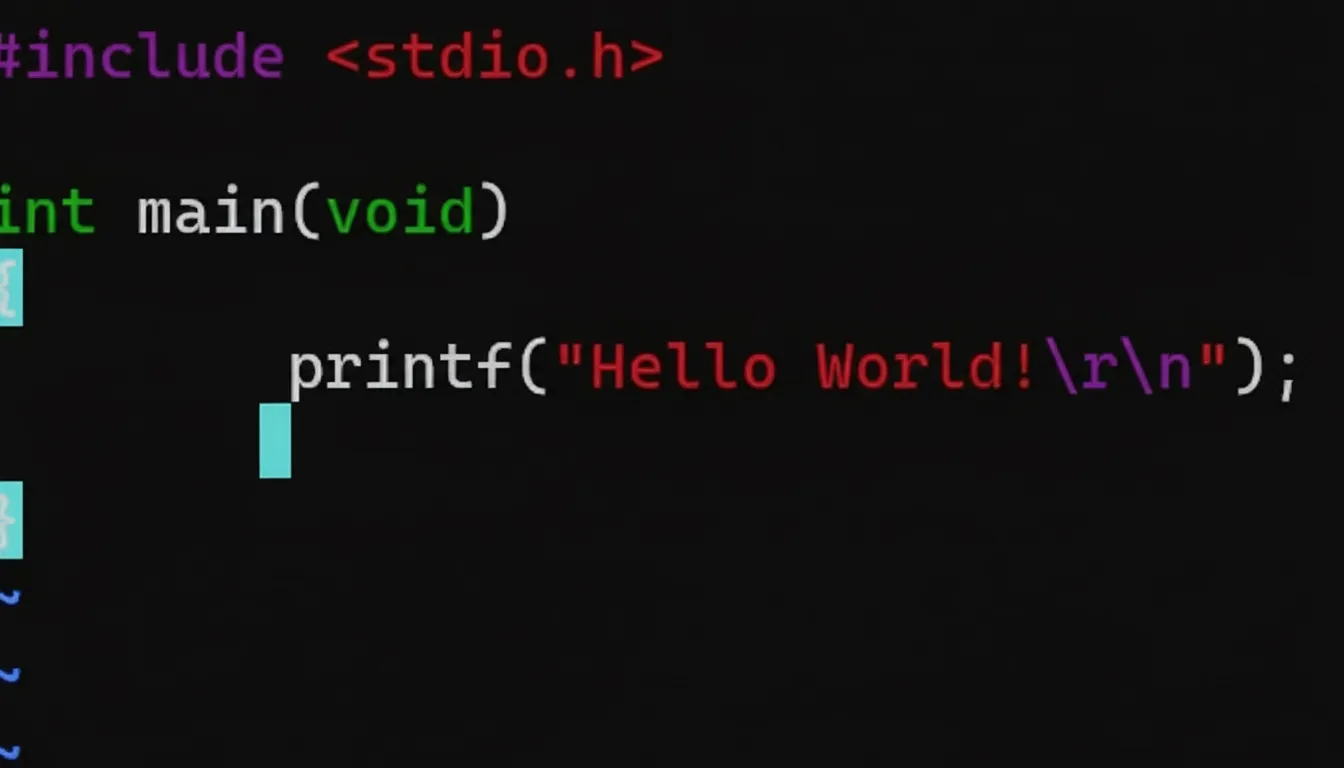
esc  exit command mode
:wq  save changes and exit the Vim editor.
Compile hello.c
aq@AQST:~$ gcc hello.c -o hello
aq@AQST:~$ ls
hello  hello.c
Run hello executable to print Hello World!
aq@AQST:~$ ls
hello  hello.c
aq@AQST:~$ ./hello
Hello World!
Makefile
Multi-file compilation requires a makefile environment. This completes the basic test. You can now continue learning system programming.





