ALLPCB


Overview
Multi-touch technology allows a user to interact with a graphical interface using multiple fingers simultaneously. It can be implemented on touchscreens, touch tables, walls, or touchpads to accept input from multiple points on the surface. The counterpart to multi-touch is single-point touch, a technology that has existed for many years. Early examples date back to the 1970s, ranging from small touch mobile phones to large systems such as ATM terminals and information kiosks.
Apple's use of projected-capacitive touchscreens on the iPhone expanded interaction beyond a single finger and contributed to a major shift in touch-based user interfaces. Many assume multi-touch is limited to pinch-to-zoom, but that is only one practical example. With multi-touch, a wide range of interaction paradigms becomes possible, and software developers can apply multi-touch gestures to create new ways of operating devices.
For consumer electronics, the core challenge of user interface design is turning complex control actions into intuitive, convenient, and manufacturable experiences. User interfaces must consider multiple human senses, while also accounting for how user needs affect hardware and systems. Most products on the market tend to treat visual and tactile feedback separately. From physical buttons on keyboards and TV remotes to sliders and trackballs, output location (the visible result of a control action) is often different from the user's touch location. Touchscreens provide the advantage of aligning visual and tactile feedback, which can fundamentally change how users interact with electronics.
Relationship and Differences: Single-point, Point, Multi-touch
Single-point touch screens
Touchscreen functionality progressed from simple to more complex designs. Early products supported the simplest interaction: one finger touching a single point on the screen to make a selection or control an application. Examples include POS terminals and airport check-in kiosks. Single-point touchscreens enabled a major user-interface improvement compared with mechanical buttons. Mechanical and capacitive buttons remain ubiquitous across phones, landline handsets, remotes, TVs, computers and peripherals, game consoles, appliances, and in-vehicle controls. Modern single-point touchscreens integrate the user control surface directly into the display, removing the need for physical buttons.
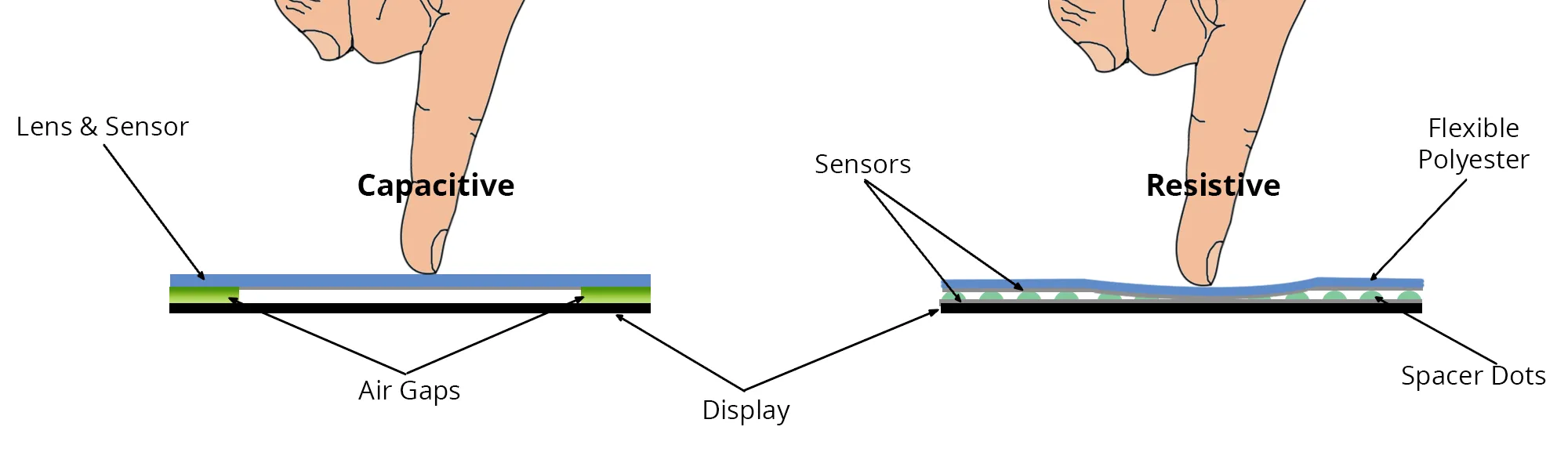
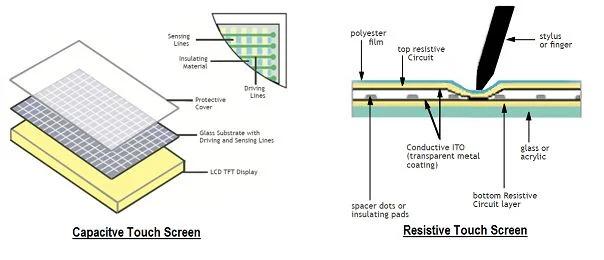
Single-point touchscreens offer two main advantages: 1) optimized device layout, especially for small devices where display and controls can occupy the same area, and 2) potentially unlimited virtual buttons since screen regions can be bound to any application function. Many single-point systems are based on resistive touch technology and are widely used in consumer devices, kiosks, POS terminals, and automotive navigation systems.
Point-touch screens
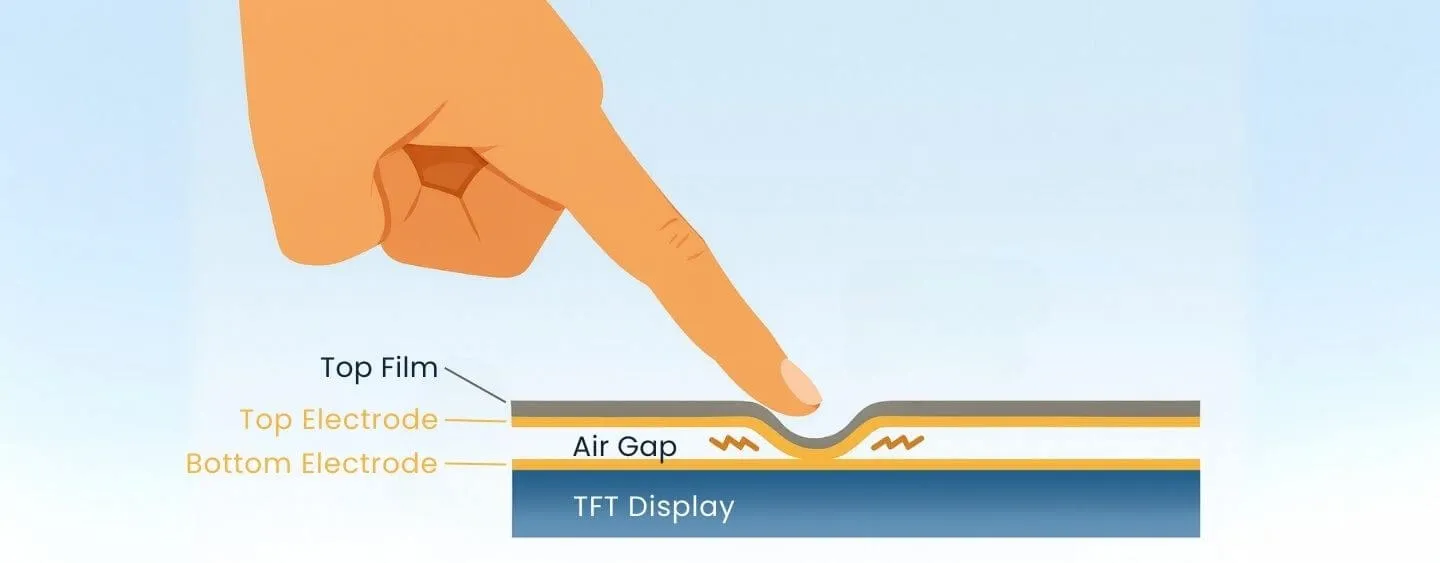
Although single-point and resistive touch technologies were revolutionary, they have two key limitations: resistive systems rely on physical deformation and suffer performance degradation with wear, and they support only one touch point at a time. The adoption of projected-capacitive touch by Apple enabled richer interactions using multiple fingers, improving usability on small devices such as smartphones. Common multi-finger gestures—photo zooming, rotating views, or panning—became practical and intuitive.
Other hardware vendors adopted multi-touch across device classes, including mobile phones such as Google G1 and BlackBerry Storm, laptop and desktop systems like MacBook Pro and HP TouchSmart, and many portable media players and embedded applications.
Multi-touch screens
Like single-point screens, many multi-touch implementations initially had limits on how many distinct touch points they could reliably detect simultaneously. Recognizing more than two points becomes important when multiple fingers or multiple users interact at once. The concept of locating multiple touch points led to "multi-touch all-point" input, which improves reliability and supports feature-rich applications.
Reliability here means accurately capturing all raw touch points on the surface to minimize ambiguity in touch location. Usability refers to how multiple, powerful features benefit from two-handed or multi-finger control on different screen sizes. Use cases include 3D interaction, virtual keyboards, and map navigation.
Multi-touch all-point input provides original touch-data access to device and system integrators so they can create next-generation interaction techniques. One commercial example is Cypress Semiconductor's TrueTouch solution. TrueTouch uses the PSoC (Programmable System-on-Chip) architecture, integrating analog and digital blocks with an 8-bit microcontroller to provide flexibility and configurability. The capacitive touch controllers in TrueTouch scale to various screen sizes and can support single-point, directional multi-touch (gesture) and full-position multi-touch. Its flexible PSoC architecture allows design changes late in product development that are harder to achieve with fixed-function solutions.
Multi-touch Development History
Early multi-touch concepts date to 1982 when researchers at the University of Toronto developed finger-pressure sensing multi-touch screens. Bell Labs also published early academic work on touch technologies the same year.
In 1984, Bell Labs developed a system that allowed multi-hand control of on-screen content. A University of Toronto group later shifted focus from hardware to software and interface design, building on Bell Labs' work.
In 1991, researchers developed a "digital desk" touchscreen that allowed multiple fingers to touch and manipulate images simultaneously. By 1999, commercial multi-touch devices such as the iGesture pad and multi-touch keyboards were produced. In 2006, Jeff Han demonstrated a large display that supported multi-finger and multi-user interactions, with rapid response times under 0.1 seconds.
Basic Principles of Multi-touch
Traditional touchscreens are sensors composed of a touch-detection element and a touch controller; common sensor types are resistive and capacitive. Optical-based multi-touch systems use touch on a projection surface to alter the input to an imaging sensor. The imaging device sends frames to software that typically performs three steps: preprocess the raw images (correction, filtering), track blobs to identify touch points and interpret input states, and send touch location and state information to higher-level applications. The application output is then rendered to the display, providing a WYSIWYG interaction. Optical implementations commonly include techniques such as FTIR (frustrated total internal reflection), DI (diffuse illumination), and LLP.
Technical Characteristics of Multi-touch
- Multi-touch enables multi-point or multi-user interactions on the same display, replacing single-point input paradigms like keyboard and mouse operations.
- Users can use one or both hands and perform gestures such as tap, double-tap, pan, press, scroll, and rotate to inspect content such as text, images, video, maps, and 3D models more naturally.
- Systems can be customized to client requirements, including touch sensors, touch software, and multimedia systems, and can integrate with professional graphics applications.
Technical Analysis of Multi-touch
Gesture-direction recognition
Multi-touch gesture detection commonly recognizes the motion direction of two fingers without necessarily determining exact positions. This supports operations such as zoom, pan, and rotate. An axis-coordinate approach divides the ITO sensor into X and Y axes to detect two touches, but detecting exact locations is a different challenge. In an axis-summed scheme, a single touch produces one peak per axis; two touches produce two peaks per axis, which can be ambiguous because the peaks may originate from different touch pairings. Some systems rely on timing assumptions to disambiguate touches, but simultaneous touches can still create "ghost points."
Full-position recognition
Multi-touch all-point systems detect the precise coordinates of each touch, eliminating ghost points. This approach supports detection of up to ten simultaneous finger touches and can recognize non-finger contacts such as palms, fists, or gloved hands. Full-position sensing typically scans each row and column intersection individually; scan complexity grows as the product of rows and columns. For example, a 10-row by 15-column panel requires 25 scans with an axis method but 150 scans with full-position sensing.
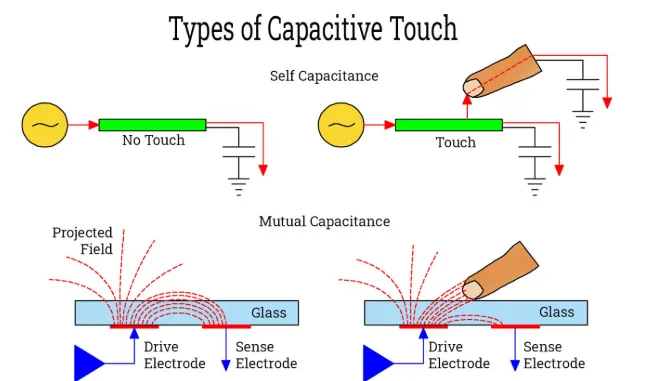
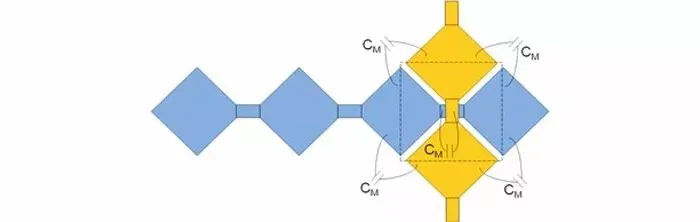
Full-position sensing often uses mutual-capacitance detection rather than self-capacitance. Self-capacitance measures each sensing cell's parasitic capacitance Cp and detects an increase when a finger is present. Mutual-capacitance measures the coupling capacitance Cm at row-column intersections; a finger decreases mutual capacitance at that intersection, allowing accurate detection of each touch point.
Types of Multi-touch Technologies
Sensor-based multi-touch systems
Many multi-touch devices are sensor-based, where sensors detect multiple contact points simultaneously. Compared to computer-vision-based systems, sensor-based designs often require custom components and higher build costs. Environmental factors such as temperature and humidity may affect performance. However, sensors can be integrated into the touch surface, making them suitable for small handheld devices like phones and tablets.
One of the earliest sensor-based devices, FMTSID (Fast Multiple-Touch-Sensitive Input Device) proposed in 1985, used a sensor matrix, row/column selection registers, A/D converters, and a control CPU to detect changes in capacitance for touch location and pressure sensing.
In 2001 Mitsubishi Research Labs presented DiamondTouch, a multi-user tabletop touch system. The projected tabletop served as both the display and the touch surface. Embedded conductive pads under the surface transmitted signals through a user's body to individual receivers associated with each seat. DiamondTouch could distinguish simultaneous inputs from different users, detect touch pressure, and support rich gestures without sensitivity to many external objects. Drawbacks included inability to detect passive objects placed on the surface and occlusion of displayed content by users' bodies due to overhead projection.
Sony's SmartSkin (2002) improved on FMTSID with a higher-resolution grid of emitters and receivers. SmartSkin detected touch positions and shapes, and estimated distance between the hand and surface using capacitive sensing and a mesh antenna grid. These richer contact features enabled novel interaction techniques.
Apple's 2007 iPhone was the first mobile device to implement multi-touch at scale in a consumer smartphone. It used capacitive coupling to sense multiple points and supported multi-finger gestures as well as a virtual keyboard, enabling new interaction modes on handheld devices and stimulating further research into mobile multi-touch interfaces.
Computer-vision-based multi-touch systems
As computing costs fell and processing power rose, vision-based approaches became viable for real-time multi-touch. These systems use image processing to identify contact points on any flat surface without dedicated sensing hardware, enabling portable setups at the expense of selection precision.
Everywhere Display used a single camera and projector to transform ordinary surfaces into interactive displays. Microsoft research presented PlayAnywhere, a compact camera-based desktop interaction system that used shadow-based touch detection for reliable contact detection, though its performance is best when fingers approach the surface perpendicularly. Later work used stereo imaging and machine learning to improve selection precision to millimeter-level accuracy, achieving fingertip touch detection rates around 98.5% in some studies.
Vision-plus-optical multi-touch systems
Combining computer vision and optical methods provides scalable, cost-effective solutions, though systems tend to be larger. Common optical approaches include:
- FTIR (Frustrated Total Internal Reflection): LEDs inject infrared light into an acrylic panel. When the surface is undisturbed, light totally internally reflects. When a finger with higher refractive index contacts the surface, total internal reflection is locally frustrated and light scatters out at the touch point. An infrared camera beneath the panel captures the scattered light, and computer-vision libraries such as Touchlib can detect touch blobs and coordinates.
- DI (Diffuse Illumination): Infrared illumination under or above the touch surface illuminates the area. Objects touching the surface reflect more IR light back to the camera, allowing detection of touch and hover states. DI systems can detect objects and markers placed on the surface, but their image-processing needs are more complex and they are more sensitive to ambient light than FTIR.
Microsoft Surface is an example of a system using rear diffuse illumination and embedded cameras to perceive touch, gestures, and objects on the surface; processing runs on a PC, and results are projected back to the surface.
Other approaches include laser-plane techniques (LLP), LED-plane systems (LED-LP), and diffuse surface illumination (DSI). These methods are used in experimental and commercial multi-touch setups.
Key Technologies
Multi-touch systems can be decomposed into hardware and software. Hardware captures raw input; software analyzes input and converts it into user commands. Key technology areas include:
- Hardware platforms: Understanding sensor platforms, their pros and cons, and architectures helps in building low-cost, portable, and accurate systems and in developing platform-agnostic interaction techniques.
- Selection precision: Accurate detection and tracking of touch points is critical, particularly when targets are small. Precision determines usability and the range of feasible gestures.
- Identity recognition: Most systems detect touch points without identifying the user. Some systems such as DiamondTouch can recognize different users. Lightweight identity methods have been proposed for FTIR platforms to distinguish which user or which hand generated a touch, which is valuable for collaborative, multi-user large-surface interactions.
- Bimanual interaction: Two-handed operations are common in daily tasks. Supporting natural bimanual interactions reduces cognitive load and increases efficiency, and is an important research direction for future interfaces.
Applications
Multi-touch is widely used for interactive projection systems and multimedia displays. Combining computer vision and projection technologies maps natural user movement to interactive content, enabling engaging experiences that integrate tactile, visual, and auditory feedback. Users can interact with content using hands or body gestures for immersive demonstrations.
Large multi-touch installations typically consist of image capture subsystems and rendering subsystems. The capture subsystem uses infrared sensors to detect viewer actions and sends processed events to rendering servers. The rendering subsystem generates images and projects them onto the display surface. Image capture and rendering are performed on workstations, enabling scalability beyond fixed projection sizes and allowing flexible large-format presentations.
Compared with traditional single-point touchscreens, multi-touch screens accept simultaneous input from multiple points and users, support richer gestures beyond simple clicks, and enable collaborative and more expressive interaction models.