ALLPCB


Overview
We use touch-enabled devices every day, such as mobile phones and tablet computers. What is the working principle of a touchscreen? How does it detect the position of a finger? Why can a phone still be used with a screen protector while it often cannot be used with gloves? Most touchscreens on the market are capacitive. To understand how they work, we first explain what capacitance is.
Historical background and basic capacitance
In 1745, Professor Musschenbroek at the University of Leiden invented the Leyden jar to store electric charge. The basic principle is that a metal rod and chain conduct charge into the jar, and metal foil lines the inside and outside of the jar. When positive charge is introduced to the inner foil and the outer foil is grounded, an equal amount of negative charge is attracted to the outer foil. Although opposite charges attract, the glass jar is an insulator that prevents neutralization, so charge is stored.
In 1752, Benjamin Franklin used the Leyden jar in his kite experiment to conduct lightning into the jar, demonstrating that lightning and the electricity on the ground are the same phenomenon.
Charge storage does not require a jar. Two conductors that are insulated from each other and placed close together form a capacitor. The simplest capacitor is a parallel-plate capacitor: two metal plates placed near each other, one carrying positive charge and the other negative charge. As long as the plates are not connected by an external conductor, the charges remain separated.
The dielectric between the plates ideally prevents direct current from flowing through a capacitor. However, during charging and discharging, the amount of charge on the plates changes, which is equivalent to a current passing through the capacitor.
Charging and discharging behavior
If an uncharged capacitor is connected to a battery, charge flows until the capacitor voltage equals the battery voltage. During charging, current flows briefly; when the voltages match, the current stops. If the capacitor is disconnected from the power source, the stored charge remains. If the two plates are then connected by a conductor, positive and negative charges neutralize through that conductor, producing a brief discharge current until neutralization is complete. Repeated charging and discharging produces alternating currents, which can pass through capacitors.
Because the human body and earth are conductors while a chair can be an insulator, AC mains can couple through a person to a voltage tester even when standing on an insulating chair. The resulting current is usually small and not felt, but it shows that capacitance allows AC to couple through the body.
Simple capacitive touchscreens
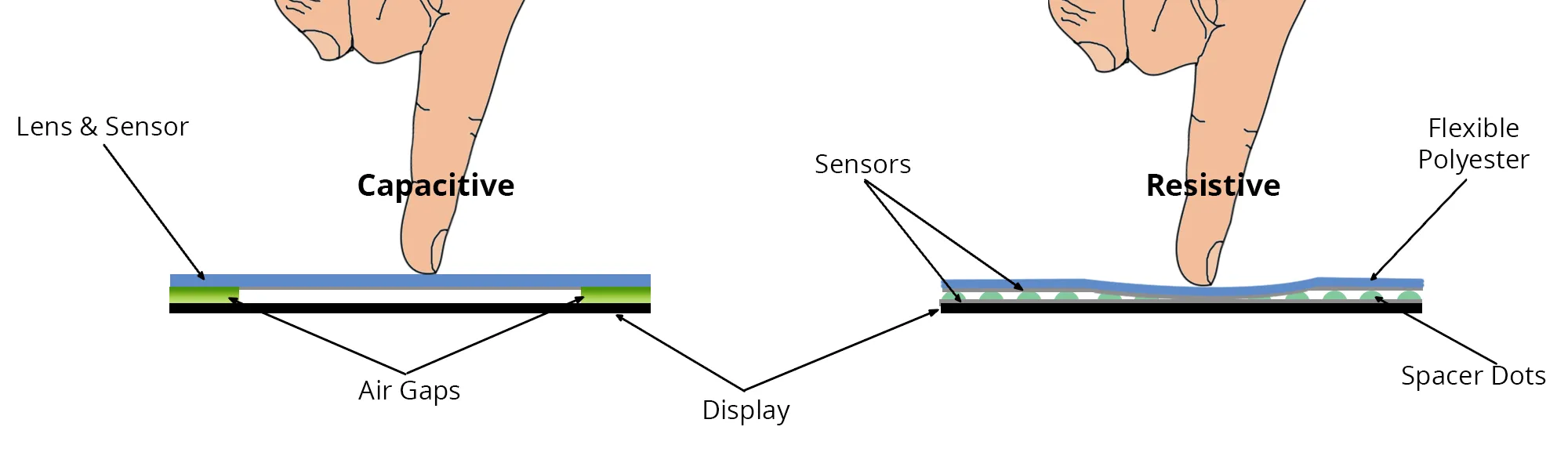
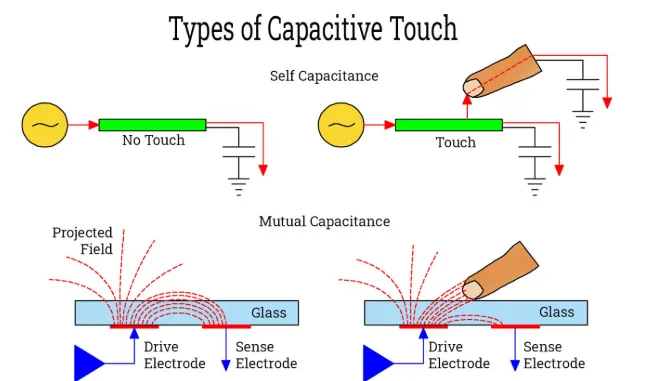
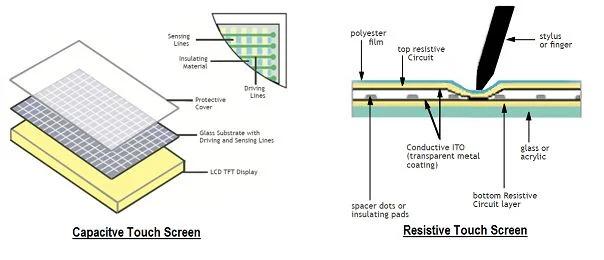
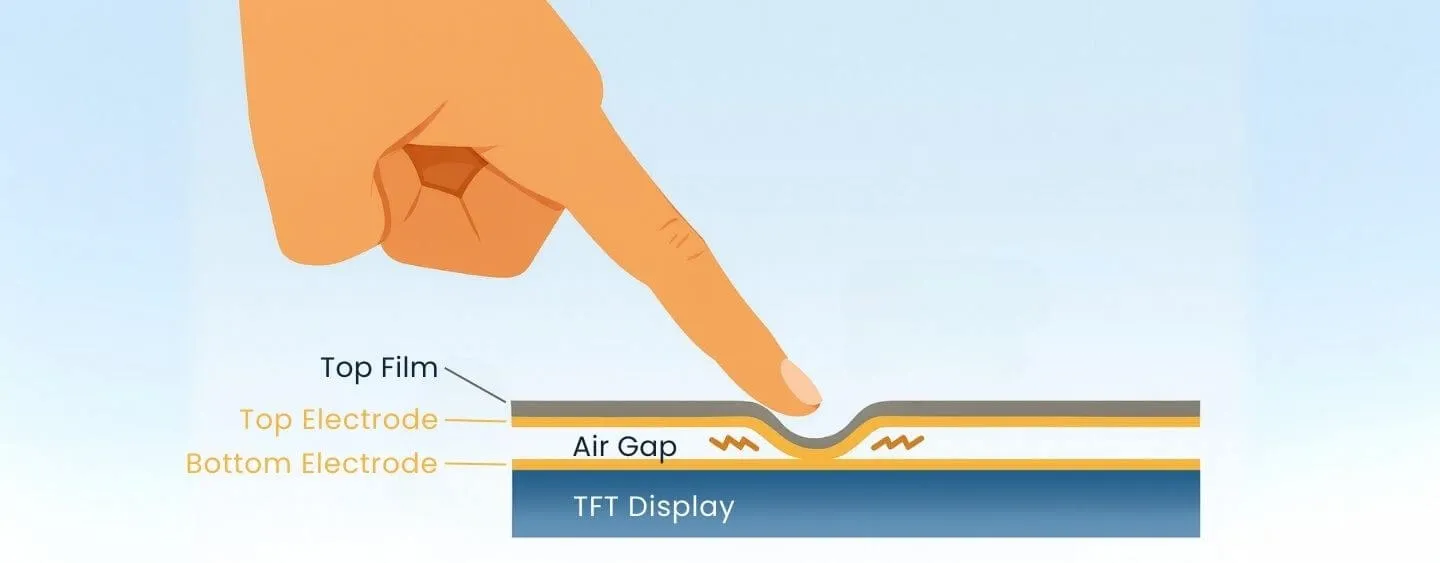
A basic capacitive touchscreen is a stacked glass assembly with a layer of ITO. Indium tin oxide (ITO) is transparent and conductive, making it suitable for touchscreens. When a finger touches a spot on the screen, it forms a coupling capacitance with the ITO layer and changes the capacitance at that location. Conductive traces at the four corners of the screen carry AC currents that couple through the capacitance toward the touch point. The magnitude of current at each corner depends on the distance to the touch point. A controller chip inside the phone analyzes the currents from the four corners and calculates the touch coordinates.
Projected capacitive touchscreens and multitouch
More advanced capacitive touchscreens use projected capacitive technology. An etched ITO grid creates multiple horizontal and vertical electrodes. Each electrode element is also sensing-capable. When a finger approaches, it couples to the electrode grid and disturbs the electric field. Sensors and a controller analyze changes in the field and currents to determine touch position. Compared with four-corner sensing, projected capacitive screens can support multi-touch and are used more widely.
Why screen protectors work but gloves may not
A human finger is conductive, so it affects a capacitive screen. Touchscreens do not require direct contact between the finger and the ITO layer because a glass dielectric already separates them. A screen protector simply increases the effective distance slightly, but the finger still couples capacitively to the ITO layer, so touches still register. Thick gloves, however, increase the distance between the finger and the screen conductors too much; the resulting capacitance is too small for the sensor to detect, so touch input fails when wearing thick gloves.
Other capacitive sensor applications
Capacitive sensors are common in everyday devices, such as automatic toilet flush systems and automatic hand dryers. When a person approaches or moves away, the capacitance formed between the body and the device changes. Sensors detect that change and a control circuit performs the corresponding action.