ALLPCB


Introduction
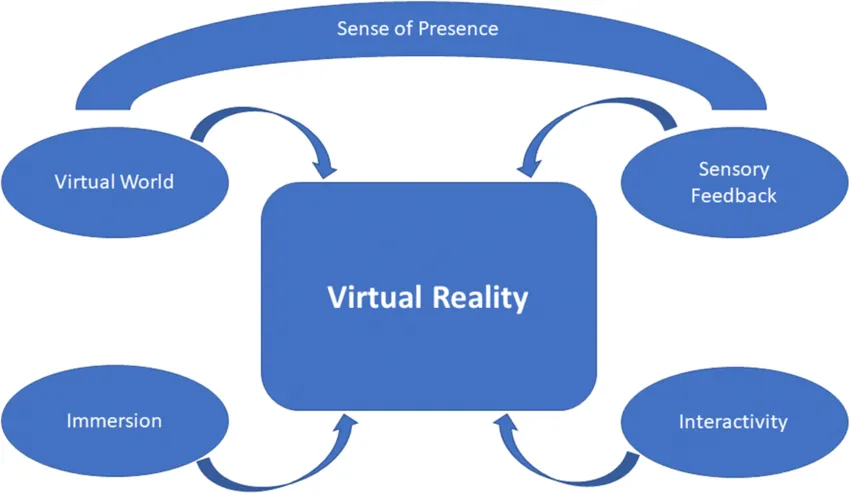
Augmented reality (AR) is a technology that enhances users' perception of the real world. AR emerged from developments in virtual reality (virtual reality, VR), but the two differ clearly. Traditional VR immerses users in a fully virtual world, creating a separate environment. AR brings computers into the user's real world, overlaying virtual information through sight, sound, and touch to augment perception, shifting from "humans adapt to machines" to technology that is "human-centered".
AR Principles
AR can be broadly classified into two categories by technique and presentation: vision-based AR (based on computer vision) and LBS-based AR (based on geographic location information).
Vision-based AR
Vision-based AR uses computer vision methods to establish a mapping between the real world and the display so that graphics or 3D models appear attached to physical objects. Essentially, the system must identify a planar reference in the real scene and map this 3D plane onto the 2D screen, then render the desired graphics on that plane. Technically, this is achieved in two main ways.
1. Marker-Based AR
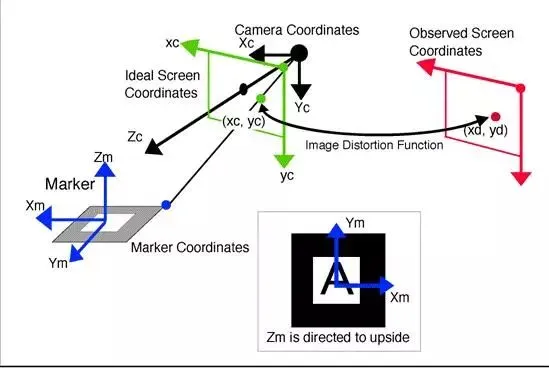
This method requires a predesigned marker (for example, a template card or QR code). The marker is placed in the real scene, defining a planar reference. The camera recognizes the marker and estimates its pose (pose estimation), determining its position. The coordinate system centered at the marker is called the marker coordinate system. The goal is to compute a transform that maps marker coordinates to screen coordinates so that rendered graphics appear attached to the marker. In practice, the transform from template coordinates to screen coordinates involves rotating and translating to camera coordinates and then projecting to screen coordinates.
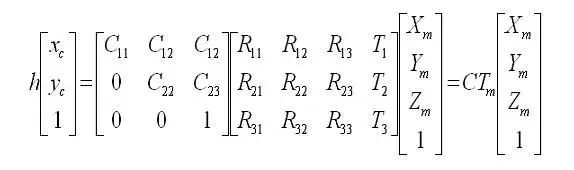
In implementation, these transforms are matrices. In linear algebra, a matrix represents a transform; multiplying coordinates by the matrix applies the transform. For translations, homogeneous coordinates are used. The camera intrinsic matrix is denoted C and the camera extrinsic matrix is Tm. The intrinsic matrix is obtained by camera calibration, while the extrinsic matrix is unknown and must be estimated from screen coordinates (xc, yc), the predefined marker coordinate system, and the intrinsic matrix. The initial estimate of Tm may be refined using nonlinear least squares optimization. When rendering with OpenGL, Tm is typically loaded in GL_MODELVIEW to display the graphics.
2. Marker-Less AR
The basic principle is similar to marker-based AR, but any object with sufficient feature points (for example, a book cover) can serve as the planar reference, removing the need for specially produced templates. The system extracts feature points from a target object using algorithms such as SURF, ORB, FERN, etc., and records or learns these features. When the camera scans the environment, it extracts features from the scene and compares them to the stored object features. If the number of matches exceeds a threshold, the object is considered detected and the extrinsic matrix Tm is estimated from matched feature coordinates, then used for rendering in the same way as marker-based AR.
LBS-Based AR
LBS-based AR obtains the user's geographic location via GPS, retrieves nearby POI information (for example, from online sources), and uses the device's electronic compass and accelerometers to determine the device orientation and tilt. These inputs establish the target object's planar reference (analogous to a marker), and coordinate transformation and rendering follow principles similar to marker-based AR.
This AR method relies on the device's GPS and sensors and does not require markers. Compared with marker-based and marker-less AR, LBS-based AR typically offers better mobile device performance because it avoids real-time marker pose recognition and intensive feature-point computation, making it more suitable for mobile deployment.
AR System Architectures
Monitor-based Systems
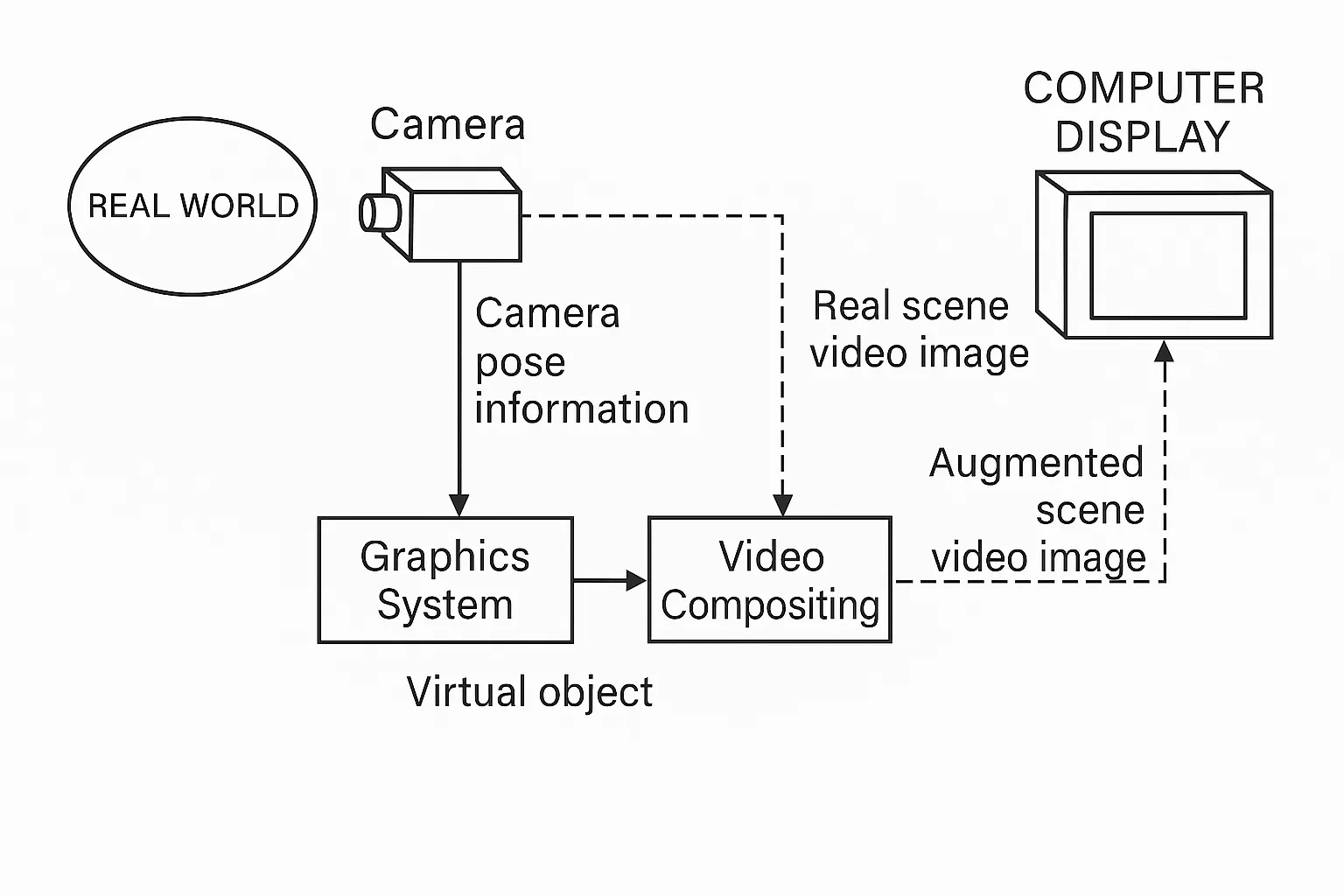
In monitor-based AR, a camera captures the real world and feeds the image into a computer, which composites virtual imagery with the real scene and outputs the augmented result to a display. Users view the final augmented scene on the monitor. While this approach does not provide strong immersion, it is the simplest AR implementation and has low hardware requirements, making it popular in laboratory research.
Video See-Through Systems
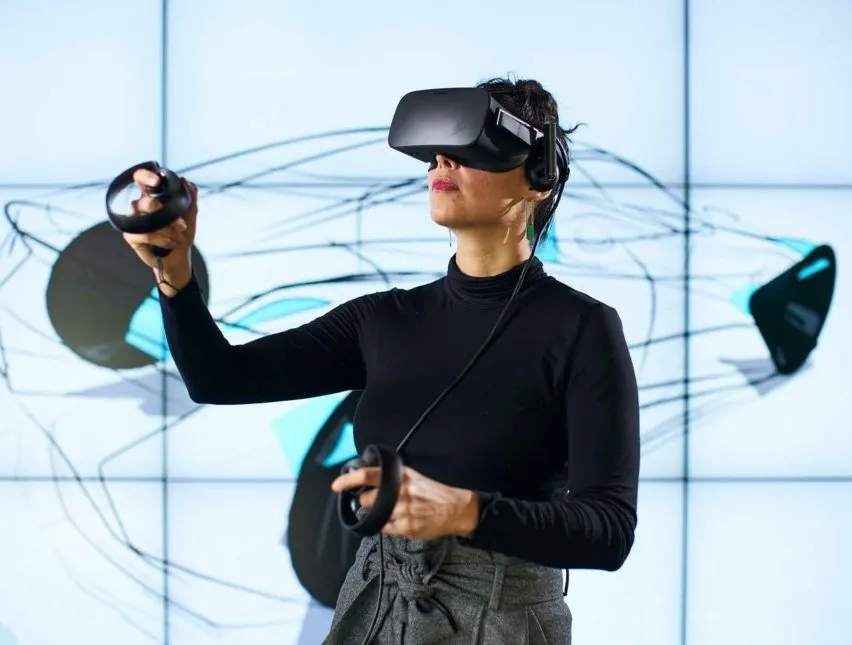
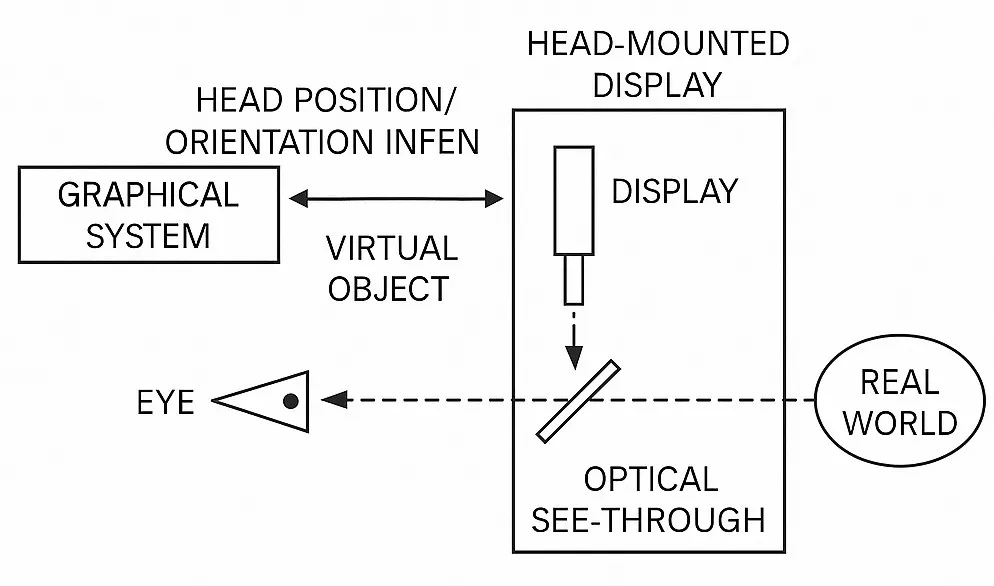
Head-mounted displays (head-mounted displays, HMDs) are widely used to enhance visual immersion. AR researchers use see-through HMD designs. These fall into two categories: video see-through HMDs, which composite video streams, and optical see-through HMDs, which use optical principles to combine real and virtual images.
Video see-through AR systems capture two channels: the real-world video from the camera and the virtual channel from the graphics pipeline, composite them digitally, and present the result to the user.
Optical See-Through Systems
In optical see-through HMDs, the real scene is seen directly by the user (often after some dimming), while virtual imagery is projected and reflected into the user's eye so that the two are combined optically. Unlike monitor-based and video see-through systems, optical see-through systems do not always pass the real-scene video through the computer pipeline.
Performance Comparison
Each display approach has trade-offs. Monitor-based and video see-through systems rely on camera-captured real-scene video that is composited by the computer, which introduces system latency; such latency is a main cause of registration errors in dynamic AR. Because the user's view is fully controlled by the computer in these systems, latency can be partially compensated through internal coordination between virtual and real channels. In optical see-through systems, the real scene is delivered directly to the eye and cannot be delayed or rate-controlled by the computer, making latency compensation more difficult.
Additionally, monitor-based and video see-through systems can analyze the input video to extract tracking information (landmarks or image features) to assist dynamic registration, while optical see-through systems typically rely on head-tracking sensors for registration assistance.
Technical Support for AR
Recognition and Tracking
AR requires analysis of the real scene and generation of virtual content. The camera provides a video stream that must be converted to digital images; image processing techniques are then used to detect configured markers. After a marker is recognized, the AR application uses that marker as a reference and, combined with positioning techniques, determines the 3D virtual object's location and orientation in the augmented environment. The identifier within the marker is matched to a stored digital template to determine which virtual object to place. Generating and positioning the virtual object accurately is a major technical challenge in AR.
Perfect integration of virtual and real objects requires precise position and orientation of virtual content. Real-world imperfections—such as occlusion, defocus, uneven lighting, and rapid motion—make tracking and localization far more difficult than in controlled laboratory environments.
Excluding interaction devices, two main tracking/localization methods are commonly used:
Image-Based Detection
Pattern recognition techniques (including template matching and edge detection) identify predefined markers, reference points, or contours in the captured image. The displacement and rotation of these features are used to calculate the transformation matrix that defines the virtual object's position and orientation.
This method does not require additional hardware and offers high accuracy, making it the most common localization approach in AR. Systems typically store multiple templates for matching detected markers, and simple template matching improves detection efficiency, aiding real-time performance. By computing feature offsets and rotations, full 3D observation of virtual objects is possible. Template matching is often used for specific printed images that trigger 3D models, such as product cards or toy character cards. Edge detection can identify and track body parts, enabling seamless fusion with virtual content (for example, a real hand lifting a virtual object).
However, image-based detection has limitations. It performs best in near, controlled environments where video quality is high. Outdoor factors such as lighting changes, occlusion, and focus issues can degrade marker recognition or cause false positives, so other tracking methods may be needed as supplements.
Global Satellite Positioning (GPS-based)
This approach uses GPS data to track and determine the user's geographic location. When a user moves in the real world, combining GPS with the camera orientation allows the AR system to place virtual information and objects accurately relative to the environment and surrounding people. Due to the prevalence of smartphones—which integrate camera, display, GPS, processor, and digital compass—GPS-based tracking is commonly used on mobile devices. Augmented reality browser applications rely on this method, connecting to the internet to fetch information and displaying it over the real scene so users can see details about objects in the camera's direction, such as nearby restaurants and reviews.
GPS-based localization suits outdoor tracking and mitigates issues that affect image-based detection outdoors, such as lighting and focus variability.
In practice, AR systems often combine multiple localization methods. For example, AR browsers may also use image detection for QR codes, detecting a QR marker and then using template matching to provide detailed information.
Display Technologies
Current AR display technologies commonly fall into three categories: 1) mobile handheld displays, 2) video-space and spatial augmentation displays, and 3) wearable displays.
Mobile handheld displays use smartphone or tablet cameras and software to capture live scenes and overlay digital imagery in real time. Tablets, with larger screens than smartphones, are increasingly used for AR applications.
Video-space displays present virtual overlays via webcams and monitors; greeting cards with AR features that require a website and webcam are an example. Spatial augmentation uses video projection techniques, including holographic projection, to place virtual information directly into the real environment for group viewing. This is useful in lecture halls, libraries, or collaborative engineering scenarios where multiple people interact with projected controls or models.
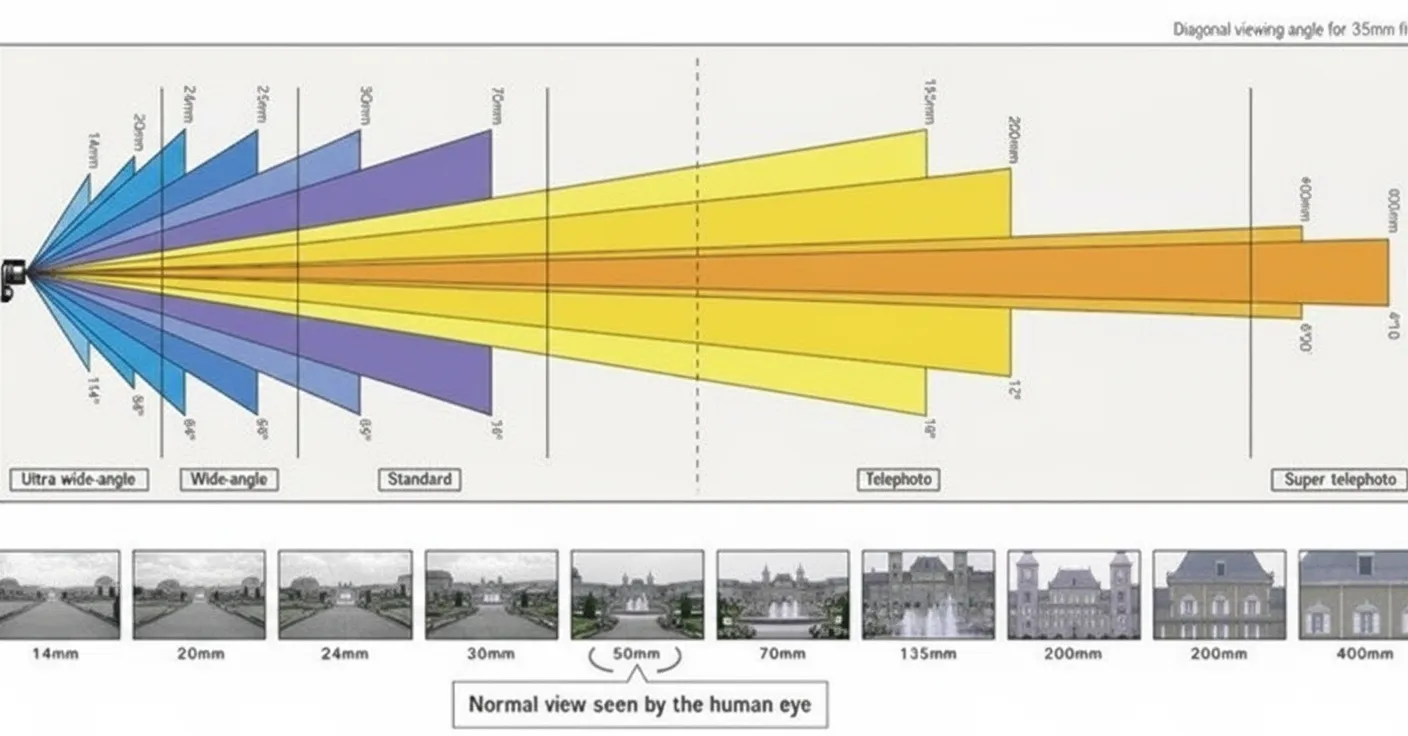
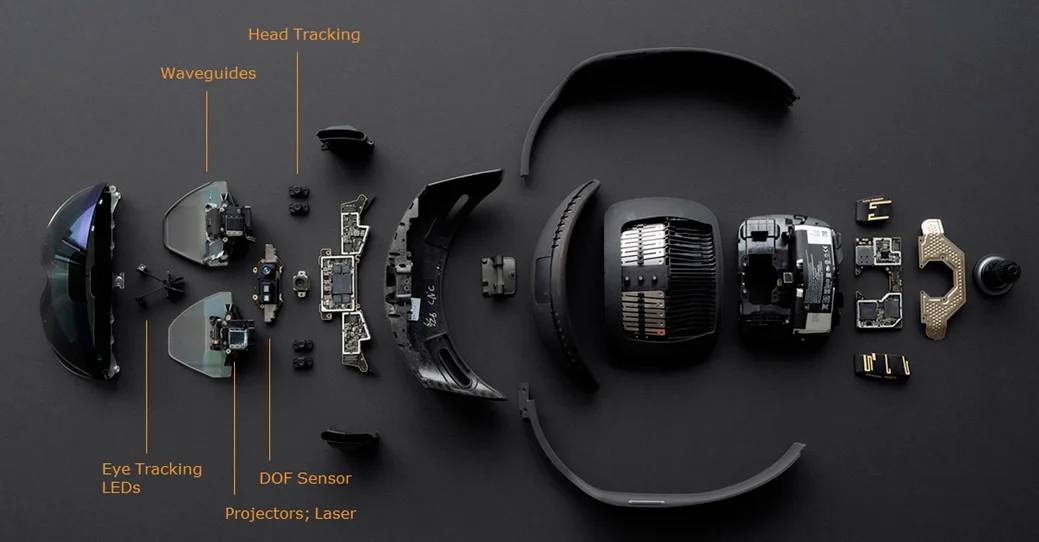
Wearable displays are glasses-like HMDs worn by users. Devices in this category typically include small displays with embedded optics and partially transparent lenses. Wearable AR has applications in flight simulation, engineering design, and training. Head-worn systems provide a more natural AR experience, a wider field of view, and a stronger sense of presence.
Interaction Techniques
The basic AR interaction is viewing virtual data, but other interaction modalities exist:
Haptic Interfaces
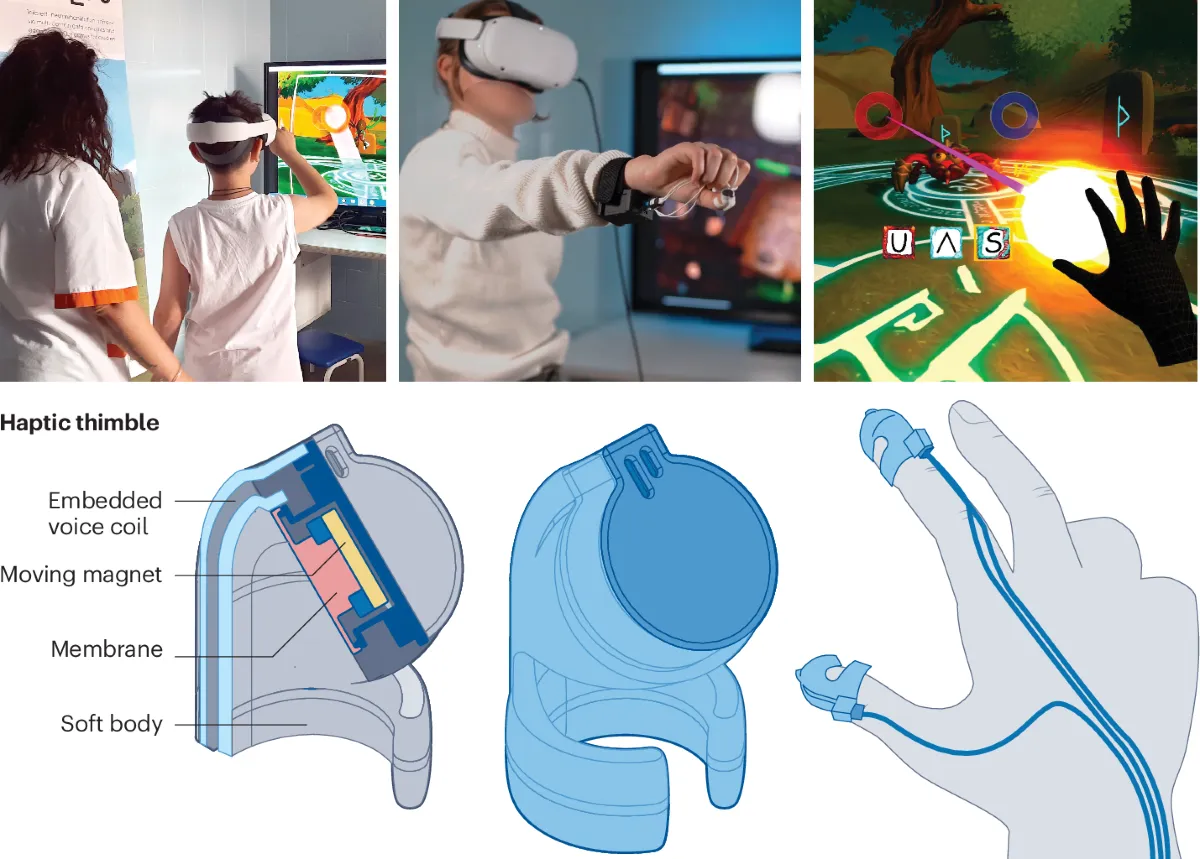
Haptic feedback provides physical sensations corresponding to digital information to strengthen the virtual-real connection. Examples include touchable virtual spheres or a virtual pen that appears to write on a real bowl.
Collaborative Interfaces
Multiple displays support remote or co-located collaborative activities. This can integrate with medical diagnosis, surgical assistance, and equipment maintenance applications.
Hybrid Interfaces
Combining different but complementary interfaces allows users to interact with AR content in various ways, improving flexibility for tasks such as digital model testing.
Multimodal Interfaces
Natural interaction modes—speech, touch, gestures, and gaze—enable flexible combinations of input modalities for convenient AR interaction.
Common AR Presentations
Basic 3D Models
Static or animated 3D models are the most basic AR presentation formats, such as characters, buildings, exhibits, or furniture. Currently, the Chinese AR industry is in an early development stage, and 3D models are commonly used in entry-level mobile AR apps. This format is foundational, widely applicable, and has relatively low development cost.
Video
Compared with simple 3D models, immersive video can attract more attention and produce better commercial outcomes. For example, product installation guides or menu explanations become three-dimensional and more expressive when augmented with AR. Creating video content suited to AR scenarios is more challenging than simply enabling video playback; it requires careful creative work.
Transparent Video
Transparent video gives the impression of a realistic 3D performer without the cost of high-end 3D modeling. Well-designed transparent video can be effective in posters, brochures, and mall promotions.
Scene Presentations
Scene presentations are more complex than single 3D model overlays. They include richer content and broader application scenarios, such as entertainment, immersive reading, and games. AR scenes are based on and interleaved with reality, differing from the fully constructed environments of VR.
AR Games
AR has transformed gaming, enabling experiences where virtual elements are overlaid on the real world. Titles like Pokemon Go demonstrate how games can play out in real environments without extensive scene modeling, allowing play anywhere and freeing games from physical location constraints.
VR Integration
AR and VR complement each other. AR augments the real world while VR moves attention into a virtual space. Combined AR and VR setups can provide richer experiences in navigation and medical applications, for example by displaying context-sensitive AR information adjacent to the user's focus point via VR-enhanced guidance.
Large-Screen Interaction
Large-screen interaction extends AR with projection to create immersive environments suitable for malls, museums, and concerts. Essentially, AR combined with projection can enhance realism and impact for larger audiences.
AR Application Areas
AR is used in many fields. Representative areas include the following.
Sports Broadcasting and Entertainment
AR has significant impact on entertainment. Virtual objects generated by AR enhance broadcast viewing. For example, in American football broadcasts, AR can add a virtual yellow first-down line that integrates into the scene; in swimming broadcasts, virtual lane markers can show athlete positions and results. These AR uses provide viewers with clearer perspectives and richer analysis.
AR is also adopted in gaming platforms and systems that add virtual objects to user environments for interactive experiences. AR influences conferences, social networks, film and television, tourism, and real-time information services such as translation and navigation.
Education
AR can add a new dimension to learning by revealing otherwise inaccessible locations, such as the inner components of a running engine. AR can also support language learning by identifying objects in the environment and prompting descriptions in the learner's target language. AR books that overlay 3D graphics, audio, or visual information can revitalize physical books and enable immersive, game-like collaborative learning.
Repair and Maintenance
AR-assisted maintenance systems, such as early research projects from Columbia University, overlay computer-generated guidance onto real equipment to improve maintenance efficiency, safety, and accuracy. AR can help technicians locate faults and begin repairs more quickly, reducing downtime. Digital manuals augmented over real devices can present step-by-step instructions that are easier to follow.
Medicine
Medical applications of AR are among the most promising. AR can provide surgeons with color, layered visualizations of internal anatomy that resemble X-ray-like views but with richer information. This enables precise localization during surgery and helps avoid critical structures. AR can also support treatments for conditions such as phobias and assist in broader health management tasks.
Commerce and Advertising
AR is used in commerce and advertising to enhance customer engagement and streamline purchasing. QR codes combined with AR can serve as reliable markers and enable interoperable systems. AR-enhanced billboards, posters, and product catalogs let users access information and order items more conveniently. In retail, AR systems allow shoppers to try products virtually without handling physical items.
Conclusion
Augmented reality combines computer vision, sensor fusion, tracking, and rendering technologies to overlay virtual content onto the real world. It supports multiple display and interaction modalities and has wide-ranging applications in entertainment, education, maintenance, medicine, and commerce. As hardware and algorithms improve, AR is expected to become increasingly integrated into everyday devices and workflows.