 ALLPCB


Overview
Microsoft developed a pre-touch technology for mobile devices. Using sensors around the phone display, the system can anticipate a user's next actions and respond accordingly.
Pre-touch is essentially hover touch technology. Besides Microsoft, companies such as Sony, Samsung, and Amazon have investigated this approach. Since the introduction of touchscreens, engineers have continued to improve interaction techniques. Hover touch has sometimes been dismissed as a gimmick, but its potential goes beyond that.
What Is Hover Touch
Hover touch is an interaction technique increasingly discussed by users and implemented in some smartphones and a few other digital products. The most prominent use is on phone touchscreens. Hover touch not only responds to direct finger contact, it can also detect non-conductive fabric. That means users wearing gloves in winter can still operate a phone, or users can control the device without actually touching the screen.
For example, Floating Touch allows users to operate a phone without direct contact with the display. Keeping the finger about 15 mm from the screen can provide mouse-like control.
How Hover Touch Works
Like many smartphones, capacitive touch sensing records input on the display. A touch event occurs when the user contacts the screen. Capacitive touch works with an X-Y electrode grid over the display and applies a voltage across it. When a finger approaches the electrodes, the capacitance changes and that change can be measured. By comparing values across all electrodes, the finger position can be located accurately.
There are two kinds of capacitive sensors on touchscreens: mutual capacitance and self-capacitance. Mutual capacitance enables multi-touch detection. Self-capacitance generates a stronger signal than mutual capacitance and can detect fingers farther from the surface, but it cannot support multi-touch because of a phenomenon called ghosting.
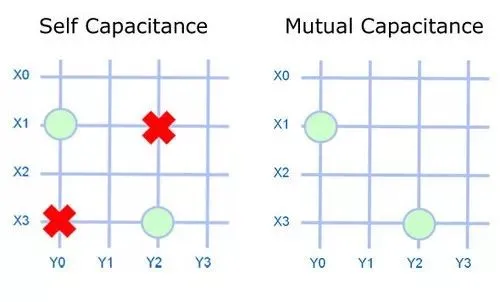
Circles indicate touch points; red X marks ghost positions
Mutual Capacitance Enables Multi-Touch
In mutual capacitance, each crossing point in the grid forms a parallel-plate capacitor. Each intersection is therefore a capacitive element, enabling precise measurement for each finger and allowing multi-touch. However, the crossing area between two traces is small, so the sensor's electric field is weak and signal strength is low. As a result, a mutual-capacitance sensor cannot reliably detect a finger hovering above the screen.
Self-Capacitance and Ghosting
In self-capacitance, each X or Y trace acts as a capacitive sensor. Self-capacitance sensors are larger than mutual-capacitance elements. Large sensors produce stronger signals, allowing detection of a finger as far as 20 mm above the screen. When a finger is near the screen, the nearest sensor traces activate (for example X1, Y0). If two fingers are present, four traces activate and ghosting occurs. The system then reports four possible touch points (X1,Y0), (X1,Y2), (X3,Y0), and (X3,Y2), making it ambiguous which pairs correspond to actual touches and therefore preventing reliable multi-touch.
Combining Self-Capacitance and Mutual Capacitance for Hover Detection
Hover touch is implemented by running both self-capacitance and mutual-capacitance sensing on the same capacitive touchscreen. Mutual capacitance handles normal touch events, including multi-touch. Self-capacitance is used to detect hovering fingers above the surface. Because hover detection relies on self-capacitance, hover multi-touch is not feasible; the screen supports multi-touch only when fingers actually contact the surface.
By leveraging existing capacitive touch sensors and lowering the detection threshold, systems can distinguish hover events from contact events. All Android applications will continue to function normally; only applications that explicitly handle hover events will respond to them. In other words, implementing hover touch requires application-level support to make full use of hover events.
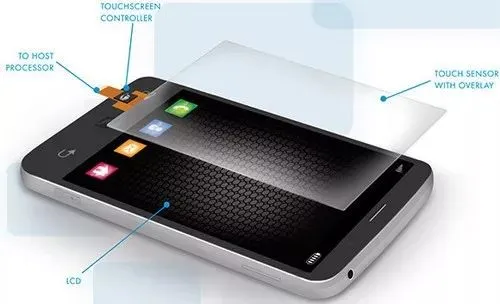
Hover-capable touchscreen
Practical Significance of Hover Touch
Hover touch introduces a new interaction paradigm for touch devices. It can preview the effect before a touch, similar to moving a mouse cursor over a button or text and receiving a visual highlight if it is actionable.
Hover touch can detect non-conductive fabric, so glove use does not prevent operation. It also allows operation when hands are wet or oily without smudging the screen.
Microsoft has explored related ideas for years. Its "pre-touch" research builds on prior 3D touch work that detects fingers above the display and enables the operating system and applications to respond. The system analyzes hand posture and finger motion in three dimensions to present convenient interaction targets and contextually relevant content.
For example, when holding a phone with one hand, pre-touch can surface a dial pad positioned for thumb reach. Sensors can also lock screen orientation while a user watches video or reads, preventing accidental changes as the grip changes.
Sony was an early adopter. In 2012 Sony released the Xperia Sola MT27i, a phone that supported hover touch at about 15 mm above the screen. Samsung added Floating Touch gestures to the Galaxy S4 in 2013. Amazon has indicated plans to use 3D gesture control in some devices, and future expansions of Apple's 3D Touch could incorporate hover-like interactions.
Outside phones, hover and magnetic levitation concepts have been combined in novel products. For example, a headset maker released a levitating Bluetooth speaker that uses magnets to float the spherical driver above a powered base. In that state, sound is less absorbed by nearby surfaces, producing efficient audio. If such hardware were combined with hover touch, users could control volume or playback with gestures.
Potential applications for hover touch include product showcases where customers can inspect items without entering a store, in-vehicle gesture controls to improve driver interaction, medical systems that reduce physical contact and contamination risk, and smart home devices controlled by hand gestures.
Hover touch is not yet a mature, widely deployed technology and requires further improvement. However, it offers a new approach to interaction for smart devices and could significantly change human-machine interfaces. Whether it will remain a niche feature or become a core interaction method remains to be seen.





