 ALLPCB


Introduction
Knobs, buttons, joysticks, and touchscreens are common ways for humans to interact with machines and embedded devices. Recent advances in sensor technology have enabled a new option: three-dimensional (3D) gesture control. Gesture controller options range from low-cost infrared (IR) LED plus photodiode sensors to higher-cost camera-based gesture recognition. IR-based gesture sensors are inexpensive, interface over a digital bus to low-cost microcontrollers, and with simple software provide sufficient accuracy for many applications.
IR-Based Gesture Sensor Principles
The operating principle of IR gesture sensors is straightforward. A gesture sensor typically needs to detect several gesture types:
- Up / Down
- Left / Right
- Forward / Backward
Sensing motion direction is achieved by two main components: an IR LED and multiple directional photodiodes. The directional photodiode array contains at least four photodiodes placed at predefined distances from the IR LED. For example, Broadcom's APDS-9960 ambient light, proximity, and gesture sensor arranges four photodiodes in a diamond pattern, with each diode corresponding roughly to one direction: up, down, left, and right.
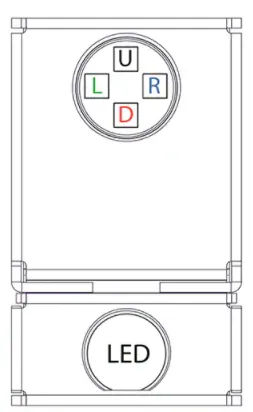
Figure 1: Broadcom APDS-9960 integrates an IR LED and four directional photodiodes to detect reflected IR energy for gesture analysis.
When the LED emits IR energy, that energy radiates into the air unless it is reflected by an object such as a hand. Photodiodes detect varying intensities of reflected energy depending on object position. For example, a photodiode located nearer the trailing edge of a hand gesture will initially receive more reflected energy than a photodiode near the leading edge, producing different sensor counts. Continuous measurements during a gesture cause the measured reflection intensity at each photodiode to vary, and analysis of this directional time series reveals the gesture.
For instance, if a hand sweeps from the top of the sensor toward the bottom, at the start of the gesture the bottom photodiode will detect stronger incident light than the top photodiode. During the gesture the hand moves to a point where both diodes receive roughly equal energy, and by the end of the gesture the top photodiode receives stronger reflection than the bottom photodiode. The photodiode curves and phases invert between start and end, allowing determination of the downward gesture direction.
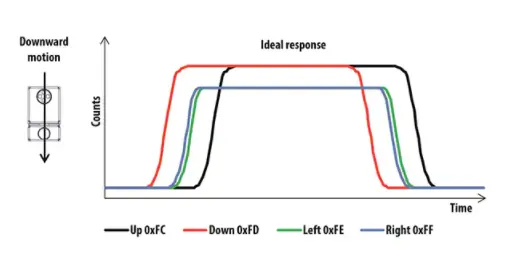
Figure 2: Photodiode response curves from the APDS-9960 for a downward gesture, where the dominant curve indicates the gesture direction.
Connecting to the Broadcom APDS-9960
The APDS-9960 comes in an 8-pin SMD-8 package with a very small PCB footprint (3.94 × 2.36 × 1.35 mm). The package includes power and ground pins, an I2C digital interface for connecting to a microcontroller, pins for a custom LED drive circuit, and an interrupt pin to notify the microcontroller of available gesture data.
Several prototyping options are available. For example, SparkFun offers an APDS-9960 evaluation breakout that includes a small LED drive circuit so the module is ready to use. Developers solder a header to route power and ground, connect the I2C bus and optional interrupt pin to a microcontroller, and begin developing embedded software. The breakout also includes mounting holes so it can be integrated into an existing PCB design.
Adafruit also provides an APDS-9960 breakout that includes an onboard 3 V regulator for powering the LED and low-power microcontrollers. Adafruit supplies a user guide and software libraries for Arduino boards and boards running Python, which helps reduce development time when integrating the APDS-9960.
The simplest way to connect these breakouts is to solder a Molex 22-28-4255 detachable header to the breakout board. It is preferable to solder the header downwards so the breakout can be inserted into a protoboard, such as Digilent's 340-002-1 solderless prototyping kit, and to avoid routing exposed wires that could be touched during gesture operation.
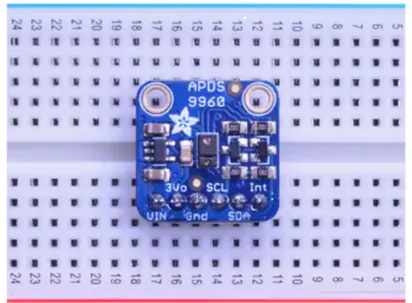
Figure: Adafruit APDS-9960 breakout soldered to a Digilent solderless protoboard.
Once power, ground, and the I2C bus are connected to the target microcontroller board, many development boards will work. For example, the STMicroelectronics B-L475E-IOT01A2 STM32L475 IoT node kit includes Arduino-compatible headers and supports MicroPython, making it straightforward to program and connect to an APDS-9960 breakout for Python-based development.
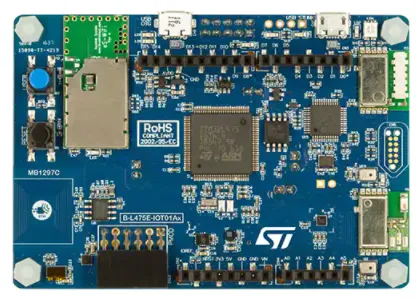
Figure: The STM32L475 IoT node kit includes Arduino headers and can be used to connect an APDS-9960 breakout.
Using Python to Detect Gestures
Reading gesture data from the APDS-9960 requires careful attention to the datasheet, because the device offers multiple functions:
- Gesture sensing
- Ambient light sensing
- RGB color sensing
- Proximity sensing
These functions are controlled by state machines whose behavior is configured through registers. For example, to prevent the gesture engine from running continuously, use the proximity engine to detect a hand presence. When IR reflection reaches a configured threshold, the proximity engine triggers the gesture engine, which samples the directional photodiodes and places measured values into a first-in, first-out (FIFO) buffer. Enabling this behavior requires setting the appropriate control registers and thresholds.
Developers may implement custom algorithms to detect application-specific gestures. For common gestures such as up/down and left/right, Adafruit's APDS-9960 CircuitPython library provides a ready-made option. After copying the library to a Python-capable device, import and initialize it as shown below.
import board
import busio
import adafruit_apds9960.apds9960
i2c = busio.I2C(board.SCL, board.SDA)
sensor = adafruit_apds9960.apds9960.APDS9960(i2c)
The sensor object is an instance of the APDS-9960 library. To enable gesture detection, set:
sensor.enable_gesture = True
The main program loop to read gestures is only a few lines:
gesture = sensor.gesture()
while gesture == 0:
    gesture = sensor.gesture()
print('Saw gesture: {0}'.format(gesture))
When a gesture is detected, the library prints the detected gesture to the console.
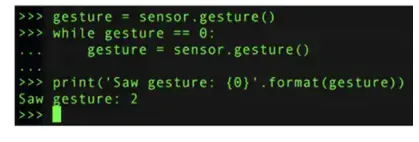
Figure: Example gesture output from Adafruit's APDS-9960 CircuitPython library.
Gestures are returned as numeric codes:
- 0 = No gesture detected
- 1 = Up
- 2 = Down
- 3 = Left
- 4 = Right
With prebuilt libraries, basic gesture recognition requires only a few lines of code. Detecting more complex gestures may require analyzing raw gesture data and adapting the library.
Tips for Building a Gesture Controller
Integrating an IR-based gesture sensor into a product has practical challenges. Consider the following recommendations:
- Use the sensor's internal proximity detector to trigger the gesture engine, minimizing false activations.
- Start from an existing gesture library and extend it for additional gestures.
- Adjust photodiode gain to suit the final gesture application.
- Tune LED drive strength for repeatable results in the intended environment.
- Begin development at a higher software level and move to lower-level code only after becoming familiar with the sensor.
Applying these practices reduces development time when getting an IR gesture controller up and running.
Conclusion
Gesture control offers a more natural and intuitive form of human-machine interaction. Among available technologies, IR-based gesture sensors are low cost and straightforward to use. By leveraging existing hardware breakouts and software libraries, developers can integrate the APDS-9960 with a microcontroller efficiently and implement basic gesture functionality with minimal effort.





