 ALLPCB


Introduction
Haptic feedback is an important factor in user experience. More products and services now involve tactile interactions, yet targeted research on haptic design is limited. This article summarizes principles, functions, construction methods, considerations, and case studies for haptic experience design to encourage greater attention to haptic feedback.
1. What is haptics
Haptics belongs to the field of kinesthetic communication, which treats tactile contact as a means of communication. Haptic sensations are immediate and pervasive. Examples include first holding a child, embracing a friend after a long time, or feeling a phone vibrate in a pocket.
Kinesthetic communication: using body movement as a means of communication. It includes all bodily actions in interactions and conveys information about traits and emotions. In short, kinesthetic communication is communication through bodily motion.
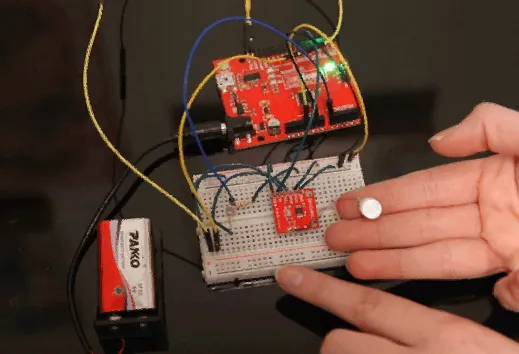
Sparkfun haptic motor connection
When applied to digital interfaces or IoT interfaces, haptics can be defined as:
- Any technology that creates a tactile experience by applying force, vibration, or motion to a user.
- Treating electronic or mechanical motion perceived by touch as part of the interface.
- Using people’s sense of touch to enhance interaction with screen-based interfaces.
Combining these definitions, Haptic UX applies tactile feedback to convey timely, useful information through touch. Real-world examples include:
- A short vibration after a successful mobile payment.
- An alert when a password entry is incorrect.
- Special gestures used to unlock a function.
- Tactile sensations in a mobile racing game.
2. Building haptic experiences
Most popular mobile devices include built-in haptic systems. Designers and developers can use these standard patterns to enhance usability. Haptics are also used in other smart devices: automotive infotainment systems, tablets, watches, fitness bands, and VR gloves.
Haptic feedback should be used to convey useful information, such as:
- Indicating correctness or error
- Signaling occurrence of events
- Attracting attention
To build effective haptic experiences, designers must understand how people interpret vibration patterns. In other words, what physical metaphors represent success, error, or neutral states?
Haptic sensations are physical metaphors. Physical metaphors are how a person interprets the semantics of a physical interaction. These metaphors are learned through repeated experience and often mirror auditory metaphors. Physical vibrations also produce sound, and the brain attempts to interpret patterns by comparing them with experience.
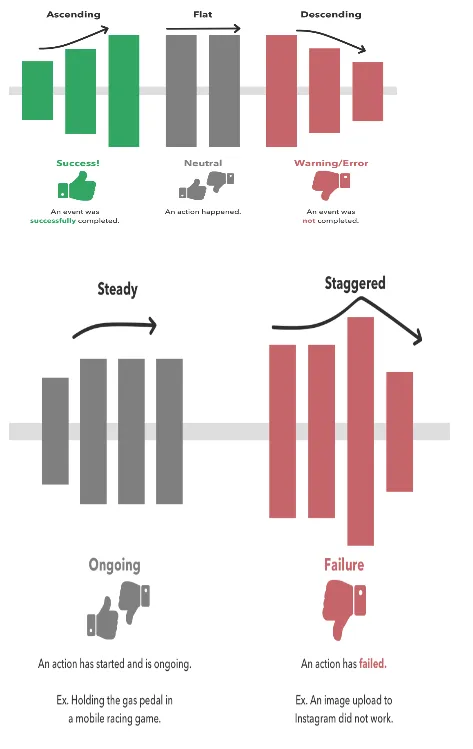
Creating physical metaphors
We can use the interaction between sharpness and intensity to convey information.
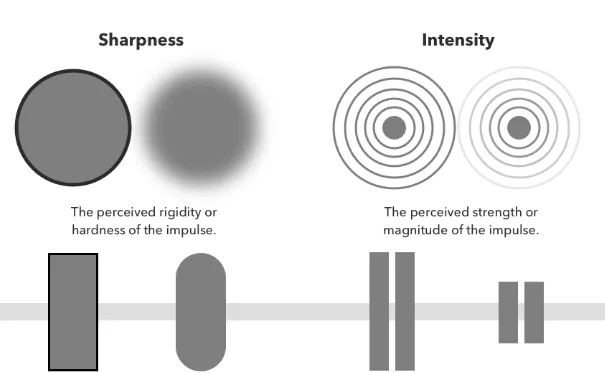
Sharpness - the perceived stiffness or crispness of a stimulus. The stronger the impulse, the clearer the user perceives it. We increase sharpness to convey important semantic feedback, such as confirming a bank deposit. We decrease sharpness to convey subtle feedback for continuous experiences, such as pressing the accelerator in a mobile racing game.
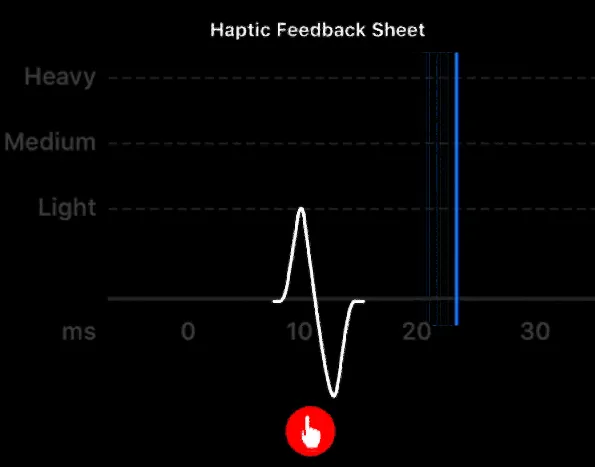
Haptic feedback table
Intensity - the perceived strength or magnitude of a stimulus. Higher intensity yields a stronger tactile impression. Increase intensity for transient events (for example, payment success or failure). Reduce intensity for neutral events, such as adding an item to a cart or opening an app.
When deconstructing haptic feedback further, adjust granularity, amplitude, and timbre to represent different semantics of transient and continuous events.
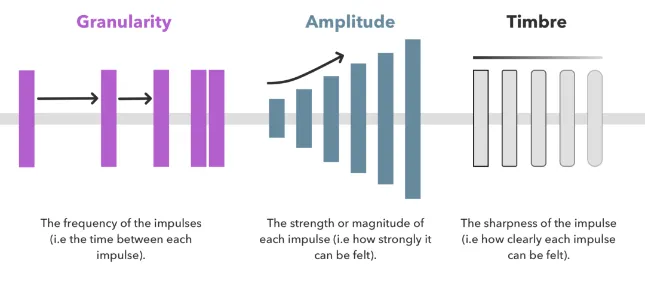
Granularity relates to frequency and timing. Smaller granularity means more rapid impulses. Amplitude refers to stimulus magnitude. Timbre relates to perceived sharpness/clarity. Higher timbre makes each impulse more distinct.
Designers can tune granularity, amplitude, and timbre to refine transient and continuous events. Transient events are short taps or vibrations tied to a specific action (for example, a button producing a quick impulse). For these events, semantic mapping and fine tuning are important. Continuous events are sustained vibration patterns that may last seconds or longer (for example, simulated rough road in a racing game or extended celebration animations).
Testing haptic patterns
Useful tools and apps for testing haptic experiences and vibration patterns:
- Vibration App - a vibration spectrum analyzer that uses the built-in accelerometer and gyroscope on some devices.
- Core Haptics (for developers) - author and play haptic patterns for custom iOS haptic feedback.
- Android Haptics (for designers) - haptic guidelines for enhancing interactivity and conveying useful information.
- Android Haptic Constants (for developers) - resources to demonstrate haptic effects on Android devices.
- Haptic Feedback Generators (for developers) - explore patterns generated by Apple’s Taptic Engine.
3. Haptic UX insights
When and how to incorporate haptics into experience design:
Use haptics to improve usability
Designers should use haptic feedback to enhance feedback and convey useful information. Haptics should not be decorative or add unnecessary feedback. For example, use haptics to indicate layered or complex gestures, rather than on every standard key interaction.
Establish a clear causal feedback loop
Haptic feedback should reinforce clear causality. Haptic stimuli must be timed immediately with the specific action. Greater latency makes the experience feel incoherent. For example, when tapping "Deposit check," a neutral haptic response should confirm the selection with no delay.
Haptics should supplement, not replace, primary feedback
Do not rely solely on haptics to convey feedback. Many devices allow users to enable or disable haptics, so visual feedback should remain the primary channel, or multiple feedback modalities should be used together. For example, a successful deposit should present a clear visual success state accompanied by haptic or audible confirmation.
Use haptics purposefully and sparingly
Decide carefully when and where to add haptic feedback. Overuse can distract and create noise. Use haptics only when it serves a clear purpose and benefits the user. For example, if every key press triggers haptic feedback, it will distract users and reduce the effectiveness of each haptic cue.
Leverage system defaults for consistency
When designing standard application flows, use the OS haptic defaults. Users are accustomed to system haptic patterns, especially those with semantic meanings: success, failure, or neutral feedback. In specialized contexts, such as mobile games, custom haptics may be appropriate.
Minimize unintended interference
Haptics produce vibration, which can interfere with other experiences, such as camera focus or typing. Clearly define how your app's haptics interact with other apps and device functions.
Preserve battery life
Vibration consumes power, especially in applications that frequently trigger haptics. Allow users to disable haptics or reduce their frequency to extend battery life.
4. Haptic experience design process
Steps to determine when and how to incorporate haptics:
- Identify primary user needs
Ensure the use case being tested addresses the user's primary needs and solves an important problem. Example: depositing money using a mobile banking app. - Deconstruct user behavior
Analyze each action users take to complete the behavior. What must they do to succeed? What must they know? Example steps for mobile check deposit: (1) open the app, (2) tap deposit, (3) tap to take photo, (4) enter amount, (5) take photo, (6) confirm photo, (7) confirm deposit. - Determine feedback states
Identify what important and useful information the app must convey at each step. What feedback does the user need to proceed? Example: after a photo uploads successfully, the user needs visual or audible confirmation. - Analyze haptic requirements
Ask: Will haptics provide useful, purposeful, and relevant information? What message should haptics convey? What other feedback will the user receive for the same action (audio, visual, touch)? Example: visual gaps between camera and app screens can make it unclear when upload review is complete; haptics can supplement by signaling success. - Select and test haptic feedback
After determining the use case, run A/B tests to evaluate whether added haptics improve usability. Choose a semantically equivalent haptic pattern that complements the user action without causing unnecessary disruption. Example: after a photo upload, a subtle phone vibration paired with a visual checkmark increases user confidence in success.
5. Examples
Directional cues without looking
Demonstrations have used haptic feedback to indicate major directional turns, prompting user attention and providing left/right cues.
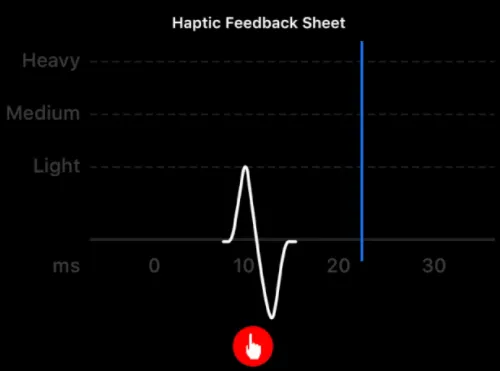
Liam Tucker — Dribbble
Automotive infotainment haptics
While driving, attention shifts among the road, passengers, radio, and ambient noise. On automotive touchscreens it can be difficult to know when an action has succeeded. Haptic feedback can indicate that the system recognized the operation, which is often more reliable than visual or audible cues alone.
Haptics to indicate hidden affordances
Subtle gestures and hidden affordances can be hard to communicate. Haptics can signal that a hidden function has been successfully activated. Example: unlocking a scroll bar or other hidden UI element on a touchscreen.
Immersive VR game haptics
With advanced haptic peripherals, VR game feedback systems continue to evolve, combining force and torque cues to enhance realism.
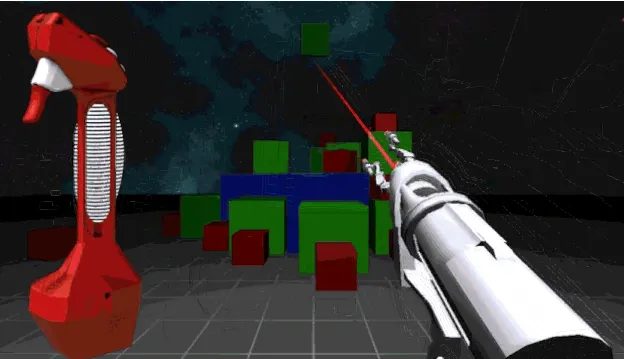
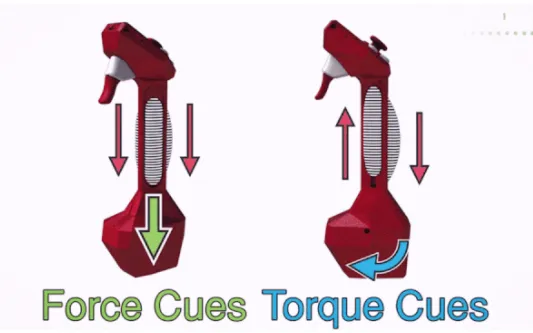
VR controller force and torque mechanics
Haptic accessibility
For users with visual or auditory impairments, haptics can serve as a primary feedback channel. Haptic patterns can indicate actions such as turning right. When screen locations are away from the line of sight, haptics can also be useful. Example: a watch placed on a payment terminal can use haptic feedback to indicate a successful transaction.
6. Conclusion
Haptic UX design aims to use tactile feedback to provide timely, useful information through touch. Haptic feedback should be purposeful, timely, semantic, and supplementary. It should address prominent user problems and be used judiciously to avoid disruption and distraction.
Haptic UX is becoming a foundation for more immersive and usable experiences. A growing range of IoT technologies, touchscreens, VR gloves, and wearables use haptics to clarify interactions in visually noisy environments. Future experiences, especially voice-driven ones, will require product teams to develop a tactile language that can evoke emotion and convey complex meanings through touch.





