ALLPCB


Using MATLAB and Simulink, engineers can integrate and automate design, implementation, and verification stages to accelerate development of medical device software and hardware. Biomedical engineers can analyze large, multimodal biomedical datasets and develop intelligent algorithms to support chronic disease management and improve quality of life. The following sections summarize applications of MATLAB and Simulink in three areas:
- Medical device development
- Biomedical data analysis
- FDA software tool confirmation
Medical device development
Model-based design helps separate design and implementation phases and facilitates integrating agile methods into existing software development workflows.
Dynamic system modeling and simulation
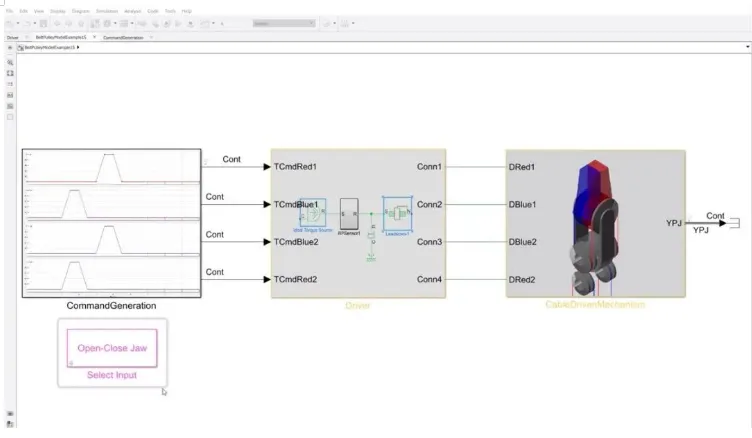
Medical device development often spans multiple engineering domains, such as software, mechanical, electrical, and fluid systems. Using Simulink for dynamic system modeling lets you integrate multiple domains in a single simulation environment to efficiently design and implement complex medical devices. With this approach you can:
- Develop software system models that are independent of environment and target hardware
- Run simulation-based tests to understand requirements and iterate on specifications
- Perform design tradeoffs and evaluate behavior of complex multi-domain devices
- Test units and complete subsystems at both model and code levels
Deployment and real-time prototyping
Once models are developed and validated in simulation, code can be automatically generated for prototypes or final production units. This reduces the need to handwrite large amounts of code and improves efficiency and quality. Real-time simulation and testing enable early design validation and rapid clinical prototyping with lower time and cost.
Verification and validation of models and code
Simulink provides verification and validation capabilities to support rigorous testing of models and generated code on target hardware. Using Simulink Test and Simulink Requirements, you can:
- Create, analyze, and manage requirements and produce traceability reports
- Perform model and code coverage analysis to measure test completeness
- Manage tests of models, generated code, and simulation or physical hardware
- Detect hidden design faults such as integer overflows, dead logic, and divide-by-zero
- Generate customizable reports that can be used as evidence for FDA or CE compliance
Biomedical data analysis
With MATLAB and Simulink, biomedical engineers can analyze large, multimodal biomedical datasets and develop intelligent algorithms to support next-generation medical devices for patient monitoring and therapy.
Biomedical data preprocessing and visualization
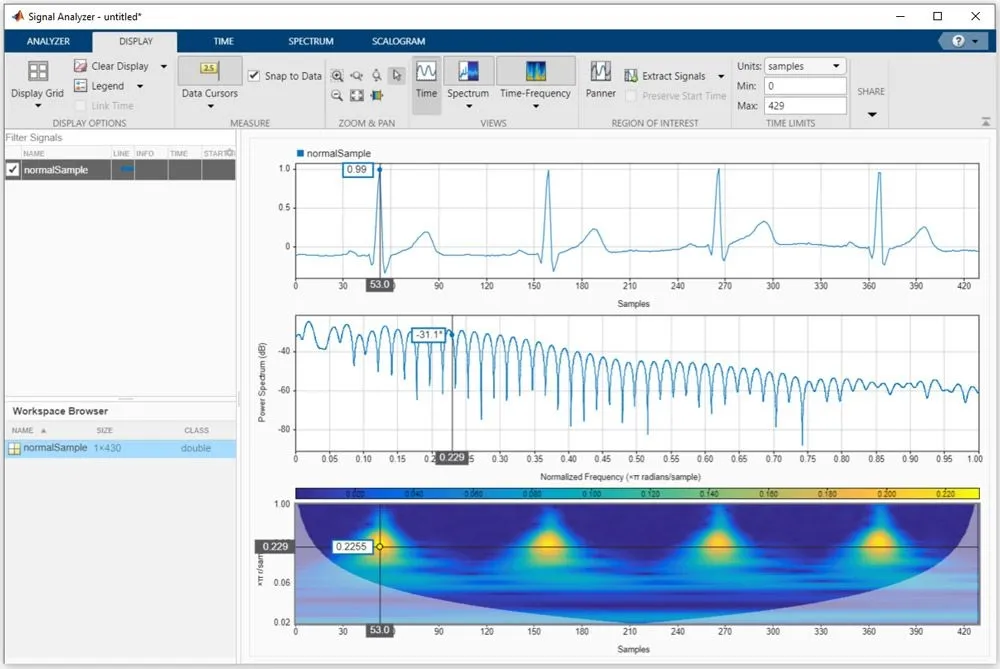
MATLAB and Simulink support analysis and preprocessing of physiological signals, medical imaging, and biomedical text and literature datasets. You can interface with hardware to acquire physiological signals. With support packages for Raspberry Pi and Arduino, you can connect Raspberry Pi, Arduino, and EKGShield boards to acquire sensor data. MATLAB also supports common file formats such as EDF, Excel, and MAT. Typical capabilities include:
- Automated acquisition and analysis of images, video, and signals from hardware
- Apps for preparing and annotating biomedical signals, images, and text data
- Simulation-based generation of physiological datasets, such as ECG
AutoML and deep learning
MATLAB supports prototype development and model building through machine learning and deep learning workflows. These methods enable predictive models for patient monitoring, hearing aids, and therapeutic applications. Using MATLAB and Simulink, you can:
- Train and compare models using click-based apps
- Apply advanced signal and image processing and automated feature extraction
- Integrate models with Simulink via MATLAB Function blocks or native Simulink blocks for embedded deployment or simulation
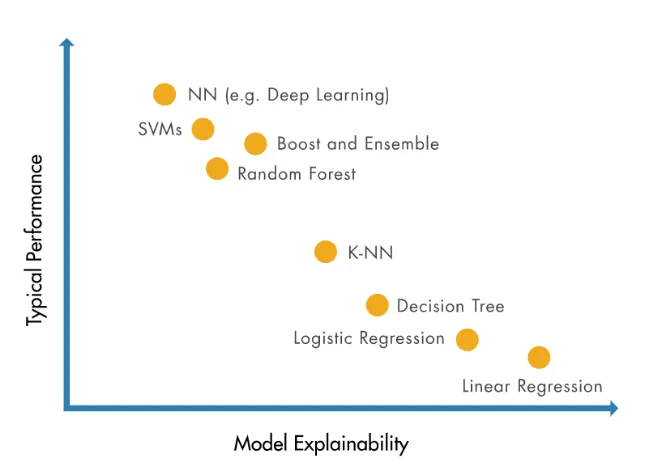
- Use interpretable machine learning techniques to address black-box concerns
- Collaborate with frameworks such as TensorFlow, PyTorch, and MxNet
- Train models on datasets larger than memory using tall arrays with minimal code changes
Code generation and Simulink integration
Statistical and machine learning models can be deployed to embedded systems, with readable C/C++ code generated for the full algorithm, including preprocessing and postprocessing. Using MATLAB Function blocks and native Simulink blocks, machine learning models can accelerate validation and verification of high-fidelity simulations. Trained models can be deployed to embedded systems, enterprise systems, FPGA devices, or the cloud. MATLAB also supports automatic CUDA code generation for deployment to NVIDIA GPUs.
Verification and validation — FDA regulations and standards
Tools from MathWorks can be confirmed for use in FDA or CE compliance workflows and for standards such as IEC 62304. MATLAB and Simulink support automated creation of engineering reports to help reduce regulatory burden and accelerate delivery.
FDA software tool confirmation
FDA does not certify or approve software development tools. The FDA regulates medical devices and drugs, not the development tools themselves. Device manufacturers are responsible for confirming the tools they use, demonstrating that tool failures would present an acceptably low risk of harm even if the tool output is incorrect.
Software produced using MATLAB has been confirmed by many medical device and pharmaceutical users as part of their compliance processes. Manufacturers develop and execute their own plans to confirm MATLAB within their workflows.
How to confirm a software tool
Confirming MATLAB or any other software tool generally involves two main activities: defining and executing a tool confirmation plan to ensure the tool performs as expected and produces correct results, and confirming that your algorithms behave as intended.
The confirmation of the software tool itself does not require exhaustive testing. The typical steps are:
- Create a tool confirmation plan: identify risks, define the operating context, and specify confirmation activities to reduce risks to an acceptable level. Document items such as hazard analysis, tool role in the development process, standard operating procedures, confirmation methods, resources, and schedule.
- Develop a confirmation protocol: include test cases, expected results, and assumptions.
- Execute the confirmation protocol: run test cases and produce a final tool confirmation report documenting the activities and evidence.
Quality and documentation
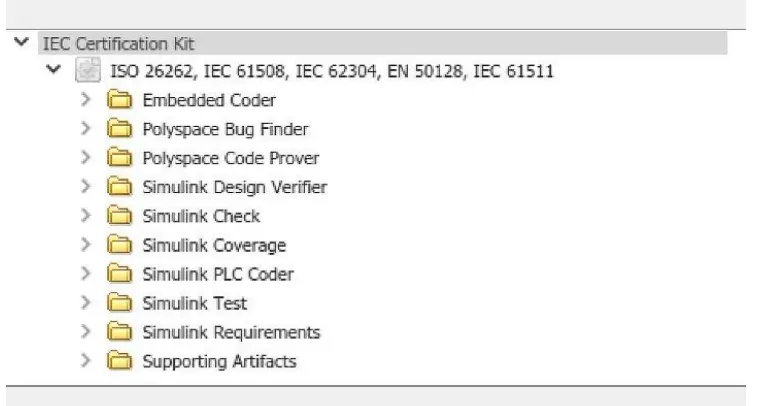
MathWorks has a long history and provides documentation useful for tool confirmation. MathWorks can provide single-page quality statements for core products such as MATLAB and Simulink that describe quality-driven development processes. MathWorks can also provide detailed audit reports from the independent German testing body TüV SüD. An IEC Certification Kit is available to supply these documents to support tool qualification against IEC 61508 requirements.
Those documents, together with a tool confirmation report, can be submitted as part of regulatory submissions to authorities such as the FDA.