 ALLPCB


Trackpad pressure sensing and haptic feedback
Apple places strong emphasis on touch experience. Large surface areas, advanced manufacturing, leading touch technologies, and a variety of gestures have made the MacBook trackpad a notable feature.
Many operations on a MacBook can be completed with simple trackpad gestures, such as scrolling through web pages, zooming documents, and rotating images.
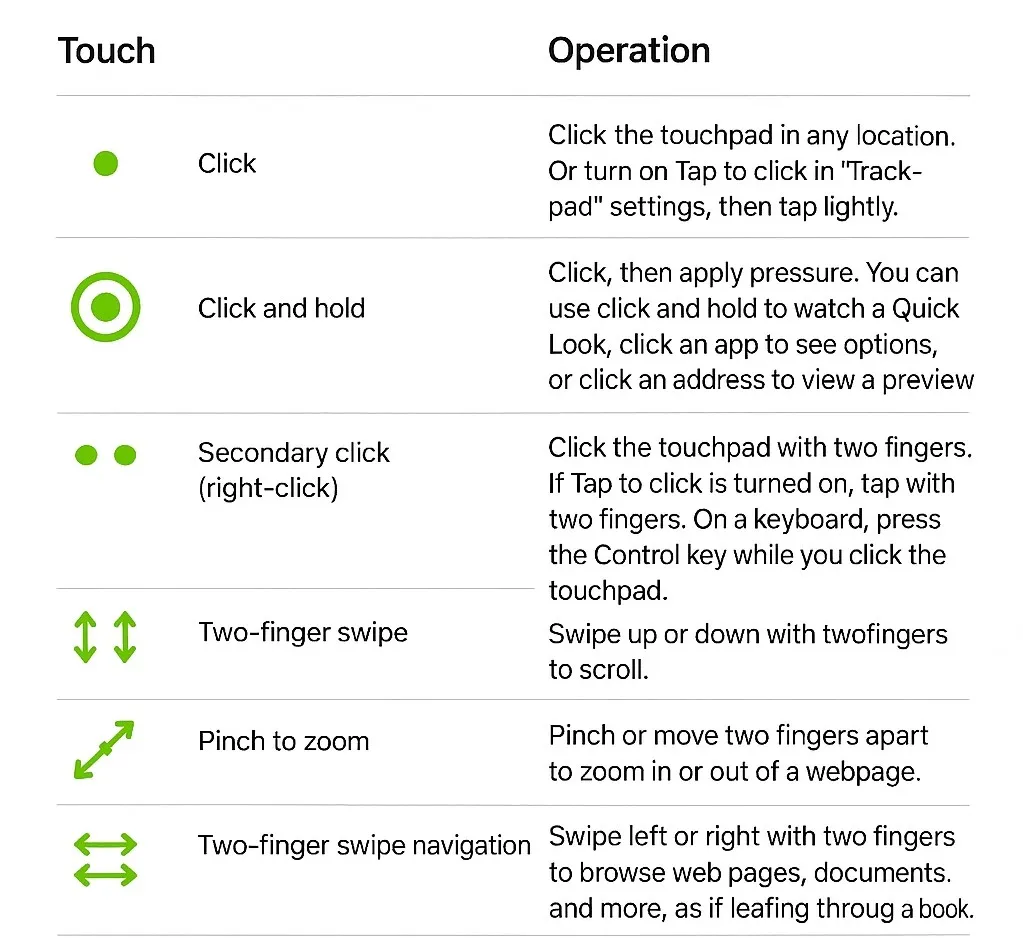
Some MacBook gestures and operations
A distinguishing feature of certain MacBook models is the force-sensitive trackpad. Pressure sensing raises the interaction experience to another level. Built-in pressure sensors allow the device to simulate the sensation of "pressing down" through vibration. For example, when a user drags or rotates an object, a slight vibration can indicate alignment, enabling more precise control.
In addition to MacBook models, the Magic Trackpad accessory for Mac desktops provides the same capability.
The Magic Trackpad uses a wireless, rechargeable design and supports full multi-touch gestures and force touch technology. Sensors beneath the trackpad surface detect subtle variations in applied pressure, enabling more nuanced fingertip interactions.
In short, both the MacBook trackpad and the Magic Trackpad are implementations of an integrated "pressure sensing + haptic feedback" solution. Pressure sensing conveys a signal, and haptic vibration simulates the sensation of pressing and provides feedback on action completion. This approach preserves an integrated enclosure design without openings, allowing for water and dust resistance, while simulating a real key press through haptic feedback.
Although a trackpad looks very different from a mouse in structure and form, it can implement all the basic mouse functions and free users from the limitations of a physical mouse. As touch technology advances, more laptops adopt an integrated "pressure sensing + haptic feedback" trackpad solution. This includes devices from multiple vendors, such as Microsoft Surface Laptop Studio, Huawei MateBook X, and Lenovo ThinkPad X1 Titanium and Xiaoxin Pro 13s.
This interaction method reduces device complexity by integrating functions and provides a novel control method that enhances user experience and interaction models.
In response to this market trend, Awinic provides a trackpad pressure and haptic solution.
Core functions of the Awinic pressure-sensitive trackpad solution
- Pressure detection of the touch surface
- Haptic feedback
- Finger trajectory detection
Solution highlights
- Pressure range
- 50–500 g
- 1–3 adjustable levels
- 3D haptic features
- Haptic feedback with configurable waveforms
- Full-area press capability
- Report rate: 150 Hz
- HID PTP (Plug-and-play support)
- Low noise
- Low power consumption
- Online/offline firmware updates without system reboot
- Support for debugging interfaces
- Customization friendly
- Supports up to six sensors
- False-touch rejection
- Compatible with multiple TP vendors (HID over I2C compliant)
On Windows systems, Awinic's solution meets the Windows HID PTP precision touchpad specification and can operate without additional drivers. It also supports firmware upgrades for Force IC and TP IC without requiring a system reboot.
Multiple pressure sensors distributed under the touch surface detect the applied force. When pressure reaches a threshold, the trackpad is recognized as "pressed." Paired with a linear motor to simulate a realistic press sensation, this approach can reproduce interaction effects similar to mechanical structures while providing full-area, uniform press feedback. Users receive consistent tactile response regardless of where they press on the surface, addressing the limitation of traditional trackpads that cannot be pressed at the top and facilitating blind operation.
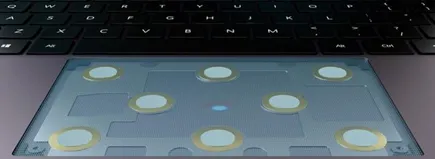
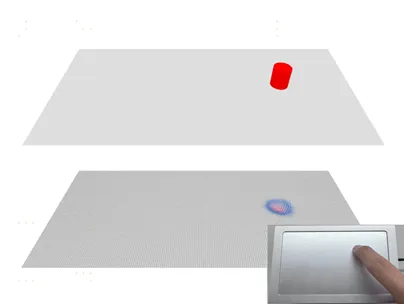
The hardware connection diagram for the pressure-sensitive trackpad solution is as follows. The Force MCU acts as the main controller for the pressure-sensitive trackpad and interfaces with the touch module, pressure sensors, and the haptic motor driver chip. The motor driver then drives the linear motor. The Force MCU connects via hardware interfaces to the laptop CPU or EC to enable integration with the notebook system.
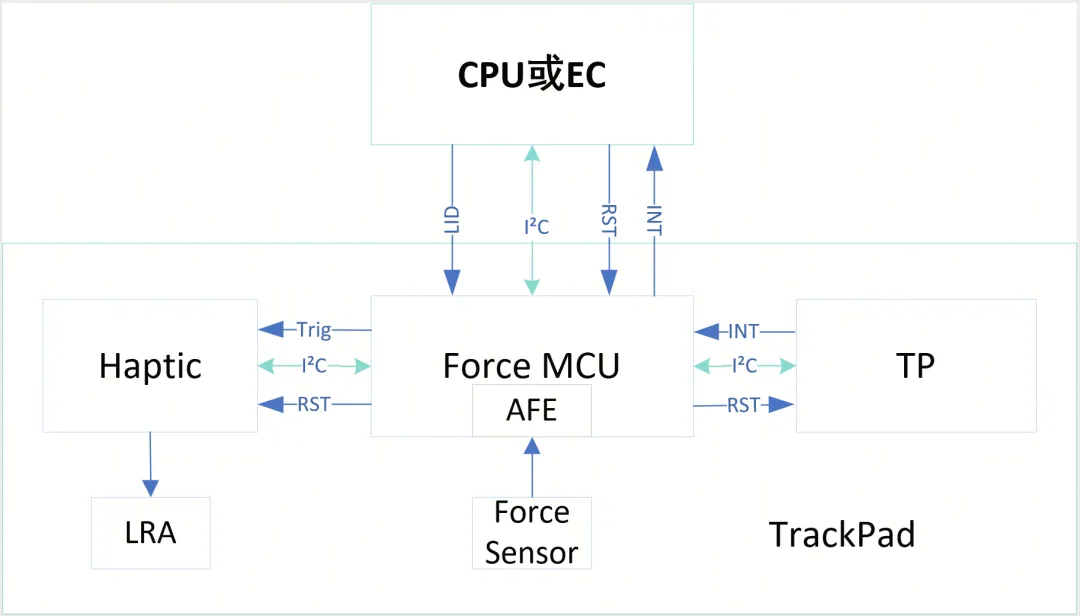
Replacing mechanical buttons with pressure sensors combined with a haptic feedback IC provides tactile feedback equivalent to mechanical keys while enabling full-area pressability and consistent feedback at any location. By grading pressure depth, different haptic responses can be generated for different pressure levels. Combined with finger trajectory detection, this enables fast screenshots, screen recording, and media fast-forward/rewind controls, among other functions.
AW8680X
The Awinic AW8680X series is the core IC family in the trackpad pressure and haptic solution. These chips provide multiple analog input channels for connecting pressure sensors and offer abundant GPIO and hardware communication interfaces for external haptic drivers and touch controllers.
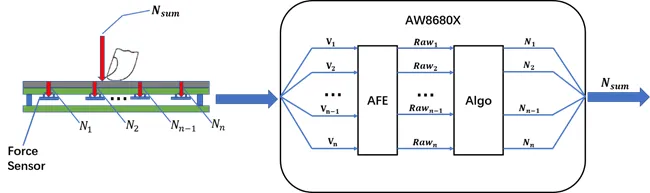
AW8680X operation with multiple pressure sensors
When a user applies force to the touch surface, multiple pressure sensors beneath the PCB share the load. Pressure causes slight deformation of the sensors, changing their resistance and altering the surrounding detection circuit voltage. The AW8680X AFE analog front end includes a high-precision ADC that samples the voltage differences around the pressure sensors and converts them into digital data. These raw data are passed to a DSP for processing. The DSP runs pressure detection algorithms that calculate the force on each sensor and derive the total resultant force.
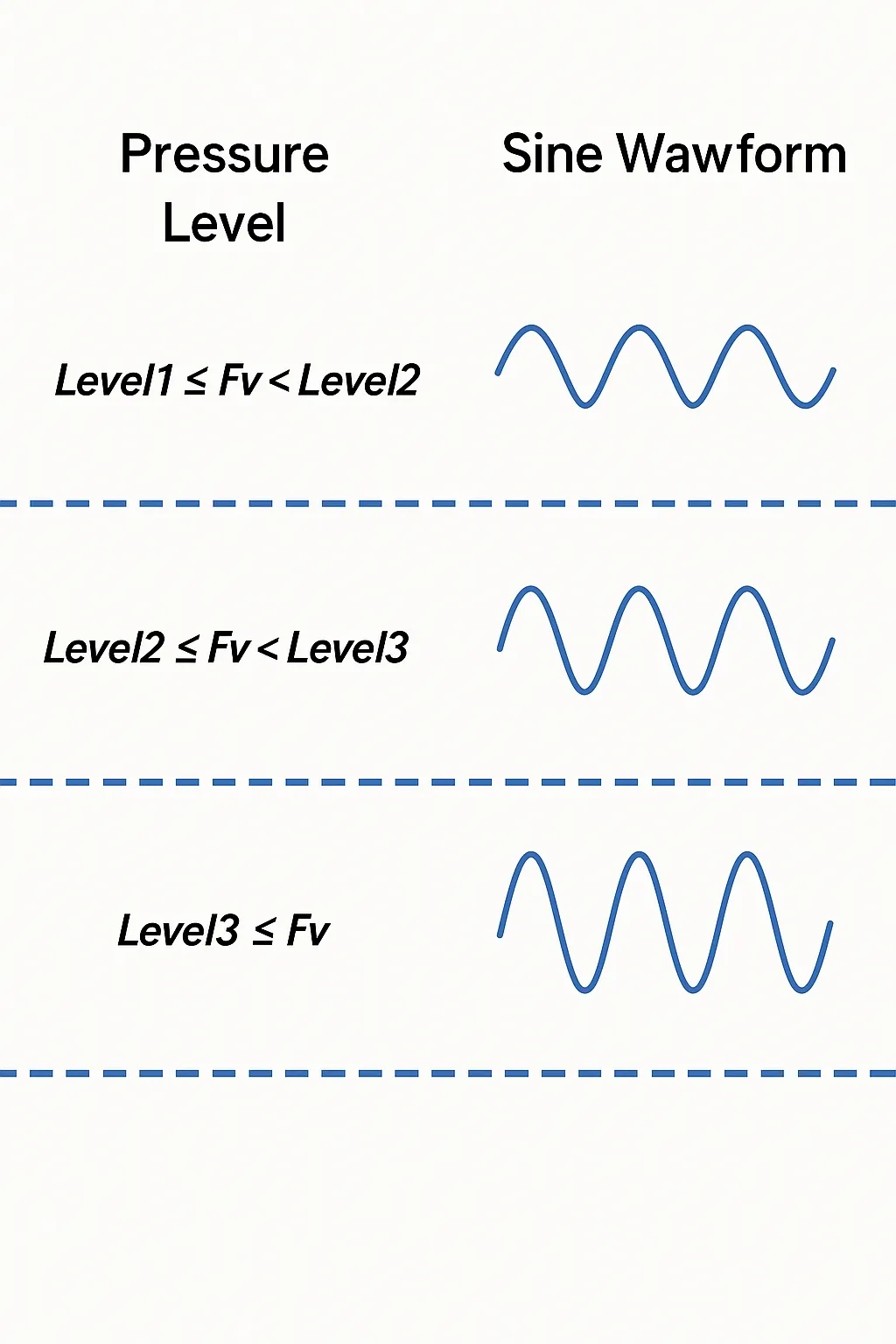
After calculating the pressure, the system can grade the pressure levels. Different pressure levels trigger different vibration patterns from the motor, producing distinct haptic feedback responses.
AW8680X key features
- Multiple analog input channels
- 100 KSPS 14-bit SAR ADC
- 12-bit offset calibration DAC
- 16 general-purpose GPIO pins
- Hardware I2C Slave interface, up to 1 MHz
AW86927
The haptic motor driver is another important component in the Awinic trackpad pressure and haptic solution.
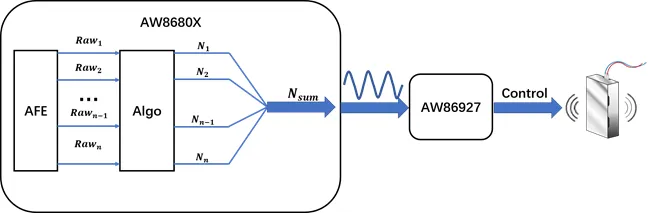
AW86927 is a motor driver specifically designed for haptic feedback. In the solution, the AW8680X computes the force on the panel and sends corresponding vibration waveforms to the AW86927 motor driver. The driver controls the linear motor to generate vibration and provide tactile feedback to the user.
AW86927 key features
- Automatic detection and adaptation of LRA F0 frequency
- Shutdown current less than 0.1 μA
- Integrated boost converter to support different LRA voltages
- Fast response time under 1 ms
- Support for single-wire triggering of preset haptic modes





