 ALLPCB


Resistive touchscreen concept
Resistive touchscreens are sensors that convert the physical touch location within a rectangular area (X, Y) into voltages representing the X and Y coordinates. Many LCD modules use resistive touchscreens. These screens can be implemented with four-, five-, seven-, or eight-wire configurations to create screen bias voltages and read back the touch-point voltages.
Advantages of resistive touchscreens
1. High accuracy, down to pixel-level; maximum applicable resolution can reach 4096x4096.
2. The screen is not affected by dust, moisture, or oil, and can operate in relatively low or high temperature environments.
3. Resistive touchscreens use pressure sensing, so they can be operated with any object, including gloved hands, and can be used for handwriting recognition.
4. Mature technology and lower manufacturing complexity make resistive screens relatively inexpensive.
Disadvantages of resistive touchscreens
1. Although resistive screens can be designed for multi-touch, simultaneous presses can create pressure imbalances that cause position errors, so true multi-touch is difficult to implement.
2. The touch-sensitive layer is prone to damage from scratches and wear.
Capacitive touchscreen concept
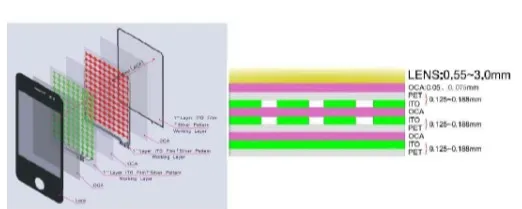
Capacitive touchscreen technology operates by sensing the body current of a user. When a finger touches the metal layer, the user and the touchscreen surface form a coupling capacitance due to the body's electric field. For high-frequency currents, the capacitance behaves like a conductor, so a very small current is drawn away at the contact point. This current flows through electrodes at the four corners of the touchscreen, and the currents through those electrodes are proportional to the finger's distance from the corners. The controller determines the touch position by precisely calculating the ratio of these four currents.
Advantages of capacitive touchscreens
1. Capacitive touchscreens require only touch, not pressure, to generate a signal.
2. After production they typically need only a single calibration or none at all, whereas resistive screens require periodic calibration.
3. Capacitive solutions tend to have longer service life because there are no moving parts. In resistive screens, the top ITO film must be thin enough to flex and contact the lower ITO film.
4. Capacitive technology has advantages in optical loss and system power consumption compared with resistive technology.
5. The choice depends on the object used to touch the screen. For finger input, capacitive screens are generally better. For stylus input, whether plastic or metal, resistive screens are suitable. Capacitive screens can also use styluses but require specially designed pens.
6. Surface capacitive can be used for large-size touchscreens with lower cost but currently cannot support gesture recognition; projected capacitive is mainly used for medium and small sizes and can support gesture recognition.
7. Capacitive technology is wear-resistant and long-lasting, which lowers maintenance costs for users.
8. Capacitive touchscreens can support multi-touch, and they are generally more responsive and less prone to wear than resistive screens.
Disadvantages of capacitive touchscreens
Capacitive touchscreens have better transmittance and clarity than four-wire resistive screens, but they still cannot match surface acoustic wave screens or five-wire resistive screens in some respects. Capacitive screens tend to be highly reflective, and multilayer capacitive composite panels can exhibit uneven transmittance across wavelengths, causing color distortion. Interlayer reflections can also produce image and character blurring.
Key differences between resistive and capacitive touchscreens
1. Capacitive screens rely on body current sensing, so non-conductive objects such as fingernails or regular gloves cannot be detected. Resistive screens rely on pressure sensing, so any object can be used, including styluses.
2. Capacitive multi-touch is achievable depending on implementation and software and has been realized on devices such as the G1 and iPhone. Resistive multi-touch is not practical without reconfiguring the resistive screen and connecting it to the device circuitry.
3. The outermost layer of a capacitive screen is glass, which can shatter under severe impact. The outer layer of a resistive screen is a thin film that must be pressed to register touch.





