 ALLPCB


1. What is a data type?
Programming languages are used to control the behavior and operation of computers and to help solve real-world problems. The data types a language can represent are abstractions of the kinds of data encountered in practice.
For example, in mathematics basic categories of numbers include positive integers, negative integers, and decimals; mathematical operations are defined on these categories. Before computers, mathematicians performed many calculations manually. With the development of computer technology, computers now perform large numbers of complex calculations, greatly improving calculation efficiency.
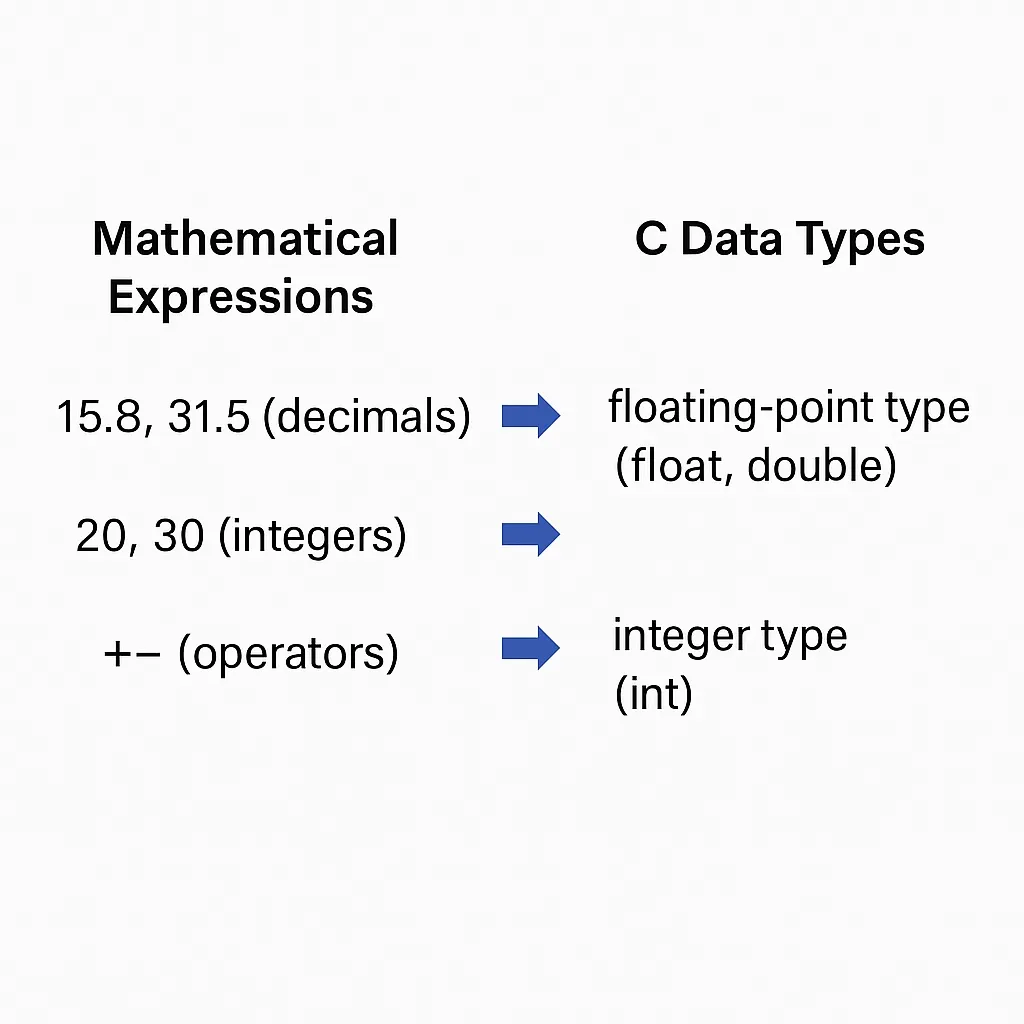
Mathematical expressions contain operands and operators. A computer program that evaluates an expression must be able to store decimals, integers, and operators. The C language provides basic data types for storing decimals, integers, and operators. The diagram below maps the types appearing in an arithmetic expression to corresponding C types.
2. Variables and data types
Variables are used to store numbers from an arithmetic expression. In C there is a distinction between declaring and defining a variable. Declaring a variable informs the compiler of the variable's type and name but does not allocate storage until the variable receives a value. Defining a variable both declares it and provides an initial value; the compiler allocates storage at that time.
Declaring a variable
Syntax: data_type variable_name;
data_type can be any type supported by C; variable_name is the identifier being declared.
Example: declare an integer variable
int number;
Example: declare a character variable
char op;
Defining a variable
Defining a variable assigns an initial value at the time of declaration. If a variable is only declared, it should be assigned a value later before use.
Example: define an integer variable
int number = 30;
Example: assign to a previously declared variable
op = '+';
As an example, consider parsing a simple expression "8.25+30". Declare three variables to store operands and the operator:
float floatNum;
int intNum;
char op;
When scanning the expression left to right (ignoring operator precedence for simplicity), if a token is an integer assign it to intNum; if it is a decimal assign it to floatNum; if it is an operator assign it to op. The diagram below shows how these variables are laid out in memory after parsing.
Different data types occupy different amounts of memory. A char typically occupies one byte. C does not fix exact byte sizes for integer types; only broad constraints are specified. For example, on a 32-bit environment an int commonly occupies 4 bytes.
3. Basic data types
The basic C data types are shown below.
C basic types include numeric and non-numeric types. Numeric types are divided into integer and non-integer types. Integer types include int, short, and long. Non-integer numeric types include single-precision and double-precision floating point. Non-numeric types include char.
4. Integer types
C integer types vary by storage size and range: short (typically 2 bytes), int (machine word size), long (4 bytes on many 32-bit environments, 8 bytes on some 64-bit environments), and long long (typically 8 bytes). Integers may be signed or unsigned.
Historically, storage was scarce so multiple integer sizes allowed programmers to choose the smallest type that met requirements. C only specifies broad constraints: short is at least 2 bytes; int is suggested to be one machine word; short cannot be larger than int; long cannot be smaller than int. Thus short and long are not guaranteed to be strictly shorter or longer than int; sizes depend on platform.
Use sizeof to determine the number of bytes a type occupies on the current platform. sizeof accepts either a type or a variable name. Example program that prints sizes of various types:
#include <stdio.h>

void main()
{
    char ch = 'a';
    printf("short: %d bytes\n", (int)sizeof(short));
    printf("int: %d bytes\n", (int)sizeof(int));
    printf("long: %d bytes\n", (int)sizeof(long));
    printf("long long: %d bytes\n", (int)sizeof(long long));
    printf("ch: %d bytes\n", (int)sizeof(ch));
}
Integers can represent positive and negative values. In C signed integers use the highest bit as the sign bit: 0 indicates positive, 1 indicates negative. The minimum representable value for a signed n-bit integer is -2^(n-1) and the maximum is 2^(n-1)-1.
The bit-level representation of a numeric value in a computer is called the machine number. For example, decimal +3 in 8-bit binary is 00000011; -3 may be represented as 10000011 in sign-and-magnitude form. Because the highest bit is a sign, the numeric interpretation differs from the bit pattern's unsigned numeric value. C uses two's complement representation for signed integers.
Example program that prints the binary representations of +3 and -3:
#include <stdio.h>

void printf_binary(unsigned char n);
int main()
{
    char positive = 3;
    char negative = -3;
    printf_binary(positive);
    printf_binary(negative);
    return 0;
}

// Print binary number
void printf_binary(unsigned char n)
{
    char i = 0;
    for (i = 0; i < 8; i++) {
        if (n & (0x80 >> i)) {
            printf("1");
        } else {
            printf("0");
        }
    }
    printf("\n");
}
From the output, +3 is 00000011 and its value is 3. -3 in two's complement is 11111101 whose unsigned interpretation is 253, but its signed true value is -3. Two's complement representation simplifies arithmetic hardware design because signed addition and subtraction can be done using the same logic as unsigned arithmetic.
Unsigned integers are declared with the unsigned keyword and represent only non-negative values, with range 0 to 2^n - 1 for an n-bit unsigned type.
Examples of integer declarations:
int pageNumber;
long int size;
short age;
unsigned short readCount;
Multiple variables of the same type can be declared in one statement separated by commas:
int pageNumber, likeNumber, readCount;
Examples of defining integer variables with initial values:
int pageNumber = 230;
short age = 21;
unsigned short readCount = 1260;
Literals may be expressed in decimal, octal (prefix 0), or hexadecimal (prefix 0x or 0X). Suffixes u or U indicate unsigned, l or L indicate long; combinations such as ul or Lu are allowed. Examples: 100u; 0x123L;
5. Floating-point types
Floating-point types store real numbers. Floating-point representation stores numbers in an exponent form similar to scientific notation, such as 2.1E5 or 3.7e-2. In C, a real constant with a decimal is by default double unless suffixed with f or F to indicate float.
A positive real number can be represented as a * 10^n (1 <= a < 10, n is integer). The significant digits of the number determine precision. Moving the decimal point and adjusting the exponent yields equivalent representations; because the decimal point can "float", these are called floating-point numbers.
C provides float and double types for single-precision and double-precision floating point. Typically float occupies 4 bytes and double 8 bytes. More bytes generally permit greater precision and a larger range. Typical float range is roughly 1E-38 to 1E38; double range roughly 1E-308 to 1E308.
In IEEE 754 single precision (commonly used for float), storage is divided into 1 sign bit, 8 exponent bits, and 23 fraction bits. Double precision uses 1 sign bit, 11 exponent bits, and 52 fraction bits. Because storage is finite, floating-point values are approximations of real numbers.
Examples:
float price = 12.35f;
float average = 89.2f;
double pi = 3.14159265;
double averageD = 89.2987017;
Float literals intended for float variables should include the f or F suffix; otherwise they are treated as double and assigning them to a float may produce a precision-truncation warning. C also provides long double, but its size and precision vary by platform; sizeof(long double) reports the size on the current platform. Suffixes for floating literals: f or F for float, l or L for long double.
6. Character type
Programs often need to store and manipulate single characters such as operators or punctuation. C provides the char type for single-character storage.
Characters are typically encoded using ASCII, where each character maps to an integer code. For example, decimal 65 corresponds to 'A' and 97 to 'a'. Standard ASCII defines 128 characters using 7 bits. A char typically occupies one byte and can represent 8-bit values, which covers ASCII.
Examples of char definitions:
char code = 'a', op = '*', digit = '0';
Character literals are enclosed in single quotes and contain a single character. You can also assign an integer ASCII code directly to a char, for example:
char code = 97;
If you need a byte type representing 0..255, use unsigned char since standard C does not define a byte type separate from char.
7. Type conversion
C is a strongly typed language: a variable's declared type remains fixed. Operations generally require operands to have the same type. When operand types differ, conversions are performed to bring them to a common type before the operation.
Implicit conversions
The compiler performs automatic promotions when operand types differ. For example:
double PI = 3.14;
int radius = 5;
double s;
s = PI * PI * radius;
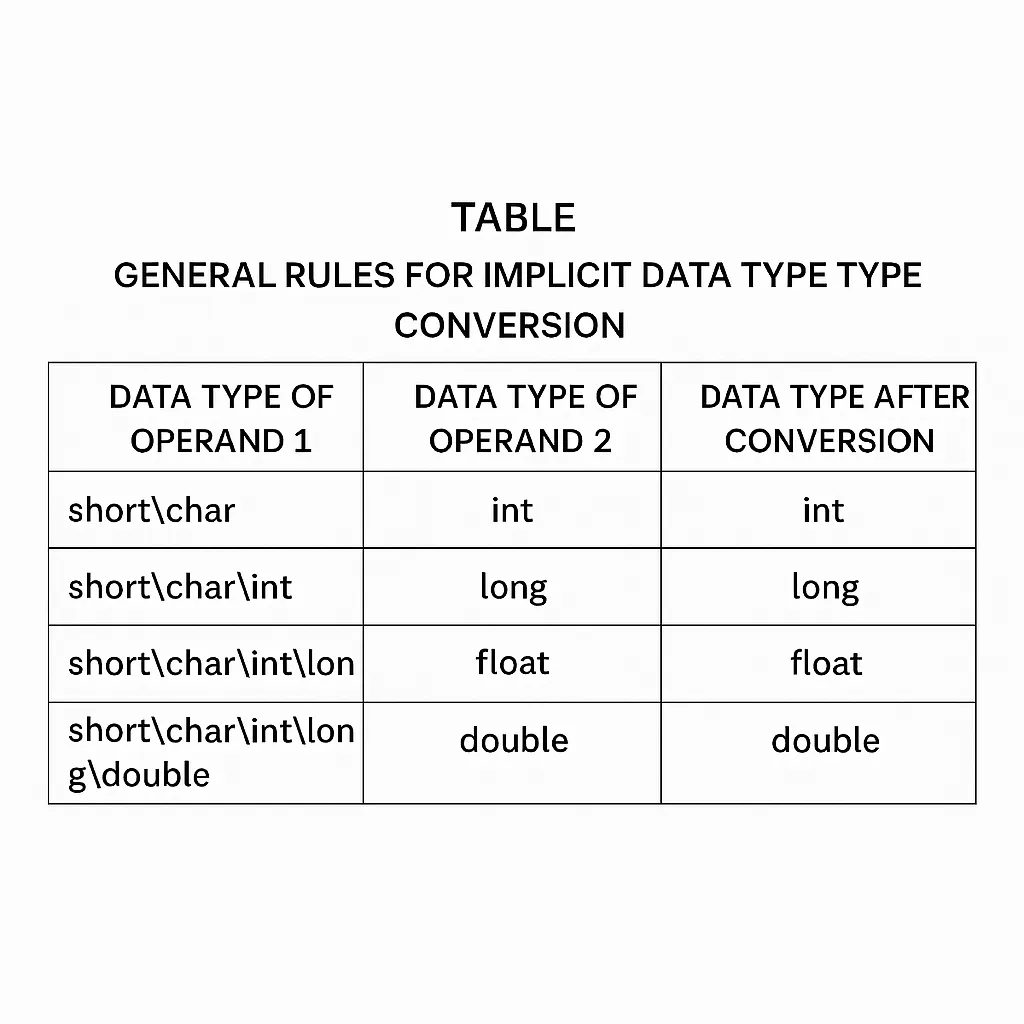
In the expression above, radius is an int while PI is double. The compiler implicitly converts radius to double before performing the multiplication. Implicit conversions follow rules that generally promote from lower-precision to higher-precision types to avoid loss of precision. A common promotion ordering is:
short -> int -> long -> float -> double
Example demonstrating implicit conversions:
#include <stdio.h>

int main()
{
    // Declare char variable
    char chTemp = 65;
    // Declare int variable
    int nTemp = 34;
    // Declare float variable
    float fTemp = 29.6f;
    // Declare double variable
    double dTemp = 86.69;

    printf("char + float = %.2f\n", (chTemp + fTemp));
    printf("float + double = %.2f\n", (fTemp + dTemp));
    printf("char + int = %d\n", (chTemp + nTemp));
    return 0;
}
Explicit conversions (casting)
Explicit conversions are performed by the programmer using casts. The programmer must consider possible precision loss or overflow when converting from a higher-precision type to a lower-precision type. The general form is:
(type_name) expression
Examples:
// Force 36.9 to int, precision lost
int nTemp = (int)36.9;
// Declare a double variable
double dTemp = 12.15;
// Force double to int, precision lost
int nV = (int)dTemp;





