 ALLPCB


Overview
SystemView is a visualization and analysis tool for embedded systems that provides full insight into an application, including a timeline, CPU load, runtime information, and context runtime details. It helps developers gain a deep understanding of runtime behavior. In addition to μC/OS-II, μC/OS-III, FreeRTOS, and embOS, SystemView also supports analysis of bare-metal systems without an operating system.
This article explains how to integrate SystemView into a bare-metal system.
Integration Steps
- Create a new project for the target device in Embedded Studio.
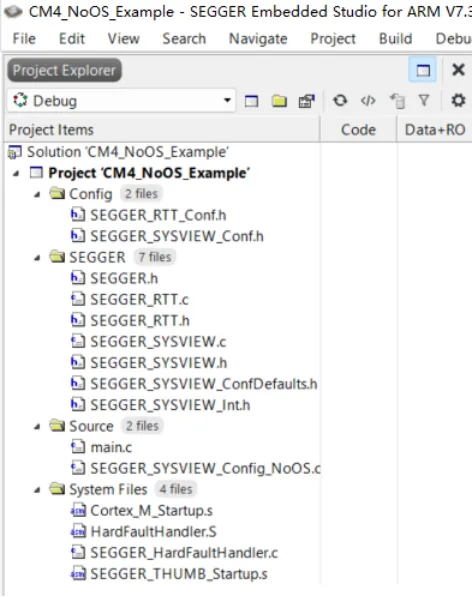
- Add all files from the /SEGGER and /Config folders in the SystemView installation directory and add the Sample/NoOS/Config/Cortex-M/SEGGER_SYSVIEW_Config_NoOS.c source file to the project.
- In the SystemViewDescription directory create a file named SYSVIEW_NoOS.txt and add the functions to record. Use ID numbers starting at 33. Example entries:
- Include SEGGER_SYSVIEW_Conf.h and SEGGER_SYSVIEW.h in main.c.
- In SEGGER_SYSVIEW_Conf.h set SEGGER_SYSVIEW_ID_BASE to the RAM address of the target device.
- In SEGGER_SYSVIEW_Config_NoOS.c modify the function _cbSendSystemDesc() as follows:
- Call SEGGER_SYSVIEW_Conf() in main(). For a no-OS application treat the entire system as an idle task and call SEGGER_SYSVIEW_OnIdle().
- Optionally initialize the system tick in main. In the tick handler call SEGGER_SYSVIEW_RecordEnterISR() at the start and SEGGER_SYSVIEW_RecordExitISR() at the end.
- Invoke the functions you want to record from the application, for example _TestFunc0().
- For each function listed in the description file call SEGGER_SYSVIEW_RecordVoid(ID) and SEGGER_SYSVIEW_RecordEndCall(ID), where ID is the ID number from the description file.
- Build and run the application, then start SystemView recording.
33 _TestFunc0 34 _TestFunc1
#include "SEGGER_SYSVIEW_Conf.h" #include "SEGGER_SYSVIEW.h"
#define SEGGER_SYSVIEW_ID_BASE 0x20000000
static void _cbSendSystemDesc(void) { SEGGER_SYSVIEW_SendSysDesc("N="SYSVIEW_APP_NAME",O=NoOS,D="SYSVIEW_DEVICE_NAME); }
Set SYSVIEW_RAM_BASE to the base RAM address of the target device.
// The lowest RAM address used for IDs (pointers) #define SYSVIEW_RAM_BASE (0x20000000)
int main(void) { U32 v; int Cnt; Cnt = 0; SEGGER_SYSVIEW_Conf(); /* Configure and initialize SystemView */ SEGGER_SYSVIEW_Start(); /* Starts SystemView recording*/ SEGGER_SYSVIEW_OnIdle(); /* Tells SystemView that System is currently in "Idle"*/ ......
void SysTick_Handler(void) { volatile U32 Cnt; SEGGER_SYSVIEW_RecordEnterISR(); Cnt++; SEGGER_SYSVIEW_RecordExitISR(); }
static void _TestFunc0(void) { SEGGER_SYSVIEW_RecordVoid(33); _TestFunc0Cnt = 100; while(50 < --_TestFunc0Cnt); _TestFunc1(); while(--_TestFunc0Cnt); SEGGER_SYSVIEW_RecordEndCall(33); }
Expected Result
If the build succeeds, SystemView recording should show the recorded events and timeline as in the example screenshot below.
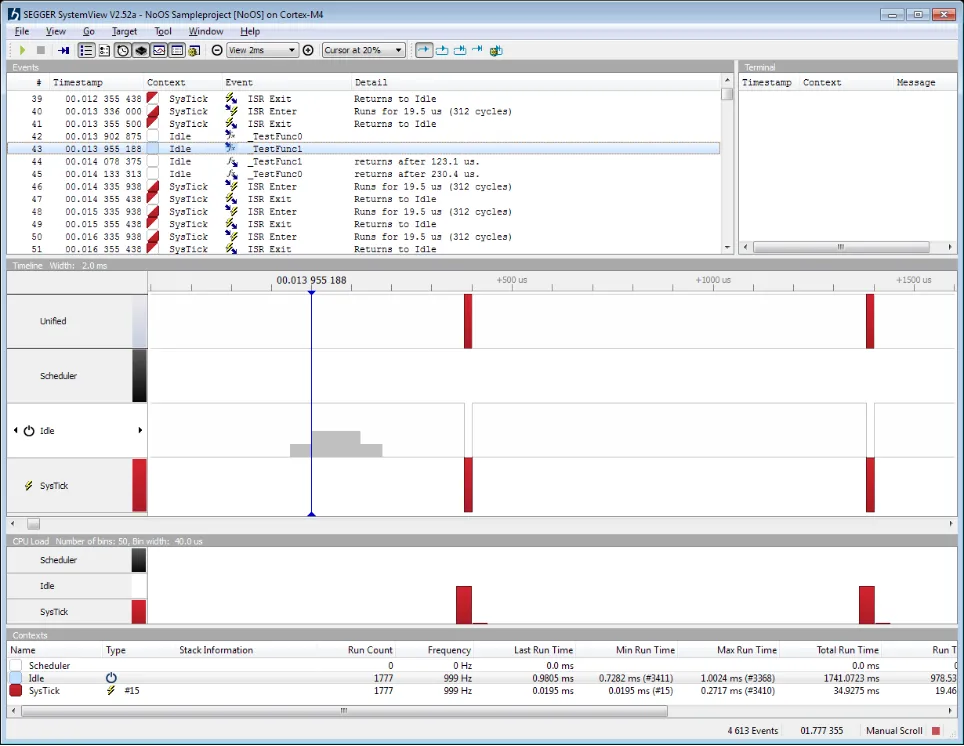
Example Project
A "NoOS" SystemView integration example project based on STM32F407 and Embedded Studio is available as the file SysView_NoOS_GenericCortexM4_Example.zip. Modify the target device name to adapt the project for other Cortex-M4 devices.





