ALLPCB


Introduction
Capacitive screens are closely tied to touch technology. Understanding touch input itself makes it easier to understand how capacitive screens work.
Touch Technology in Devices
Touch technology is familiar to mobile phone users. ATMs often use touchscreens, and many hospitals, libraries, and other public venues use touch-enabled computers. Many MP3 players, digital cameras, and tablets also incorporate touch technology.
Single-point vs multitouch
Most existing touch implementations are single-point, meaning they can only recognize one finger press or tap at a time. If two or more points are touched simultaneously, the device cannot respond correctly. Multitouch technology divides the task into two parts: capturing signals from multiple touch points simultaneously, and interpreting each signal to recognize gestures. This allows the screen to detect actions such as multiple fingers touching or tapping at the same time.
Definition: Multitouch is an interaction technique implemented by combining human-computer interaction methods and hardware. It enables human-computer interaction on a display or touch surface without traditional input devices such as a mouse or keyboard. A multitouch system can accept input from multiple points on the surface simultaneously.
Why screen material matters
To implement multitouch, a physical touch surface is required. In mobile phones, most devices with touchscreens now dominate the market. For example, Nokia 5800XM, Apple iPhone, and Sony Ericsson X10 are all touchscreen phones, but they differ in touch capability and positioning because of screen material and construction. The Nokia 5800XM used a resistive screen and only supported single-point touch, while devices using capacitive screens could support multitouch and generally offered higher resolution and clearer display characteristics.
However, capacitive-screen phones do not always support multitouch. For instance, some phones with capacitive screens could not provide multitouch functionality. The difference can stem from hardware design or software support. Comparing two capacitive devices, one may support multitouch while the other does not; the main distinctions lie in the touch-sensing architecture and controller design.
Types of capacitive touch technology
Capacitive touch technology mainly comes in two types: surface capacitive and projective capacitive.
Surface capacitive
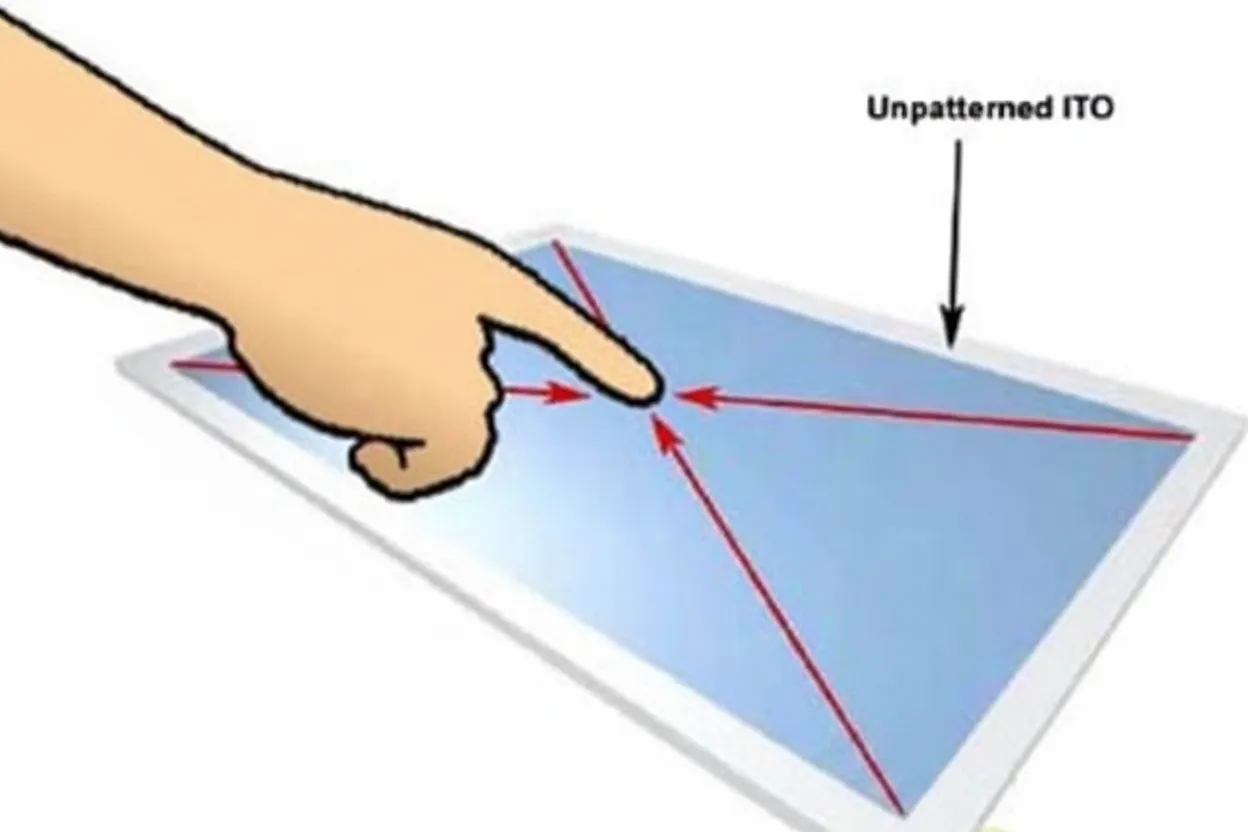
Surface capacitive technology has a relatively simple structure. It uses a single ITO glass layer as the sensing element, with at least four electrodes at the edges. A voltage is applied at the corners to create a uniform electric field across the glass surface. When a user touches the surface, the controller detects changes in the field caused by the finger's interaction and calculates the touch coordinates.
This architecture prevents surface capacitive systems from supporting multitouch because the homogeneous sensing layer aggregates all signals into a single, larger signal. The uniform layer destroys too much information, making it impossible to resolve multiple simultaneous touches. Surface capacitive screens also face challenges when miniaturizing, so they are difficult to apply in small mobile-phone displays and are more common in medium to large sizes.
Projective capacitive
Projective capacitive technology is the basis for multitouch. It still relies on capacitive sensing but uses multiple ITO layers arranged in a matrix pattern. Conductive traces form crossing X and Y electrodes to create a capacitive grid. When a finger touches the screen, scanning along the X and Y axes detects changes in capacitance at specific intersections, allowing the controller to compute the finger position. This matrix architecture preserves spatial information and enables recognition of multiple simultaneous touch points.