ALLPCB


1. Configure the kernel regulatory domain
Wi?Fi channels are regulated differently across countries and regions. Some 5 GHz channels are reserved for radar detection. If a router operates on a radar?reserved channel, you may not be able to perform packet injection, deauthentication, or create a cloned AP on that channel. Modify the kernel regulatory domain country code according to the Wi?Fi channel compliance table so the wireless adapter uses usable frequency ranges and supports injection, deauthentication, and AP creation.
Example Wi?Fi channel compliance table: https://www.docin.com/p-2253061296.html
Edit the startup configuration file so the country code is set at boot.
# Edit configuration so that, at each boot, the wireless adapter's operating frequency country code is set to CN (China). # PA (Panama) is often recommended to avoid radar channels and allow deauthentication on 5 GHz. ╰─ vim /etc/rc.local #!/bin/bash # THIS FILE IS ADDED FOR COMPATIBILITY PURPOSES ## It is highly advisable to create own systemd services or udev rules # to run scripts during boot instead of using this file. ## In contrast to previous versions due to parallel execution during boot # this script will NOT be run after all other services. ## Please note that you must run 'chmod +x /etc/rc.d/rc.local' to ensure # that this script will be executed during boot. # set wlan frequency country code to PA/CN iw reg set PA exit 0 # Add execute permission ╰─ chmod +x /etc/rc.local
Apply the configuration.
# Restart the service ╰─ systemctl restart rc-local.service ╰─ systemctl status rc-local.service # Or reboot the machine ╰─ reboot
After this change, the 8812au adapter should be able to deauthenticate 5 GHz signals successfully.
# Verify channels after configuration # You should see output similar to the following # Channels should not have any special markers after them # This indicates deauthentication and AP creation can be performed on those channels ╰─ iw list Wiphy phy0 Frequencies: * 2412 MHz [1] (20.0 dBm) * 2417 MHz [2] (20.0 dBm) * 2422 MHz [3] (20.0 dBm) * 2427 MHz [4] (20.0 dBm) * 2432 MHz [5] (20.0 dBm) * 2437 MHz [6] (20.0 dBm) * 2442 MHz [7] (20.0 dBm) * 2447 MHz [8] (20.0 dBm) * 2452 MHz [9] (20.0 dBm) * 2457 MHz [10] (20.0 dBm) * 2462 MHz [11] (20.0 dBm) * 2467 MHz [12] (20.0 dBm) * 2472 MHz [13] (20.0 dBm) * 2484 MHz [14] (20.0 dBm) Frequencies: * 5075 MHz [15] (30.0 dBm) * 5080 MHz [16] (30.0 dBm) * 5085 MHz [17] (30.0 dBm) * 5090 MHz [18] (30.0 dBm) * 5100 MHz [20] (30.0 dBm) * 5120 MHz [24] (30.0 dBm) * 5140 MHz [28] (30.0 dBm) * 5160 MHz [32] (30.0 dBm) * 5180 MHz [36] (30.0 dBm) * 5200 MHz [40] (30.0 dBm) * 5220 MHz [44] (30.0 dBm) * 5240 MHz [48] (30.0 dBm) * 5260 MHz [52] (30.0 dBm) * 5280 MHz [56] (30.0 dBm) * 5300 MHz [60] (30.0 dBm) * 5320 MHz [64] (30.0 dBm) * 5340 MHz [68] (30.0 dBm) * 5360 MHz [72] (30.0 dBm) * 5380 MHz [76] (30.0 dBm) * 5400 MHz [80] (30.0 dBm) * 5420 MHz [84] (30.0 dBm) * 5440 MHz [88] (30.0 dBm) * 5460 MHz [92] (30.0 dBm) * 5480 MHz [96] (30.0 dBm) * 5500 MHz [100] (30.0 dBm) * 5520 MHz [104] (30.0 dBm) * 5540 MHz [108] (30.0 dBm) * 5560 MHz [112] (30.0 dBm) * 5580 MHz [116] (30.0 dBm) * 5600 MHz [120] (30.0 dBm) * 5620 MHz [124] (30.0 dBm) * 5640 MHz [128] (30.0 dBm) * 5660 MHz [132] (30.0 dBm) * 5680 MHz [136] (30.0 dBm) * 5700 MHz [140] (30.0 dBm) * 5720 MHz [144] (30.0 dBm) * 5745 MHz [149] (30.0 dBm) * 5765 MHz [153] (30.0 dBm) * 5785 MHz [157] (30.0 dBm) * 5805 MHz [161] (30.0 dBm) * 5825 MHz [165] (30.0 dBm) * 5845 MHz [169] (30.0 dBm) * 5865 MHz [173] (30.0 dBm) * 5885 MHz [177] (30.0 dBm)
2. Configure Fluxion to support 5 GHz AP creation
Edit the Fluxion AP script so it supports creating APs on the 5 GHz band.
# Edit ap script file ╰─ cat Desktop/fluxion-fix-for-5Ghz/lib/ap/hostapd.sh function ap_service_prep() { if [ ${#@} -lt 5 ]; then return 1; fi APServiceInterface=$1 APServiceInterfaceAddress=$2 APServiceSSID=$3 APServiceMAC=$4 APServiceChannel=$5 ap_service_stop # Prepare the hostapd config file. country_code="$(iw reg get | awk 'FNR == 2 {print $2}' | cut -f 1 -d ":" 2> /dev/null)" [[ ! ${country_code} =~ ^[A-Z]{2}$ ]] && country_code="00" rm -rf "$APServiceConfigDirectory/$APServiceMAC-hostapd.conf" > /dev/null 2>&1 echo "interface=$APServiceInterfacedriver=nl80211ssid=$APServiceSSIDchannel=$APServiceChannel" >> "$APServiceConfigDirectory/$APServiceMAC-hostapd.conf" if [[ ${APServiceChannel} -gt 14 ]];then { echo -e "hw_mode=a" } >> "$APServiceConfigDirectory/$APServiceMAC-hostapd.conf" else { echo -e "hw_mode=g" } >> "$APServiceConfigDirectory/$APServiceMAC-hostapd.conf" fi if [[ "${country_code}" != "00" ]];then { echo -e "country_code=${country_code}" } >> "$APServiceConfigDirectory/$APServiceMAC-hostapd.conf" fi
Add the following code snippet as shown in the screenshot:
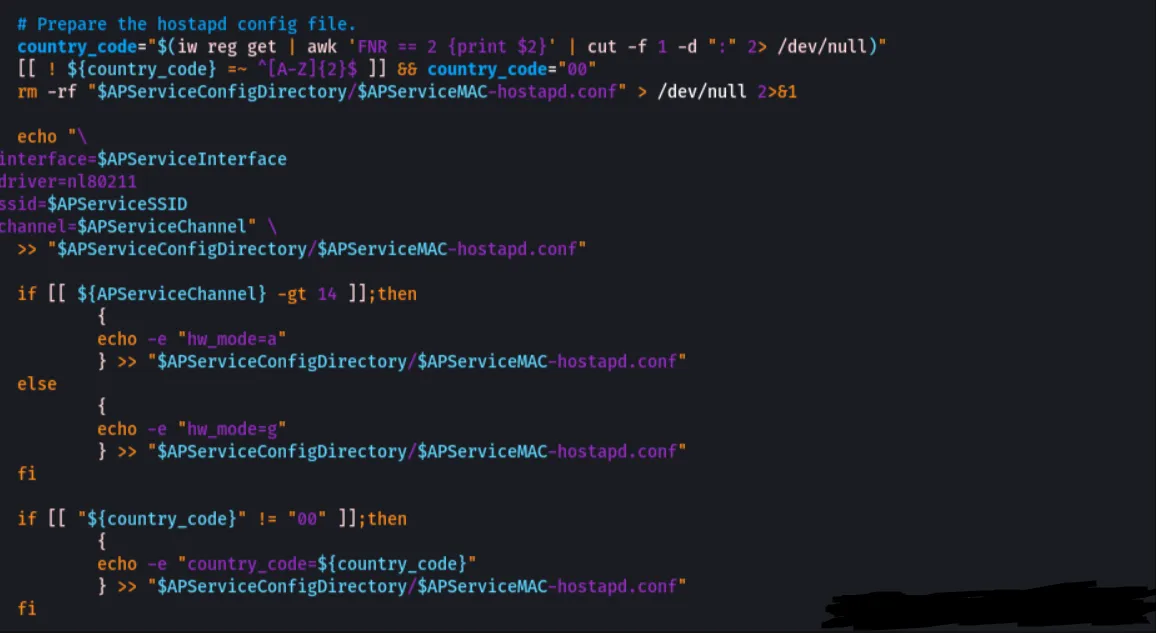
After this change, Fluxion should be able to create APs on the 5 GHz band without stalling.