 ALLPCB


Overview
This article examines the impact of Linux page size on database performance and how to optimize Kubernetes nodes for database workloads. Most popular databases benefit from using large Linux pages.
Kubernetes was originally designed to orchestrate container lifecycles at scale for lightweight, stateless applications such as Nginx, Java, and Node.js. For that use case, 4KB Linux pages are an appropriate choice.
Recently, Kubernetes has been extended with features such as StatefulSets, Persistent Volumes, and large pages to better support large, stateful, persistent databases.
The chart below illustrates the performance difference when using Linux large pages for databases.
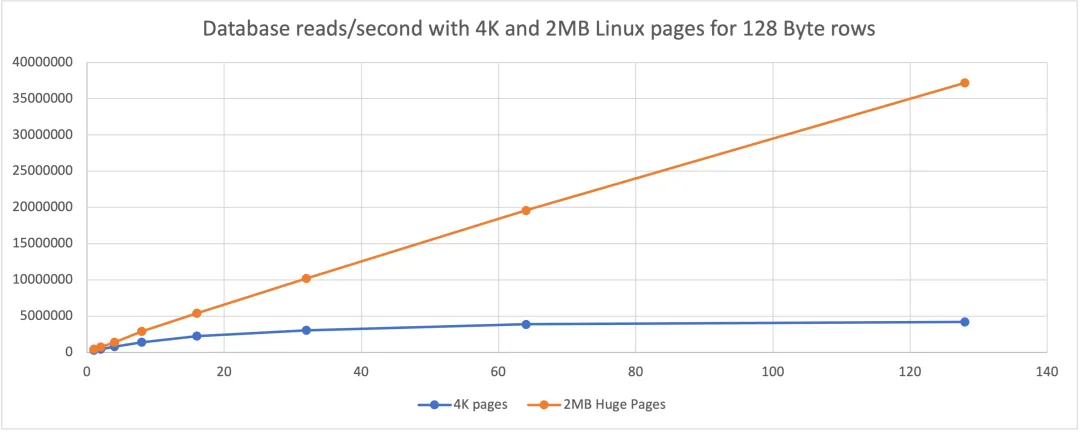
For the same database, same data, and same workload, using 2MB Linux pages instead of 4KB pages can increase throughput by up to 8x. The chart also shows that the benefit of large pages increases with higher concurrency.
Scope of the Article
The remainder of the article explains background concepts and the factors that determine how Linux page size affects database workloads.
Linux Page Sizes
All modern multiuser operating systems use virtual memory so different processes can use memory without concerning themselves with the physical layout. Linux on x86_64 uses paging for virtual memory management.
Linux x86_64 supports these page sizes:
- 4KB
- 2MB
- 1GB
The page size is the minimum contiguous unit of memory used by virtual memory management. Smaller pages minimize wasted memory for small allocations. For large allocations, using 2MB or 1GB pages reduces the total number of pages and is significantly faster because translating virtual addresses to physical addresses incurs cost.
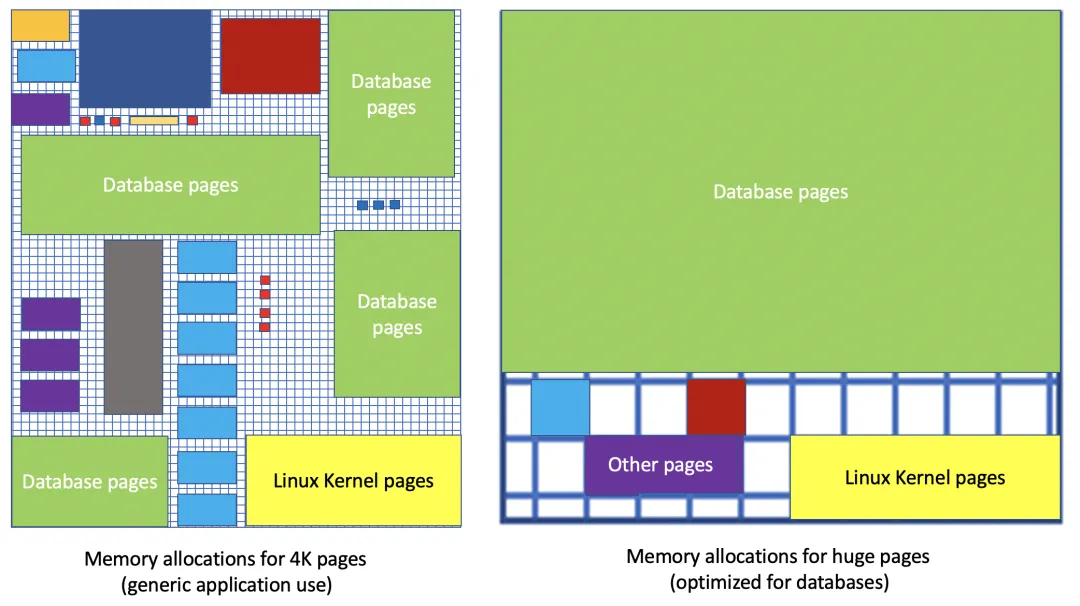
TLB Hits and Misses
Every memory access on Linux requires translating a virtual address to a physical address. Since this is a frequent operation, all CPUs provide a translation lookaside buffer (TLB) that caches recent address translations.
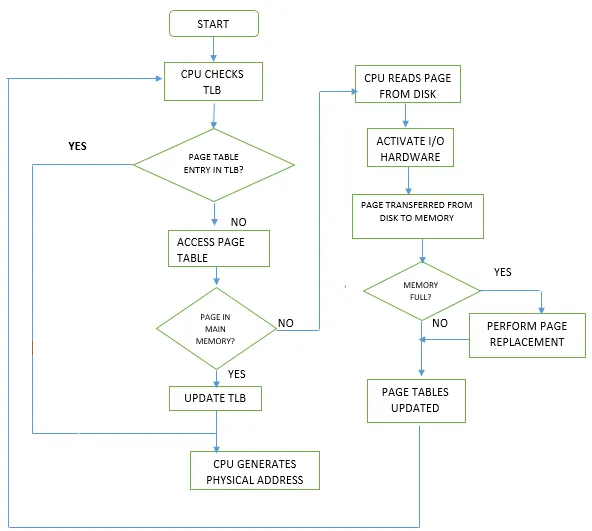
Address translation first checks whether the mapping is present in the TLB. If present, this is a TLB hit and is handled very quickly in hardware. If not present, it is a TLB miss, and the mapping must be resolved in software by walking the kernel page tables. Although page table walks are implemented in efficient C code, they are much slower than a TLB hit handled in hardware.
Why TLB Misses Matter for Databases
Databases must access memory to read and write data. Each access requires at least one TLB lookup. TLB misses significantly slow database reads and writes:
- The larger the database and the more distinct pages accessed, the more TLB lookups are required. This effectively reflects the database working set size.
- Higher concurrency increases the number of TLB lookups per unit time.
If rows or records contain variable-length types such as strings, JSON, CLOB, or BLOB, individual rows can easily exceed 4KB. With a 4KB page size, accessing a 20KB row typically requires at least five TLB lookups. With 2MB or 1GB pages, accessing the same 20KB row usually requires one TLB lookup. Generally, the wider the rows/records, the greater the advantage of large pages over 4KB pages.
The challenge is that CPUs have a limited number of TLB entries. Example TLB capacities:
- Intel Ice Lake:
- L1 TLB: 64 entries for 4KB pages, 32 entries for 2MB pages, 8 entries for 1GB pages
- L2 TLB: 1024 entries for 4KB+2MB pages; 1024 entries for 4KB+1GB pages
- AMD EPYC Zen 3:
- L1 TLB: 64 entries covering 4KB, 2MB, and 1GB pages
- L2 TLB: 512 entries for 4KB and 2MB pages
Because L1 TLB capacity for 4KB pages is typically around 64 entries and L2 TLB on recent Intel and AMD CPUs provides 512 to 1024 entries for 4KB pages, databases that access many different wide rows/records will often experience TLB misses with 4KB pages.
Using 2MB pages effectively makes the TLB cover a much larger address space, greatly reducing TLB misses. For example, AMD EPYC Zen 3 and Intel Ice Lake show large effective increases in TLB coverage when using 2MB pages.
Reducing the number of TLB misses can have a substantial positive impact on database performance.
Benchmarks
Linux behavior is independent of whether your database is MySQL, PostgreSQL, or Oracle, or whether your application is written in Node.js, Java, Go, Rust, or C. Linux performance depends on metrics such as how many TLB misses occur per unit time for a given workload.
The following benchmarks consider several configurations:
- Narrow rows/records: 128 bytes. Accesses uniformly cover 100 million distinct rows. Each row fits within one 4KB Linux page.
- Medium rows/records: 8KB. Accesses uniformly cover 100 million distinct rows. Each row spans at least two 4KB pages.
- Wider rows/records: 16KB. Accesses uniformly cover 100 million distinct rows. Each row spans at least four 4KB pages.
To minimize variables:
- Only perform database reads. All 100 million rows fit in DRAM and the database is prewarmed.
- Database client uses IPC rather than TCP sockets to access the database.
This configuration ensures the workload is CPU- and/or memory-bound with no disk I/O or network overhead.
4KB Pages, 128 Byte Rows
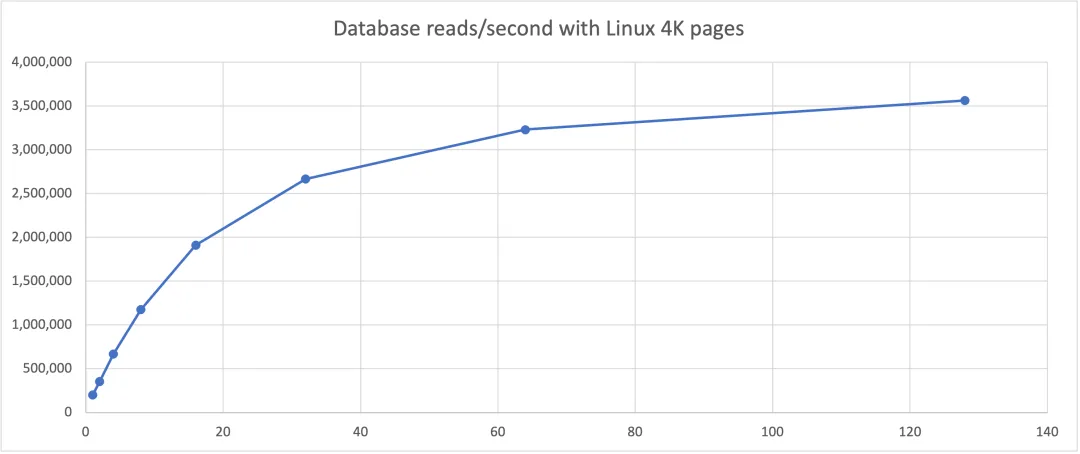
On an AMD EPYC processor, using 4KB pages and 128 database connections, a single Linux server can perform over 3.5 million database reads per second.
4KB vs 2MB Pages, 128 Byte Rows
With the same hardware, database, table, data, and queries, using 2MB pages yielded up to 8x the throughput compared with 4KB pages.
4KB vs 2MB Pages, 8KB Rows
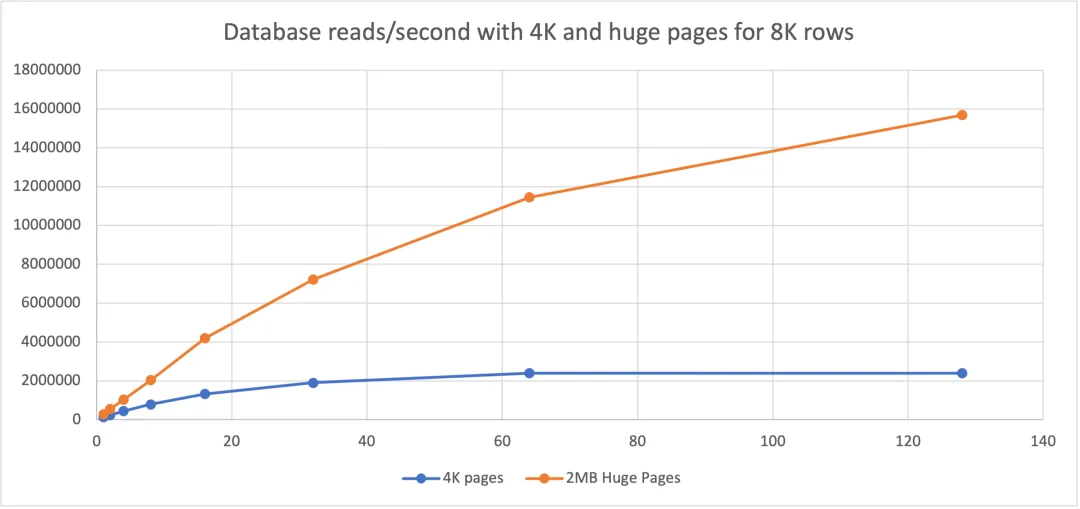
For 8KB rows, 2MB pages provided approximately 8x the throughput of 4KB pages.
4KB vs 2MB Pages, 16KB Rows
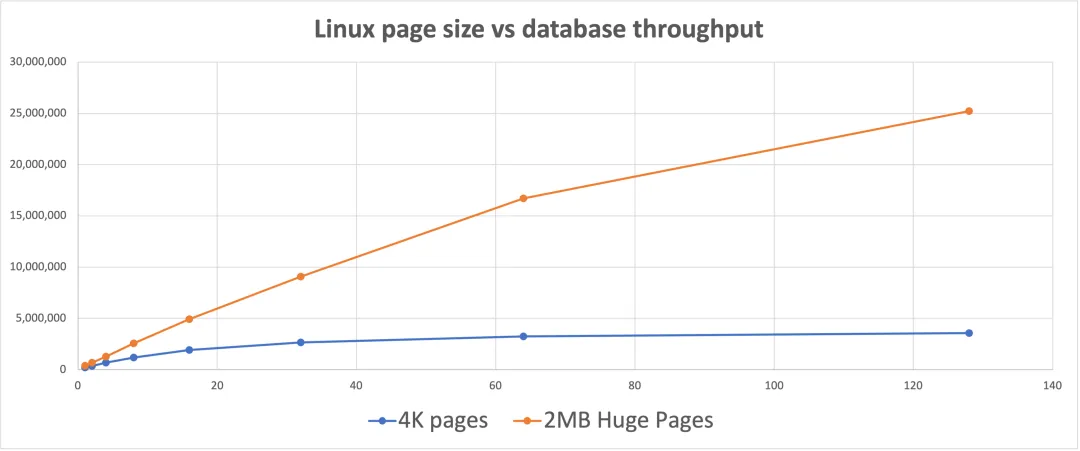
For 16KB rows, 2MB pages achieved roughly 5x the throughput of 4KB pages for the same hardware and workload.
2MB vs 1GB Pages
Given the large advantage of 2MB over 4KB pages, does 1GB offer a similarly large additional benefit? For the tested row widths (128 bytes, 8KB, and 16KB), 1GB page throughput was between 1% and 21% higher than 2MB pages. While up to 21% is meaningful, it is not comparable to the 8x improvement seen versus 4KB pages. Testing with rows wider than 2MB might show larger differences between 2MB and 1GB pages.
Kubernetes Node Specialization
Early Kubernetes workloads were often small, stateless web-based applications such as load balancers, web servers, proxies, and application servers. For that use case, 4KB pages are appropriate.
More specialized workloads now run on Kubernetes clusters that have nodes with different hardware and software requirements. For example, machine learning workloads can run on general x86_64 CPUs, but run much faster on nodes with GPUs or ASICs. Some nodes may have fast local storage, more RAM, or run ARM64 CPUs.
Not all Kubernetes nodes are identical. Nodes can be defined and advertised using DaemonSets or node labels. Using pod selectors to match node labels allows the Kubernetes scheduler to run pods on the most suitable nodes automatically.
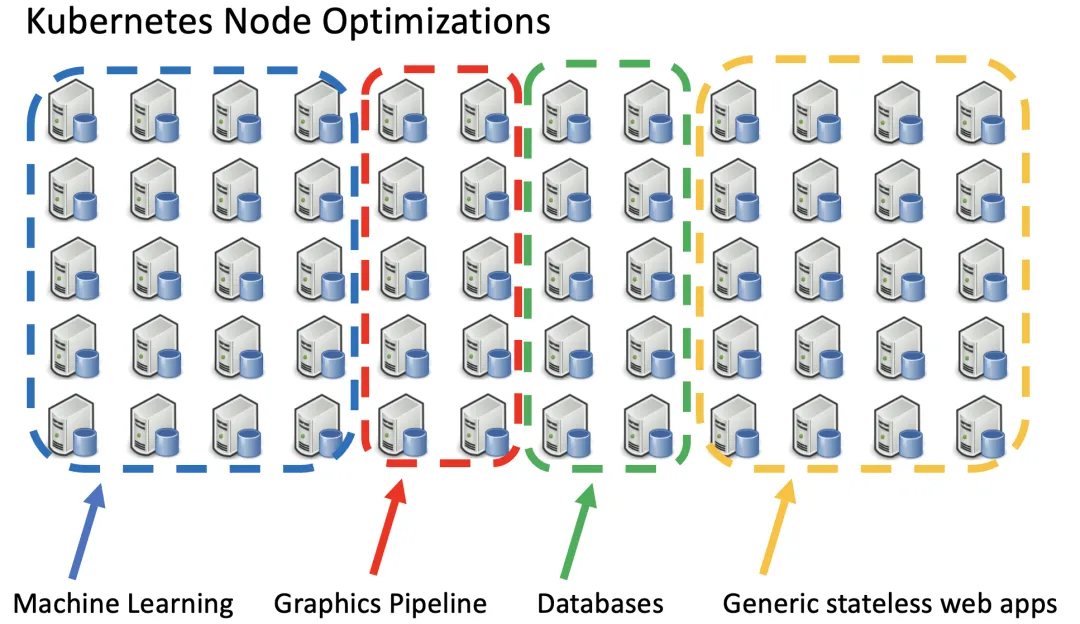
The diagram above shows a Kubernetes cluster with four types of specialized nodes.
What You Can Control to Optimize Databases on Kubernetes
Factors typically outside your control:
- Row/record width in the database
- Number of rows/records in your database
- Database working set size
- Concurrency and access patterns to data in the database
- CPU TLB capacity
Factors you can control within your Kubernetes cluster:
- Whether the Linux kernel on x86_64 Kubernetes nodes uses 4KB, 2MB, or 1GB pages
- How many large pages (2MB or 1GB) you configure on the host
- Memory and large page resource requests and limits for Kubernetes applications
You can choose to configure a set of machines to run database workloads with 2MB or 1GB large pages. Configuring large pages is done at the Linux kernel level, not at the Kubernetes or container level. Transparent huge pages are usually disabled because they rarely improve database performance and can waste memory.
Configuring 2MB pages on Linux x86_64 is straightforward on most distributions and often does not require boot-time parameter changes. Configuring 1GB pages varies by distribution and typically requires boot-time parameters. 1GB pages have been configured successfully on recent Intel Xeon and AMD CPUs for distributions such as Red Hat Enterprise Linux, Oracle Linux, CentOS, Ubuntu, and SuSE.
How Many Large Pages Should You Configure?
The answer is database-specific. It depends on the node RAM, how many other non-database pods will run on the node, how much RAM those pods need, and the marginal benefit your database gets from additional memory.
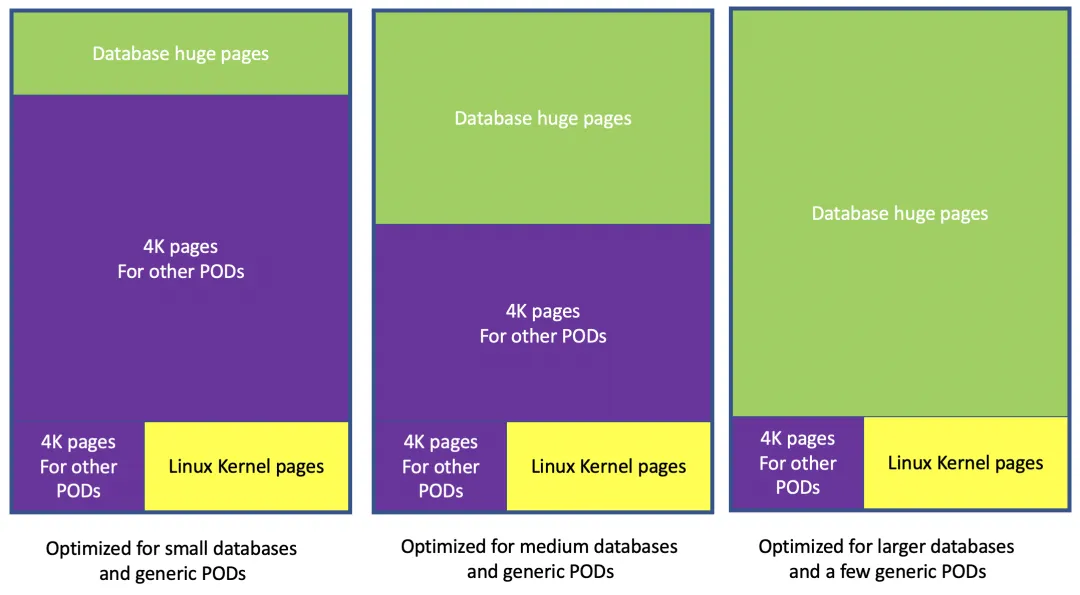
Summary
- Most popular databases see performance benefits from large pages on Linux x86_64.
- Kubernetes supports 4KB, 2MB, and 1GB Linux pages.
- For historical reasons, most Kubernetes clusters use 4KB Linux pages by default.
- Many clusters already optimize some nodes for specific workloads (for example, machine learning, fast local storage, or stateless web apps).
- Consider adding node types optimized for database performance by configuring the Linux kernel to use 2MB or 1GB pages on those nodes.
- Choose an appropriate mix of large pages and 4KB pages on those machines based on your database workload.





