ALLPCB


Are you facing issues with your printed circuit board (PCB) designs or assemblies, such as solder bridges, open circuits, shorts, component misplacement, or via problems? These common PCB manufacturing defects can lead to costly delays and unreliable products. In this comprehensive guide, we’ll walk you through identifying, troubleshooting, and preventing these issues to ensure your projects run smoothly. Whether you're an engineer or a hobbyist, this blog will provide actionable solutions to improve your PCB quality and performance.
Introduction to PCB Manufacturing Defects
PCBs are the backbone of modern electronics, connecting components to create functional devices. However, even small defects during manufacturing or assembly can cause significant problems, from minor performance issues to complete system failures. Understanding common PCB manufacturing defects like solder bridges, open circuits, shorts, component misplacement, and via problems is the first step to troubleshooting and preventing them. By addressing these issues early, you can save time, reduce costs, and ensure your products meet high-quality standards.
In this blog, we’ll dive deep into each of these defects, explain their causes, and share practical tips for diagnosing and fixing them. Let’s get started with a closer look at why these issues occur and how they impact your PCB projects.
Why Do PCB Manufacturing Defects Happen?
PCB manufacturing is a complex process involving design, fabrication, and assembly stages. Defects can arise at any point due to various factors, including:
- Design Errors: Incorrect spacing, improper trace routing, or missing design rule checks (DRC) can lead to shorts or open circuits.
- Fabrication Issues: Inconsistent etching, poor material quality, or misaligned layers can cause via problems or trace damage.
- Assembly Mistakes: Improper soldering techniques or incorrect component placement can result in solder bridges or misaligned parts.
- Environmental Factors: Humidity, temperature fluctuations, or contamination can affect soldering quality and component stability.
Understanding the root causes of these defects helps in implementing preventive measures. Now, let’s explore each common defect in detail, focusing on identification and troubleshooting methods for PCB manufacturing defects.
1. Solder Bridges: Causes and Solutions
Solder bridges occur when excess solder creates an unintended connection between two or more adjacent pads or traces, leading to a short circuit. This defect is common in densely packed PCB designs with fine-pitch components.
Causes of Solder Bridges
- Excessive solder paste application during assembly.
- Insufficient spacing between pads (often below 0.2 mm for fine-pitch components).
- Improper soldering temperature or reflow profiles causing solder to flow uncontrollably.
How to Identify Solder Bridges
You can spot solder bridges through visual inspection or automated optical inspection (AOI) systems. Look for shiny, unintended solder connections between pins or pads. Electrical testing can also reveal shorts caused by these bridges, often showing continuity where none should exist.
Troubleshooting Solder Bridges
- Use a desoldering wick or solder sucker to remove excess solder carefully.
- Adjust the stencil design to apply less solder paste on fine-pitch areas.
- Optimize reflow oven settings to ensure proper solder flow, typically maintaining a peak temperature of 235-250°C for lead-free solder.
- Increase pad spacing in the design phase to prevent solder from bridging, adhering to minimum spacing guidelines (e.g., 0.25 mm for standard designs).
2. Open Circuits: Diagnosis and Fixes
An open circuit happens when there’s a break in the conductive path, preventing current from flowing through a trace or connection. This defect can cause components to malfunction or stop working entirely.
Causes of Open Circuits
- Damaged or broken traces due to over-etching during fabrication.
- Poor solder joints that fail to connect components to pads.
- Physical damage during handling or assembly, such as cracks in the PCB substrate.
How to Identify Open Circuits
Open circuits can be tricky to spot visually. Use a multimeter to test continuity between points on the PCB. If there’s no continuity where a connection should exist, you’ve likely found an open circuit. X-ray inspection can also help identify hidden breaks in multilayer boards.
Troubleshooting Open Circuits
- Repair broken traces by soldering a small jumper wire to reconnect the path.
- Reflow or resolder poor joints, ensuring proper wetting (solder adhesion) to the pad.
- Inspect fabrication processes to prevent over-etching, targeting an etch rate that maintains trace width tolerances of ±10%.
3. Shorts: Identifying and Preventing Unwanted Connections
Shorts occur when two separate conductive paths unintentionally connect, often causing circuit failure or damage. Unlike solder bridges, shorts can result from design flaws or fabrication errors beyond soldering.
Causes of Shorts
- Insufficient clearance between traces or pads, often below 0.15 mm in high-density designs.
- Copper residue or debris left during fabrication, connecting adjacent traces.
- Misaligned layers in multilayer PCBs causing unintended connections.
How to Identify Shorts
Use a multimeter to test for unexpected continuity between nets that should be isolated. Automated testing equipment like flying probe testers can also detect shorts in complex designs by checking impedance values (typically below 1 ohm for a short).
Troubleshooting Shorts
- Remove debris or excess copper using a precision blade or cleaning solution like isopropyl alcohol.
- Revise the PCB layout to increase trace spacing, aiming for a minimum clearance of 0.2 mm for standard designs.
- Implement stricter quality control during fabrication to ensure clean etching and layer alignment within ±0.05 mm tolerance.
4. Component Misplacement: Detection and Correction
Component misplacement happens when parts are incorrectly positioned or oriented on the PCB, leading to functional errors or assembly failures. This is often seen in automated pick-and-place processes.
Causes of Component Misplacement
- Incorrect data in the pick-and-place file, such as wrong coordinates or rotation angles.
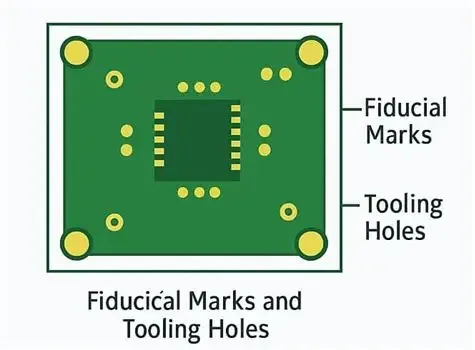
- Misaligned fiducial markers, causing the machine to place components off-target.
- Human error during manual placement of components.
How to Identify Component Misplacement
Visually inspect the board for components that don’t align with silkscreen markings or appear rotated (e.g., a 90-degree offset for polarized components like diodes). Functional testing will also reveal issues, as misplaced components often prevent the circuit from operating correctly.
Troubleshooting Component Misplacement
- Verify the pick-and-place file against the PCB layout to ensure accurate coordinates and orientations.
- Recalibrate assembly machines and check fiducial marker placement for accuracy within ±0.1 mm.
- Manually reposition or resolder components if necessary, ensuring correct polarity and alignment.
5. Via Problems: Addressing Connectivity Issues
Vias are small holes in a PCB that connect different layers, and defects in vias can disrupt signal integrity or power distribution, leading to circuit failures.
Causes of Via Problems
- Incomplete plating, resulting in poor conductivity through the via (resistance above 0.1 ohms).
- Misaligned drilling, causing vias to miss connecting traces.
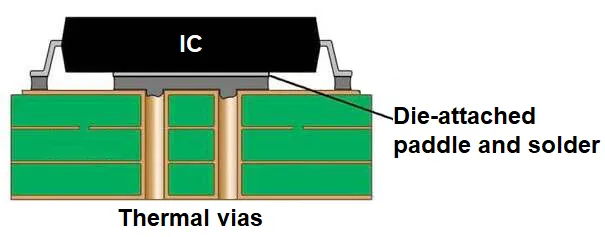
- Thermal stress during soldering, leading to via cracking or delamination.
How to Identify Via Problems
Use electrical testing to measure continuity and resistance through vias. High resistance or lack of continuity indicates a problem. X-ray imaging can reveal internal defects like incomplete plating or cracks not visible on the surface.
Troubleshooting Via Problems
- Inspect via plating quality during fabrication, aiming for a uniform copper thickness of 25-30 micrometers inside the via.
- Adjust drilling precision to ensure alignment within ±0.05 mm of design specifications.
- Use thermal management techniques during soldering, such as controlled preheat stages (e.g., 2-3°C per second up to 150°C), to minimize stress on vias.
Preventive Measures for PCB Manufacturing Defects
While troubleshooting is essential, preventing defects in the first place is even better. Here are key strategies to minimize PCB manufacturing defects:
- Design Rule Checks (DRC): Use software to validate your design against manufacturing constraints, ensuring proper spacing and trace widths (e.g., minimum trace width of 0.15 mm for standard processes).
- Quality Materials: Choose high-quality PCB substrates and components to avoid issues like delamination or poor solderability.
- Process Control: Implement strict controls during fabrication and assembly, such as maintaining solder paste thickness within ±10% of target values.
- Testing and Inspection: Perform in-circuit testing (ICT) and AOI at multiple stages to catch defects early.
Conclusion: Building Better PCBs with Effective Troubleshooting
PCB manufacturing defects like solder bridges, open circuits, shorts, component misplacement, and via problems can disrupt your projects, but with the right knowledge and tools, they’re manageable. By understanding the causes of these issues, using precise troubleshooting techniques, and adopting preventive measures, you can significantly improve the reliability and performance of your PCBs.
Start by inspecting your designs and processes for potential flaws, and apply the solutions outlined in this guide to address any issues. With careful attention to detail and a proactive approach, you’ll be well-equipped to handle common PCB manufacturing defects and deliver high-quality electronic products.