ALLPCB


Module overview
The CYW43012 module is based on the CYW43012 chipset and provides high-speed SDIO Wi-Fi and Bluetooth connectivity. It targets ultra-low-power applications to extend battery life for wearable devices, smart home products, and portable audio applications. Its coexistence engine optimizes performance for dual-band 2.4/5 GHz Wi-Fi and dual-mode Bluetooth/BLE 5.0.
Supported software
The BSP for the PSoC6-EvaluationKit-062S2 already includes support for the module's Wi-Fi functionality and integrates with the RT-Thread WLAN management framework, allowing the module to be used for network communication.
Hardware connection
The PSoC6-EvaluationKit-062S2 evaluation board includes a connector for this module. Install the module into the socket and ensure correct orientation.
The module operates at 1.8 V. If you plan to use it, you must switch the SDIO interface voltage to 1.8 V. Older boards provide resistor pads for selecting 1.8 V or 3.3 V; you need to remove the 3.3 V resistor and short the 1.8 V pad. Newer boards include a toggle switch to select between 1.8 V and 3.3 V for the SDIO interface.
Software configuration
In the BSP directory bspInfineonpsoc6-evaluationkit-062S2 open the env tool and use menuconfig to enable Wi-Fi module support. The relevant configuration options are available in the menu.
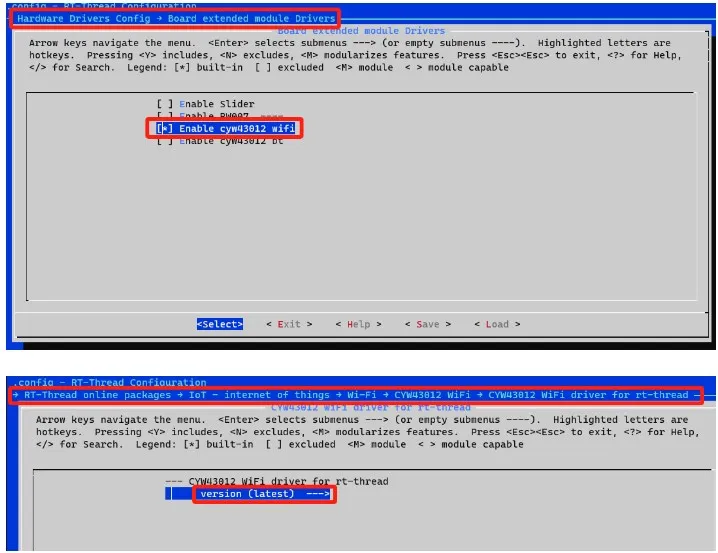
After configuring, exit and save. Run pkgs --update to update packages and download the required adaptation package.
Build and download
With the software configured, build the project by running scons in the env tool. The build produces an rt-thread.elf file. Use the appropriate download tool to flash this file to the evaluation board.
Run and test
After flashing and resetting the board, the firmware will initialize. The Wi-Fi firmware should start normally.
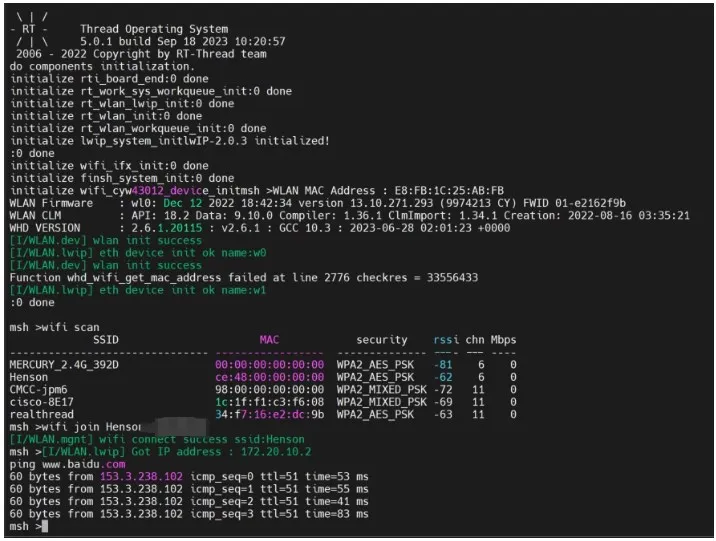
Use the provided Wi-Fi commands to scan for and join access points as shown in the image.
Summary
Following these steps allows use of the CYW43012 module on the Infineon evaluation board for network development and testing.